SEC EDGAR API for 10-K Sections: Risk Factors & MD&A as Text (2026)
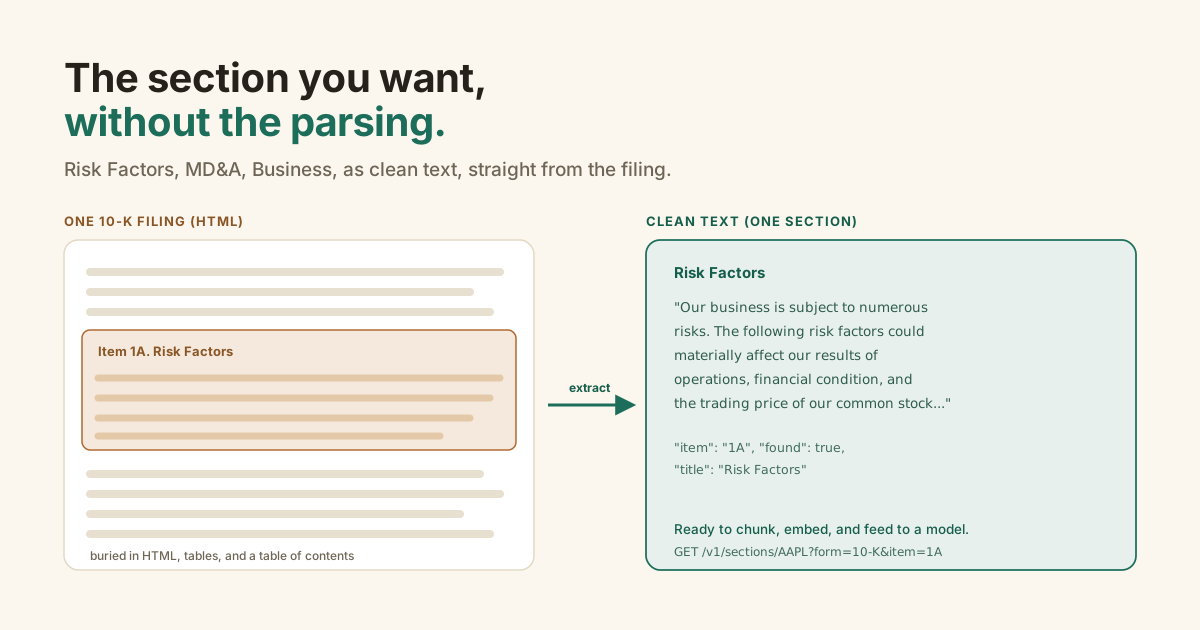
Sometimes you don't want the numbers. You want what management actually wrote: the risks, the story behind the results, what the business even is.
That text is all in the 10-K. The problem is the 10-K is one enormous HTML document, and the section you want is buried in it behind a table of contents, inline tables, and page after page of markup.
The SEC EDGAR API returns a filing's narrative sections as clean text. A call to /v1/sections/{ticker} pulls a single item, like Risk Factors (Item 1A) or MD&A (Item 7), out of the latest 10-K or 10-Q, strips the HTML and the table of contents, and hands you just that section's body. Chunk it, embed it, or just read it.
GET /v1/sections/{ticker}?form=10-K&item=1A. It returns the exact section the company filed, HTML and table-of-contents stripped, built for RAG and LLM equity research. It's text extraction, not summarization.What sections can you extract from a 10-K?
The narrative items. A 10-K is organized into numbered items across two main parts, and the ones people actually read are Item 1 (Business), Item 1A (Risk Factors), and Item 7 (MD&A). Per the SEC's own guide to reading a 10-K, those three carry the company's description of itself, its risks, and management's explanation of the results.
Item 1A lists the significant risks in order of importance, and they're specific to that company rather than generic.
Item 7, MD&A, is where management explains the "why" behind the numbers: what moved year over year, and how they read liquidity and trends.
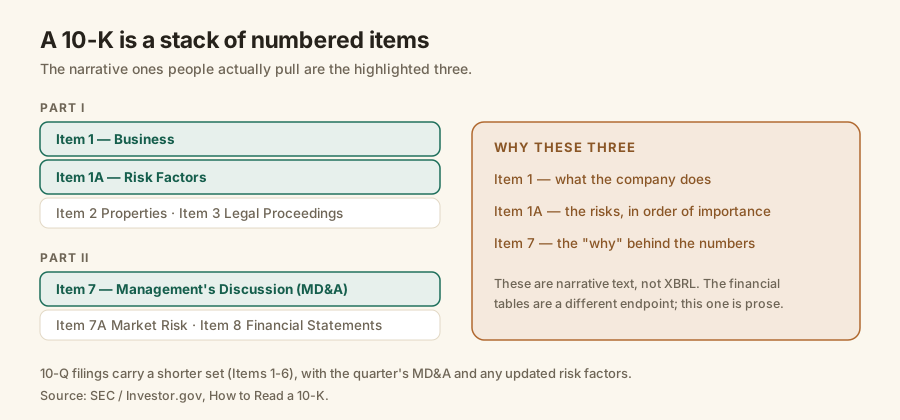
These sections are prose, not XBRL. The tagged financial data (revenue, net income) is a different thing entirely, which the fundamentals endpoint handles. This endpoint is only about the text.
Which sections does the SEC EDGAR API return?
Any item in the latest 10-K or 10-Q, fetched by its SEC code. Call /v1/sections/{ticker} with no item and you get a list of the available sections and how long each is; add ?item=1A and you get that section's text. The 10-K exposes the full item set; the 10-Q exposes its shorter one.
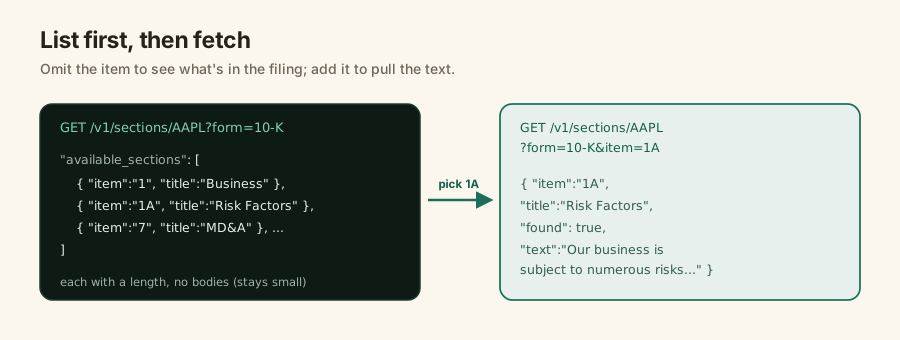
Here are the items you'll reach for most.
| Item | Section | What's in it |
|---|---|---|
1 | Business | What the company does, its segments and markets |
1A | Risk Factors | Significant risks, in order of importance |
3 | Legal Proceedings | Material litigation and legal matters |
7 | MD&A | Management's discussion of results, liquidity, trends |
7A | Market Risk | Quantitative and qualitative market-risk disclosures |
Why is pulling one section so hard to do yourself?
Because a filing isn't structured for it. The 10-K arrives as a single HTML document, sometimes megabytes of it, with the sections marked only by a heading like "Item 1A. Risk Factors" in the running text. To extract one you download the document, strip the markup, and find where that item begins and ends. And the phrase you're matching on appears twice: once in the table of contents, once at the real section.
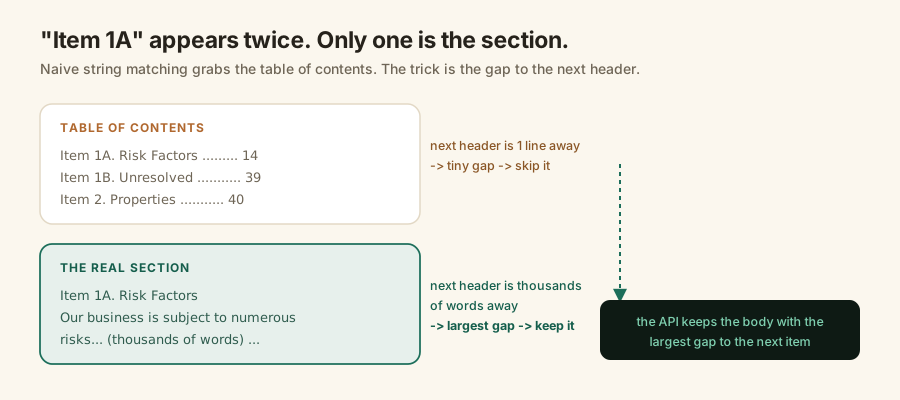
The table-of-contents copy of "Item 1A" is one line from the next heading. The real section is thousands of words from it. So the reliable trick is to take the occurrence with the largest gap to the next item header, which is exactly how Edgrapi picks the body.
None of that is deep. It's just fiddly, per company, and easy to get subtly wrong, which is the same reason the rest of EDGAR is annoying.
How do you get a section's text in one call?
You call the endpoint with a ticker, a form, and an item code. With Edgrapi the sections live at /v1/sections/{ticker}, your key goes in the X-API-Key header, and you get back the section's clean text.
import requests

r = requests.get(
    "https://api.edgrapi.com/v1/sections/AAPL",
    headers={"X-API-Key": "edgr_your_key"},
    params={"form": "10-K", "item": "1A"},
)
sec = r.json()
print(sec["title"], "-", len(sec["text"]), "chars")
print(sec["text"][:300])
# Risk Factors - 48213 chars
# The Company's business, reputation, results of operations, financial condition ...
Swap 1A for 7 to get MD&A, or drop the item to list what the filing contains first.
Why is this built for RAG and AI agents?
Because a retrieval pipeline is only as good as the text you put into it. A RAG system chunks a document, embeds the chunks, and retrieves the relevant ones for a model to answer from. Feed it a raw 10-K and it embeds navigation, table markup, and the table of contents, so the model grounds its answers in boilerplate. Feed it the clean Risk Factors section and it stays on the actual disclosure. Garbage in, confident garbage out.
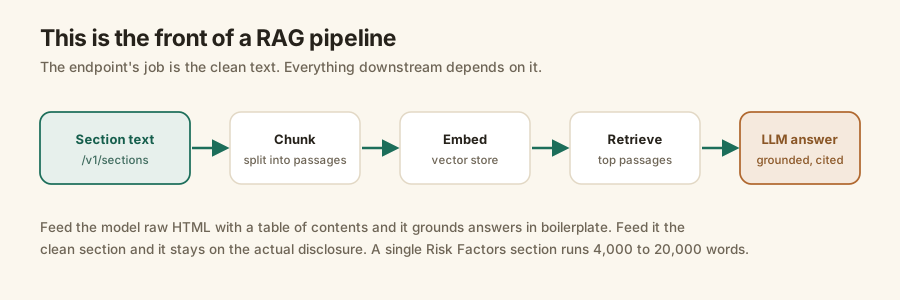
The scale is real. One 2026 study extracting risk factors across the S&P 500 pulled 10,688 individual risk factors, and a single Risk Factors section commonly runs 4,000 to 20,000 words. That's a lot of text to get clean, per company, per year.
For agents, Edgrapi runs a hosted MCP server at https://api.edgrapi.com/mcp with a get_sections tool, so a Claude or ChatGPT agent can pull a company's Risk Factors or MD&A mid-conversation and reason over it. The agents guide covers that setup.
What it does not do
It doesn't summarize. The endpoint extracts and cleans the section; it doesn't rank the risks, score sentiment, or tell you what matters. You get the exact text the company filed, and your own model or analysis does the reasoning.
That's deliberate. A summarizer bakes in someone else's judgment; clean text keeps the interpretation yours, which is what you want when the output has to be defensible.
Start with one Risk Factors section
Grab a free key, call /v1/sections on a company you follow, and read what its 10-K actually says about its risks.
The free tier is 50 credits, no card, enough to pull the Risk Factors and MD&A for a basket of companies and wire up a retrieval prototype. Point it at https://api.edgrapi.com and pull your first section.
Frequently asked questions
Can I get the Risk Factors section of a 10-K from an API?
Yes. Edgrapi's GET /v1/sections/{ticker}?form=10-K&item=1A returns the Risk Factors section of the latest 10-K as clean text. Item 1A is the SEC's code for Risk Factors. You get the section body with the HTML, tables, and table-of-contents stripped out, ready to chunk or feed to a model.
Which 10-K sections does the SEC EDGAR API return?
The narrative items by their SEC code: Item 1 (Business), 1A (Risk Factors), 7 (Management's Discussion, MD&A), and the rest of the 10-K items. Call the endpoint without an item to list what's available in that filing, then call again with the item code to fetch its text. 10-Q filings expose their shorter item set (1-6).
What is the difference between Item 1A and Item 7 in a 10-K?
Item 1A is Risk Factors: the significant risks the company faces, listed in order of importance. Item 7 is Management's Discussion and Analysis (MD&A): management's own explanation of the results, the 'why' behind the numbers. Both are narrative text, and both are the sections analysts and LLMs read most.
How do I extract MD&A text from SEC filings?
MD&A is Item 7 in a 10-K. Doing it by hand means downloading the filing's HTML, stripping the markup, and finding where Item 7 starts and ends without grabbing the table of contents. Edgrapi does that: GET /v1/sections/{ticker}?form=10-K&item=7 returns the MD&A body as clean text.
Is this good for RAG or feeding a 10-K to an LLM?
That's what it's built for. A RAG pipeline needs clean section text to chunk and embed; feed a model raw filing HTML and it grounds answers in boilerplate and the table of contents. The sections endpoint hands you just the Risk Factors or MD&A body, which is the input a retrieval system actually wants.
Does it return the section as text or as a summary?
As text, verbatim from the filing. The endpoint extracts and cleans the section; it does not summarize, rank, or interpret. You get the exact disclosure the company filed, and your own model does the reasoning. That keeps it honest and keeps the analysis under your control.