SEC EDGAR API for Free: What You Get, What It Costs (2026)
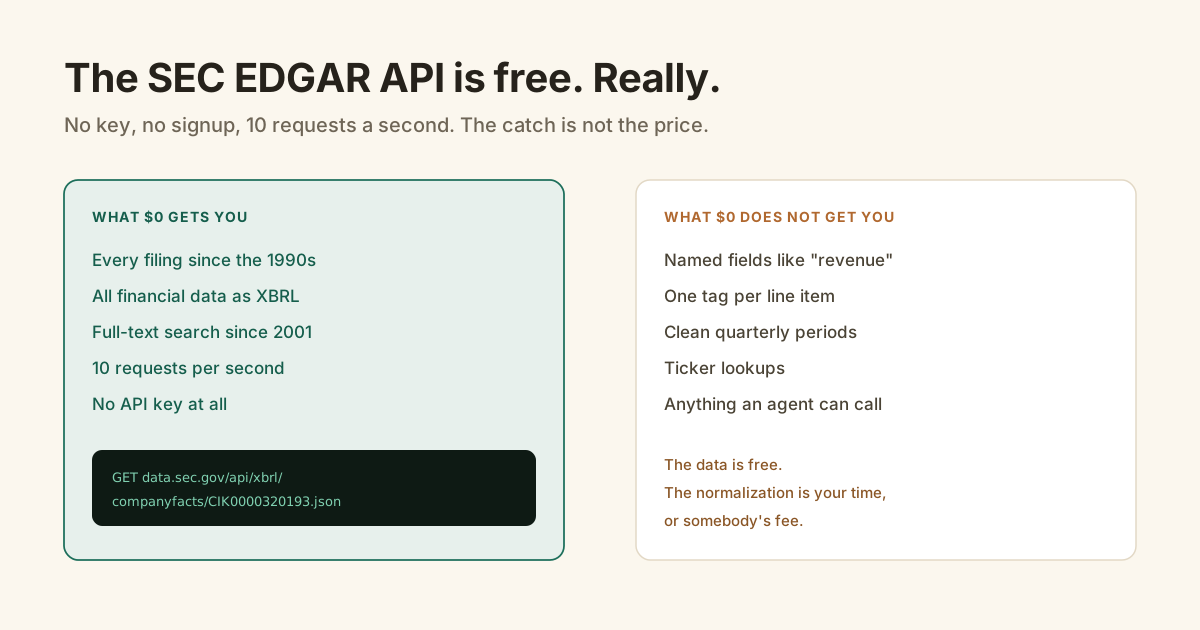
Here's something most API companies won't lead with: the SEC EDGAR API is genuinely, completely free.
No key. No signup. No credit card wall after 14 days. We sell a wrapper around it, and I'm still telling you this first, because you'll find out in one Google search anyway.
The SEC EDGAR API at data.sec.gov is free with no API key: every US public company's filings and XBRL financials, capped at 10 requests per second, per the SEC's own documentation. What $0 does not include is normalization. The data arrives as raw XBRL, and turning that into "revenue" and "net income" is either your engineering time or a wrapper's fee.
What does the free SEC EDGAR API include?
Everything, honestly. The SEC serves every filing since the mid-1990s, all XBRL financial data, filing indexes, and full-text search across every electronic filing since 2001, per the SEC's full-text search FAQ. The limit is 10 requests per second per IP with no daily cap, and the only requirement is a User-Agent header with your contact info.
Three endpoints do most of the work:
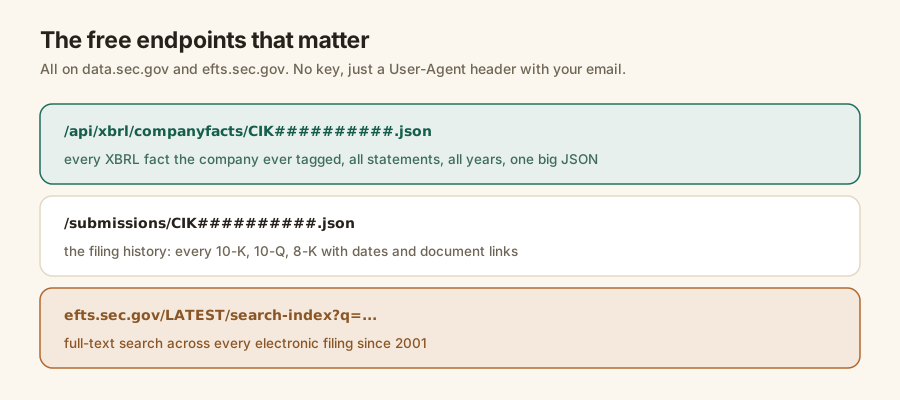
And the coverage is total in a way no commercial product can beat. Every 10-K, every 10-Q, every 8-K, from every US public company, straight from the source. This is the actual filing, not somebody's copy of it.
There is no premium tier hiding behind it. The SEC does not sell one.
Why is the free version hard to use?
Because the free version speaks XBRL, and XBRL was designed for completeness, not convenience. The US GAAP taxonomy behind it has more than 15,000 elements, per XBRL US, and the same line item legally hides under several of them. The SEC has required this tagging since Inline XBRL phased in from June 2019, so the data is thorough and machine-readable, and a real chore to normalize.
Concretely, "revenue" might be tagged RevenueFromContractWithCustomerExcludingAssessedTax, plain Revenues, or SalesRevenueNet, depending on the company and the year. NVIDIA switched tags mid-history. Your parser has to follow.
Then quarterly data mixes true three-month figures with trailing-twelve-month windows, and CIKs must be zero-padded to ten digits or the request 404s.
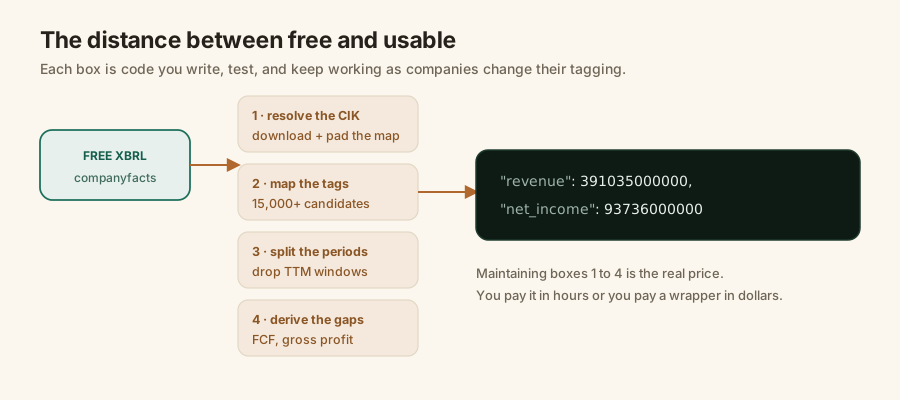
Each of those is a solved problem, individually. Together they're a small product you now maintain forever. I wrote up the gory details in why parsing SEC EDGAR XBRL is harder than it looks.
How do you use the free API, step by step?
You resolve the ticker to a CIK, call companyfacts, and dig your metric out of the tag structure. Here is the shortest honest version in Python:
import requests

UA = {"User-Agent": "you@example.com"}

# 1. ticker -> CIK (download the SEC's map, zero-pad to 10 digits)
tickers = requests.get("https://www.sec.gov/files/company_tickers.json", headers=UA).json()
cik = str(next(r["cik_str"] for r in tickers.values() if r["ticker"] == "AAPL")).zfill(10)

# 2. every XBRL fact Apple ever tagged (one big JSON)
facts = requests.get(
    f"https://data.sec.gov/api/xbrl/companyfacts/CIK{cik}.json", headers=UA).json()

# 3. dig out net income (hoping this is the right tag for this company...)
ni = facts["facts"]["us-gaap"]["NetIncomeLoss"]["units"]["USD"]
Step 3 is where the trouble lives. That tag works for Apple. For another company it's ProfitLoss, and for quarterly numbers you'll need to filter periods by their end dates or silently pick up a twelve-month window.
If you're in Python and want the free route with less pain, the open-source edgartools library wraps a lot of this. We compared it against our own API; the numbers came out identical, which is the point: same filings, same values.
When should you stay free?
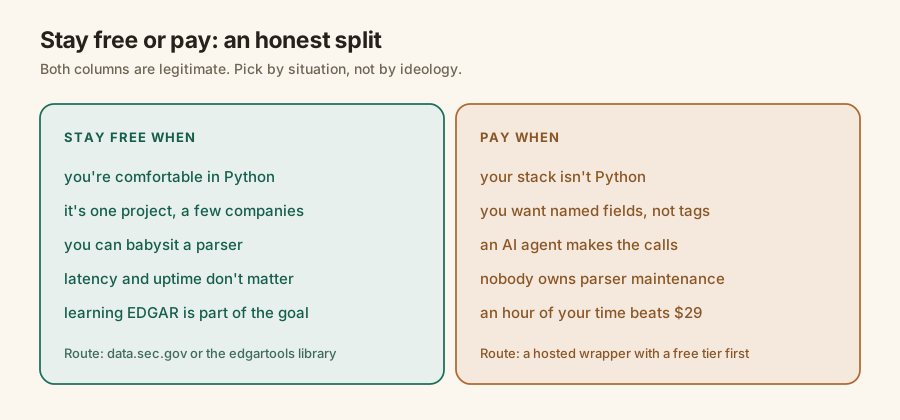
Stay free when you're in Python, the project touches a handful of companies, and owning a parser is acceptable or even fun. A research notebook, a thesis, a personal screener: the free route is the right call, and anyone who tells you otherwise is selling something. The 10 req/s cap is generous for those uses, and learning EDGAR's shape has real value if this is your field.
When does paying start to make sense?
Pay when the parser's maintenance costs more than the fee. That flips fast in four cases: your stack isn't Python, an AI agent makes the calls and needs an MCP server rather than a library, nobody wants to own tag-mapping bugs at 2am before earnings, or you'd simply rather read "revenue" than run tag archaeology. Wrappers price this at $22 to $55 a month entry as of July 2026.
The math is unromantic. A $29 plan is roughly one engineering hour a month. If the free route costs you more than an hour a month in upkeep, free is the expensive option.
Compare honestly, though, because wrapper free tiers differ more than their prices: some cap you at 100 calls for life, some renew daily or monthly. The alternatives roundup lines all five options up.
What does a wrapper's free tier add to the free API?
The normalization, on someone else's dime. Edgrapi's free tier is 100 credits that refill every month, no card, and every endpoint is open: statements, ratios, filings, sections, and the hosted MCP server. That's the same data as data.sec.gov, minus the four jobs from the diagram above. One call to /v1/fundamentals/AAPL returns the three financial statements with named fields.
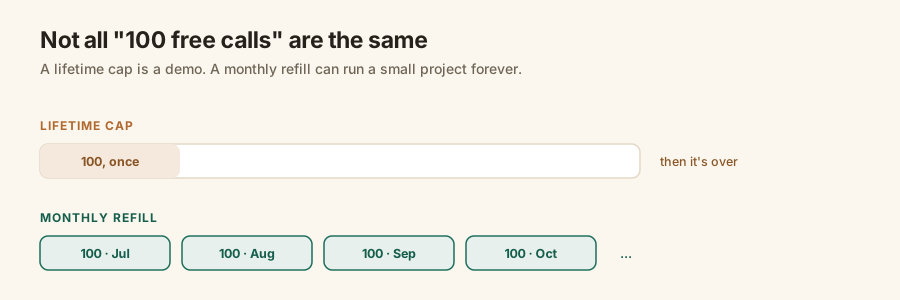
Why monthly instead of a bigger one-time pile? Because a renewing 100 keeps a side project alive indefinitely, which is the honest version of "free tier." A pile you burn once is a trial with better marketing.
Start with the SEC's version
I mean it: hit the free API first. Call companyfacts for a company you know, look at the raw XBRL, and see how the tags feel. Ten minutes there will tell you which column of the decision diagram you live in.
If the answer is "someone else should deal with this," grab a key at https://edgrapi.com/app. 100 credits every month, no card, and the full SEC EDGAR API guide maps everything the hosted version adds.
Frequently asked questions
Is the SEC EDGAR API free?
Yes, completely. The SEC's endpoints on data.sec.gov cost nothing, need no registration and no API key, and cover every public company's filings and XBRL financials. The only requirements are a User-Agent header identifying you and a cap of 10 requests per second. What is not free is the work of turning the raw XBRL into usable numbers.
Do I need an API key for SEC EDGAR?
No. The SEC's own API has no keys at all. You send a User-Agent header with your name and email, and that is the entire setup. Keys only appear when you use a commercial wrapper that normalizes the data for you: those meter usage per account, so you sign up and send a key like edgr_ with each request.
What are the SEC EDGAR API rate limits?
10 requests per second per IP, with no daily cap, per the SEC's own developer documentation. Exceed it and the SEC temporarily blocks your IP, so batch pipelines should throttle just under it. There is no paid tier to raise the limit; if you need more throughput you cache aggressively or spread the work over time.
How do I get company financials from SEC EDGAR for free?
Call the companyfacts endpoint: GET data.sec.gov/api/xbrl/companyfacts/CIK##########.json with the company's zero-padded CIK and a User-Agent header. It returns every XBRL fact the company ever tagged. You then map tags like NetIncomeLoss to your own field names and split annual from quarterly periods, which is where the real work lives.
What is the catch with the free SEC EDGAR API?
The output is raw XBRL, not clean statements. The same line item can hide under any of several tags among the US GAAP taxonomy's 15,000+ elements, companies switch tags between years, and quarterly data mixes in trailing-twelve-month windows. The data is free; the normalization layer is the part you build, test, and maintain yourself.
When should I pay for an SEC EDGAR API wrapper?
Pay when the maintenance costs more than the fee: your stack is not Python, an AI agent makes the calls, nobody on the team wants to own a parser, or you want named fields like revenue instead of tag archaeology. Try free tiers first. Edgrapi's renews at 100 credits every month with no card, which is enough to test a real workload.