How to Get a SAM.gov API Key (Step by Step) and a Faster Alternative
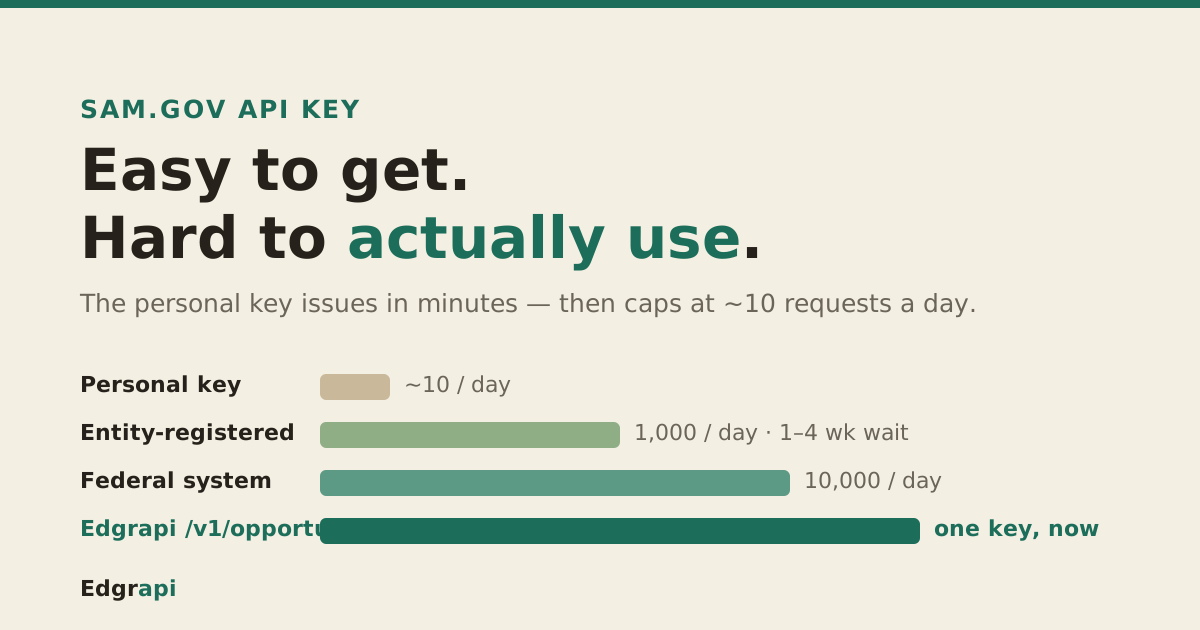
You can get a SAM.gov API key in about five minutes. The problem is what happens next.
A SAM.gov API key lets you pull federal contract opportunities from api.sam.gov as JSON. You request it from your SAM.gov Account Details page after signing in, and the personal (non-federal) key works right away. But that personal key is capped at roughly 10 requests a day, per GSA's role-based limits, which is fine for a test and useless for a real app. This guide covers the exact steps, the rate-limit wall, and the faster path.
/v1/opportunities holds the key and limits for you.How do I get a SAM.gov API key?
You get a SAM.gov API key from the Account Details page of your SAM.gov account, after signing in with Login.gov. You re-enter your account password to reveal the key, and SAM shows it once. According to GSA's Get Opportunities documentation, that single public key works across SAM's public APIs and is passed as an api_key query parameter on every call.
Here are the steps.
- Go to SAM.gov and sign in with your Login.gov credentials. If you don't have an account, create one first. It's free.
- Click your username in the top right, then open Account Details.
- Scroll to the API Key section and enter your account password when prompted. This is a second check, on top of your login.
- Request a public API key. SAM generates it and displays it inline.
- Copy the key right then. Once you navigate away, it's hidden. If you lose it, you regenerate a new one.
That's the whole flow. No approval queue, no waiting.
One thing to know up front: this is an individual key tied to your personal account. It is not the same as a system account key, and that difference decides how many calls you get. More on that below.
How do I make my first Get Opportunities call?
Once you have the key, you call the production endpoint at https://api.sam.gov/opportunities/v2/search with three required parameters: your api_key, a postedFrom date, and a postedTo date. GSA requires both dates in MM/dd/yyyy format, and the two dates can span at most one year. Leave them out and the call fails.
Here's a working request.
curl "https://api.sam.gov/opportunities/v2/search?api_key=YOUR_KEY&postedFrom=08/01/2026&postedTo=08/31/2026&limit=10"The limit parameter tops out at 1000 records per request, and its default is 1. So if you forget to set it, you get a single result and wonder where your data went. Set it deliberately.
The response comes back as JSON. You get totalRecords, your limit and offset, an opportunitiesData array with the actual notices, and a links array for paging. From there you filter with optional params like ptype, state, ncode (NAICS), and title.
Each record in opportunitiesData carries the fields you'd expect on a notice: title, solicitationNumber, the posting agency under fullParentPathName, the notice type, postedDate, the responseDeadLine, naicsCode, and a uiLink back to the human-readable page on SAM.gov. That last field matters more than it seems. It's your audit trail, the link you show a user so they can verify the notice is real.
Simple enough. The friction isn't the request. It's how often you're allowed to send it.
How do I filter opportunities by NAICS, state, or set-aside?
You filter SAM.gov opportunities by adding optional query parameters to the same search call. The ones developers reach for most are ncode for a NAICS code, state for place of performance, ptype for the notice type, and typeOfSetAside for small-business set-asides. Stack them onto your required postedFrom and postedTo dates and the API returns only matching notices instead of the full firehose.
Say you want IT services solicitations in Virginia from last month.
curl "https://api.sam.gov/opportunities/v2/search?api_key=YOUR_KEY&postedFrom=08/01/2026&postedTo=08/31/2026&ncode=541512&state=VA&ptype=o&limit=50"A few of these are worth memorizing. ptype=o means a solicitation; p is presolicitation; k is a combined synopsis. NAICS codes go in ncode, product service codes in ccode.
The filters matter more than they look. Every notice you exclude at the API is one you don't page through later, and paging is exactly what eats your daily request budget. So the tighter you filter, the longer your tiny request allowance lasts.
How do I page through more than 1,000 results?
You page through results with the limit and offset parameters. Each call returns at most 1,000 records, so to read the 4,300th notice you request limit=1000&offset=4000 and continue from there. The response carries a totalRecords count and a links array, so you always know how many pages are left. For recurring pulls, narrow the date window instead of re-scanning the whole range.
Here's the shape of it.
curl "https://api.sam.gov/opportunities/v2/search?api_key=YOUR_KEY&postedFrom=08/01/2026&postedTo=08/31/2026&limit=1000&offset=1000"Now the trap. Every page is a separate request. If a search returns 30,000 records, reading all of them takes 30 calls, and a personal key only gets about 10 a day. You'd run dry a third of the way through.
The fix is to stop re-reading data you already have. Cache each notice by its notice ID, and on the next run only fetch the narrow date window since your last pull. Boring Data Platform's rate-limit guide recommends the same pattern: keep searches broad but infrequent, cache stable records, and fetch detail only when something changes.
This is the part most tutorials skip. They show you one clean call and never mention that a real integration pages, and paging is where the daily cap bites.
Why is my SAM.gov API key limited to 10 requests a day?
Your personal key is limited because SAM ties daily request caps to your account role, and a plain non-federal account with no registered entity sits at the bottom tier: about 10 requests per day. Registered entities get 1,000 per day, and federal system accounts get 10,000. GSA states the limit is "based on the federal or non-federal or general roles," and the low tier is the default nearly everyone starts on.
Ten calls sounds worse than it is, then worse again. Each call can pull up to 1,000 records, so in theory 10 calls reach 10,000 notices a day.
But real apps don't work in clean 1,000-record pulls. You paginate. You retry. You test. You poll for updates. Every one of those is a request, and you burn through 10 fast.
When you cross the line, SAM.gov returns a 429 Too Many Requests. The keys ride on api.data.gov, which reports your budget in two response headers on every call: X-RateLimit-Limit and X-RateLimit-Remaining. Watch X-RateLimit-Remaining and you'll see it tick toward zero.
The block isn't permanent. It clears at the next daily reset. But "come back tomorrow" is not a thing you can build a product on.
How do I increase my SAM.gov API rate limit?
You raise your limit by registering an entity in SAM.gov, which moves your key from 10 requests a day to 1,000. The catch: entity registration is a full vendor-onboarding process, not a settings toggle, and it commonly takes one to four weeks. Anything above 1,000 is federal-only, and per api.data.gov, only federal system-account users can request an increase.
So your real options look like this.
| Access path | Daily limit | Setup | Who it fits |
|---|---|---|---|
| Personal (non-federal) key | ~10 requests/day | Minutes | Testing, one-off lookups |
| Entity-registered key | 1,000 requests/day | ~1–4 weeks registration | Contractors with a registered entity |
| Federal system account | 10,000 requests/day | Federal-only, eligibility gated | Government systems |
Edgrapi /v1/opportunities | Credit-based, no SAM key on your side | Minutes | Developers and agents who want JSON now |
If you have a registered entity already, the 1,000/day tier is probably enough for a modest tool. If you don't, you're looking at weeks of paperwork before your app can breathe. That gap is the whole reason the last row exists.
Does a SAM.gov API key expire?
Yes. SAM.gov rotates personal API keys on a 90-day cycle, so a key that works today will stop working about three months from now unless you rotate it. GSA's Federal Service Desk documents the process: you get an email notice roughly 15 days before expiry, SAM auto-generates the replacement key in your account, and both the old and new keys work during that 15-day overlap so you can swap without downtime.
The overlap is generous. The failure mode is human.
If nobody updates the key in your backend before the old one dies, your integration starts returning errors on a Tuesday for no visible reason. Anyone who has run a SAM integration for a year has a story about this.
Set a calendar reminder for day 75. Rotate early. Don't let a 90-day timer be the thing that pages you.
Which SAM.gov API errors will you actually hit?
Beyond the 429 rate-limit error, three failures catch almost everyone on their first day: a missing or misformatted date, a silent one-record response, and an expired or wrong key. None of them return a helpful message, so knowing the shape in advance saves you an afternoon.
Start with the dates, since that's what trips people first. Both postedFrom and postedTo are required, and both must be MM/dd/yyyy. Send 2026-08-01 instead of 08/01/2026 and the call rejects it. Skip the dates entirely and it fails too.
The limit default is sneakier. If you don't set it, it defaults to 1, so your call succeeds and returns a single opportunity. Nothing errors. You just quietly get one result and assume the data is thin.
Then there's the key itself. An expired, revoked, or mistyped key returns an authorization error, not a 429. If your integration ran fine for months and suddenly throws auth failures, check the 90-day rotation before you check your code.
None of these are hard once you know them. They're just undocumented enough to cost you the first hour.
Is there a faster alternative to the SAM.gov API?
Yes. Edgrapi's /v1/opportunities endpoint returns the same SAM.gov Get Opportunities data as clean, normalized JSON on a single key, and it holds the SAM API key and system-account burden on our side. You skip the personal key's 10-per-day wall, the entity-registration wait, and the 90-day rotation on your own account. It's the same official public-domain data, same freshness. What changes is the friction.
Here's the same opportunity search through Edgrapi.
curl "https://api.edgrapi.com/v1/opportunities?keyword=valve&limit=10" \
  -H "Authorization: Bearer YOUR_EDGRAPI_KEY"
You get back a flat JSON shape with the fields you actually use, no XML detours, no juggling postedFrom/postedTo math to satisfy the 1-year rule. An empty result set costs just 1 credit, so exploratory queries stay cheap. And there's a matching MCP tool, get_opportunities, so an AI agent can call it directly — the same one-key pattern as the USAspending and Grants.gov endpoints.
Be clear about the trade. Edgrapi is a paid, credit-metered API, not a free government endpoint. You're paying to skip the operational tax: the key rotation, the rate-limit tiers, the normalization work. For a lot of teams, that tax costs more than the credits.
To be honest about the data itself: it originates from SAM.gov, so if SAM is slow to post a notice, Edgrapi sees it when SAM does. We don't have a secret faster feed. We have a cleaner door.
Start where you actually are
If you just need to poke at federal opportunity data, get the personal SAM.gov key today and run the curl call above. It'll work inside five minutes.
If you're building something that has to run every day, decide now: start the entity registration this week so the clock is ticking, or skip the queue with a normalized endpoint like Edgrapi's /v1/opportunities and keep one key instead of a rotation schedule. Either way, don't ship an app on top of a 10-call-a-day key and hope.
Frequently asked questions
How do I get a SAM.gov API key?
Sign in to SAM.gov with Login.gov, open Account Details from your username menu, and re-enter your account password when prompted. Request a public API key and copy it immediately, because SAM only displays it until you leave the page. The key is free and works right away, passed as an api_key query parameter on your API calls.
Is the SAM.gov API free?
Yes, the SAM.gov API is free to use, and the public API key costs nothing. The cost is in the limits, not the price. A free personal key is capped near 10 requests per day, and reaching the 1,000-per-day tier means registering an entity, which is free but takes roughly one to four weeks to process.
What is the SAM.gov API rate limit, and why am I getting a 429 error?
SAM.gov limits requests per day by account role: about 10 for a non-federal personal key, 1,000 for a registered entity, and 10,000 for a federal system account. A 429 Too Many Requests means you hit your daily cap. Check the X-RateLimit-Remaining header on each response to see how many calls you have left before the next reset.
How do I increase my SAM.gov API rate limit?
Register an entity in SAM.gov to move from the 10-per-day tier to 1,000 requests per day. That registration is a vendor onboarding process, not a quick setting, and it usually takes one to four weeks. Above 1,000 per day is reserved for federal system accounts, and only federal users are eligible to request a further increase.
Does a SAM.gov API key expire?
Yes. SAM.gov rotates personal API keys every 90 days. You get an email notice about 15 days before the key expires, SAM generates the replacement automatically, and both keys work during that overlap window. Update your systems with the new key before the old one lapses, or your integration will start failing once it expires.
What's the difference between a personal SAM.gov API key and a system account?
A personal key is tied to your individual SAM.gov account and starts at the lowest rate tier, around 10 requests per day. A system account is a separate, server-oriented credential with far higher limits, up to 10,000 requests per day, and is the only path eligible for rate increases. Personal keys are for testing and light use; system accounts are for production traffic.