SEC EDGAR API as an MCP Server: SEC Filings for Any AI Agent (2026)
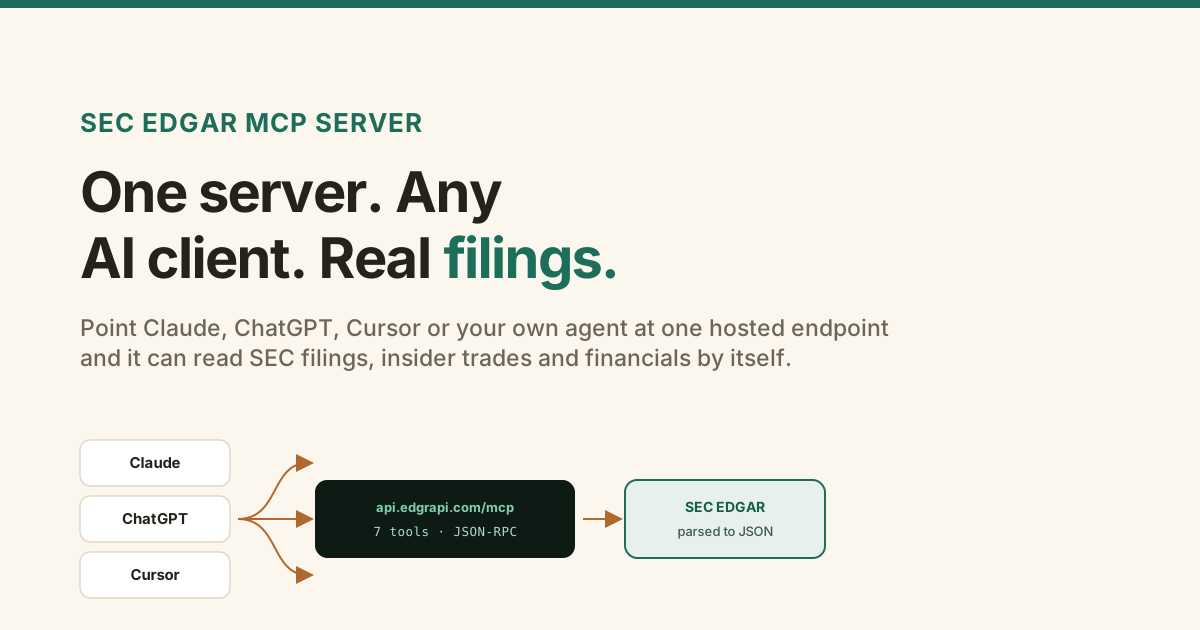
An AI model without tools is a confident guesser about SEC filings. Ask it what insiders bought last week and it will answer from training data that went stale months ago.
A SEC EDGAR MCP server fixes that. It hands the agent a set of tools it can call to read the actual filing, so the answer comes from EDGAR instead of memory. Here is what the server is, the tools it gives you, which clients connect, and an honest look at the free options next to the hosted ones.
https://api.edgrapi.com/mcp with seven: insider trades, 8-K events, filings, sections, fundamentals, ratios, and company. Discovery is open, so you can list them with no key. It works with Claude, ChatGPT, Cursor and more. If you would rather self-host for free, EdgarTools and stefanoamorelli's server are good open-source picks. Edgrapi's free tier is 50 credits, no card.What is a SEC EDGAR MCP server?
It is a server that turns SEC filings into tools an AI agent can call. Model Context Protocol is the standard that lets a client like Claude or Cursor discover those tools and use them in a conversation.
Underneath, MCP is just JSON-RPC over HTTP. The client asks the server what tools it has, the model decides which one answers the question, and the server does the work and returns JSON. Nothing about it is exotic; it is a clean way to give a model a set of typed actions.
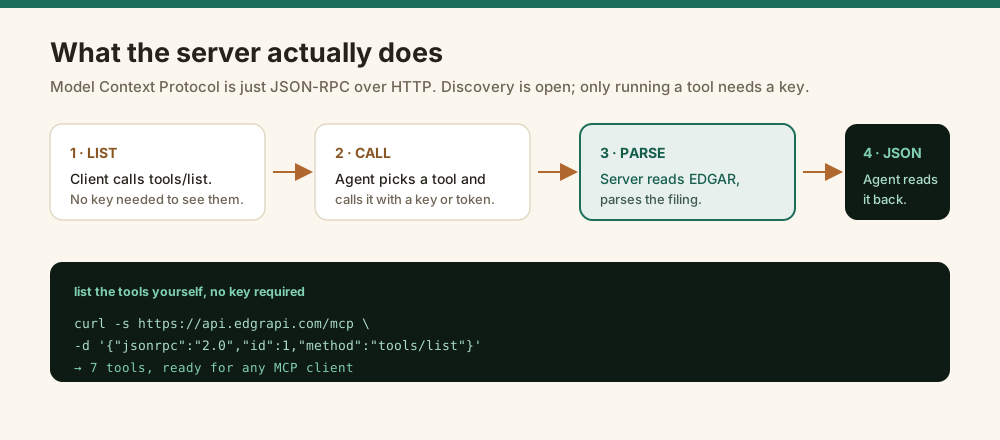
You can see the whole tool catalogue yourself without an account, because discovery is open:
curl -s https://api.edgrapi.com/mcp \
  -H "Content-Type: application/json" \
  -d '{"jsonrpc":"2.0","id":1,"method":"tools/list"}'
That returns the full set of tools and their schemas. A key is only needed when a tool runs.
Which AI clients can connect?
Most of the ones you would want to. Remote MCP servers work with Claude, ChatGPT, Cursor, Windsurf, VS Code with Copilot, Gemini CLI, and any agent you build yourself.
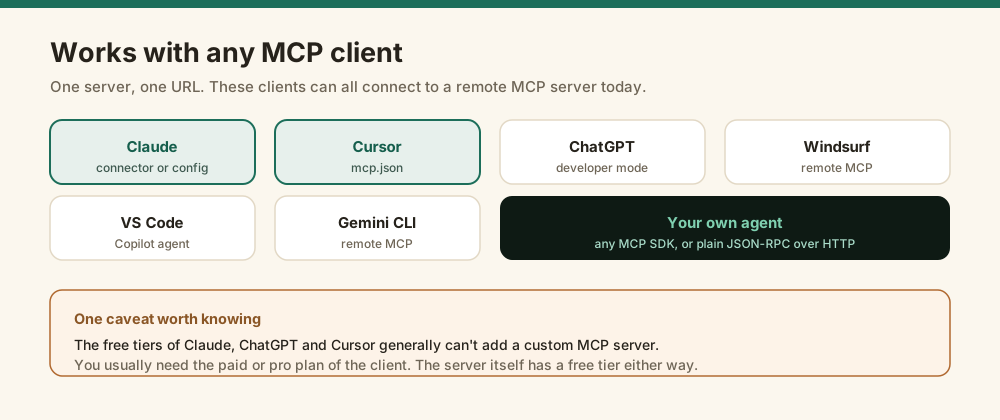
There is one honest caveat. The free tiers of the consumer apps, Claude, ChatGPT, and Cursor, generally cannot add a custom MCP server, so you usually need the paid or pro plan of the client. The server has its own free tier regardless. For the exact steps in the two most common clients, see the Cursor guide and the Claude guide.
What tools does the server expose?
Seven. The two worth building around are insider trades and material events, because those answer the questions a tool-less model gets most wrong.
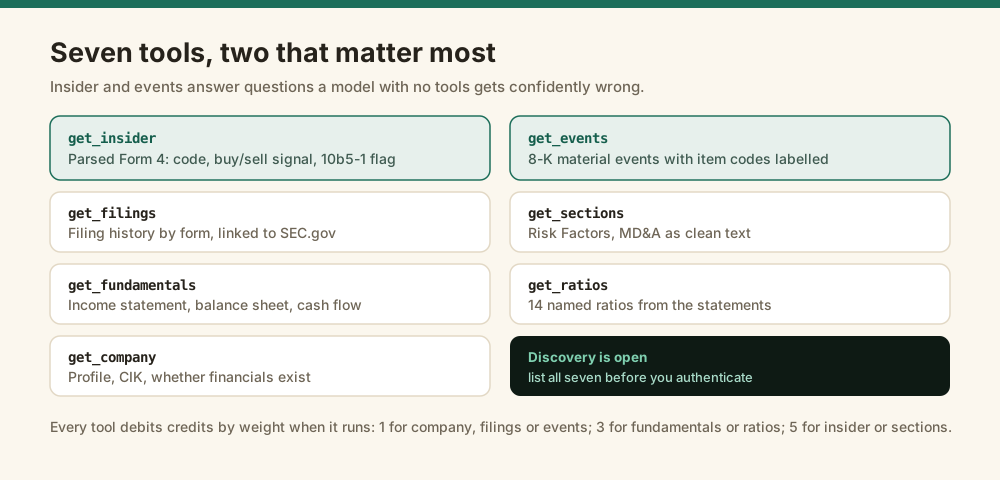
| Tool | What it returns | Credits |
|---|---|---|
get_insider | Parsed Form 4 trades: code, buy/sell signal, shares, price, 10b5-1 flag | 5 |
get_events | 8-K material events with item codes labelled | 1 |
get_filings | Filing history by form, linked to SEC.gov | 1 |
get_sections | Risk Factors, MD&A and other 10-K sections as text | 5 |
get_fundamentals | Income statement, balance sheet, cash flow | 3 |
get_ratios | 14 named ratios computed from the statements | 3 |
get_company | Profile, CIK, and whether financials exist at all | 1 |
It is the same data as the REST API and the same credit balance, so an agent and your own code share one account. For function-calling instead of MCP, the agent guide covers the same tools.
How do you authenticate it?
Two ways, and neither is needed to browse. A key as a Bearer header is the quick path, and OAuth 2.1 is the route that keeps a key out of any file.
// a key as a bearer token
{ "url": "https://api.edgrapi.com/mcp",
  "headers": { "Authorization": "Bearer edgr_your_key" } }
With OAuth you give the client only the url. It calls the server, gets a 401 pointing at the metadata, registers itself, and opens a browser for you to approve, after which it holds a token that expires. The client guides walk through both for Claude and Cursor.
How does it compare to the other SEC MCP servers?
There are several now, and they are not all after the same thing, so here is the version without the marketing. A few are free and open source, which matters if you are happy to self-host.
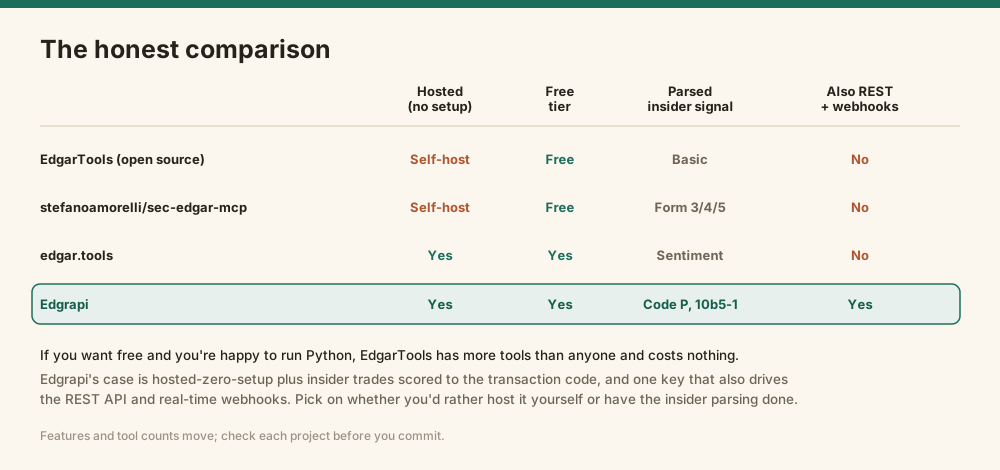
EdgarTools ships a free, open-source server with more tools than anyone and a live filings feed, and stefanoamorelli/sec-edgar-mcp is a well-built open-source option on PyPI. If you want free and you do not mind running Python, start with one of those. edgar.tools is a hosted alternative with its own analytics.
Edgrapi's case is narrow and specific: it is hosted, so there is nothing to run, and the same key drives the REST API and real-time webhooks alongside MCP. What it does that the general servers mostly do not is score insider trades to the transaction code, so an agent can tell an open-market purchase from a routine option exercise, and flag 10b5-1 plans. If your agent needs that insider signal without you building it, that is the reason to pick it. If you only need fundamentals, the free servers are genuinely fine.
How do you add it to Claude and Cursor?
Claude. Open Settings, then Connectors, then Add custom connector, and paste https://api.edgrapi.com/mcp. Claude runs the OAuth sign-in in your browser, so there is no key to paste. Approve it and the tools show up in the chat.
Cursor. Add one entry to mcp.json, in ~/.cursor/mcp.json for every project or .cursor/mcp.json for one repo, then restart Cursor:
{
  "mcpServers": {
    "edgrapi": {
      "url": "https://api.edgrapi.com/mcp",
      "headers": { "Authorization": "Bearer ${env:EDGRAPI_KEY}" }
    }
  }
}
Leave out the headers block if you would rather sign in with OAuth than store a key. If the tools don't appear, check that the URL ends in /mcp, that the key is set in the environment Cursor was launched from, and that you restarted the client.
MCP or function calling: which should you use?
Use MCP when the client supports it (Claude, Cursor, Claude Code and most agent IDEs do). You get every tool at once with no glue code. Use function calling when you are building your own agent loop on the API: you describe a tool, the model asks for it, and your code makes the HTTP call.
tools = [{
    "name": "get_fundamentals",
    "description": "Income statement, balance sheet and cash flow from SEC EDGAR, by ticker.",
    "input_schema": {"type": "object",
                     "properties": {"ticker": {"type": "string"}},
                     "required": ["ticker"]},
}]
# when the model calls get_fundamentals, GET https://api.edgrapi.com/v1/fundamentals/{ticker}
Either way, the point is the same: the agent quotes numbers from the filing instead of guessing them from memory.
Point a client at it and ask
Grab a free key from the dashboard, add the server in your client with https://api.edgrapi.com/mcp, and ask what insiders have been buying at a company you follow.
The free tier is 50 credits with no card. The Cursor and Claude guides have the exact setup, and the insider radar is public if you want to see the data before wiring anything up.
Edgrapi surfaces public SEC filings for research. It is not investment advice.
Frequently asked questions
What is a SEC EDGAR MCP server?
It is a server that exposes SEC EDGAR filings as Model Context Protocol tools, so an AI client like Claude, ChatGPT or Cursor can pull real filings instead of guessing. Edgrapi's runs at https://api.edgrapi.com/mcp and offers a full set of tools covering insider trades, 8-K events, filings, sections, fundamentals, ratios and company profiles. It is hosted, so there is nothing to install.
Which AI clients work with an MCP server?
Claude, ChatGPT, Cursor, Windsurf, VS Code with Copilot, Gemini CLI, and any agent you build with an MCP SDK all support remote MCP servers. One caveat: the free tiers of the consumer apps usually cannot add a custom MCP server, so you typically need the paid or pro plan of the client. The server's own free tier is separate from that.
Is there a free SEC EDGAR MCP server?
Several. EdgarTools ships a free, open-source server with more tools than anyone, and stefanoamorelli/sec-edgar-mcp is a popular open-source one on PyPI. Both are free if you are happy to self-host Python. edgar.tools and Edgrapi are hosted, so nothing to run. Edgrapi's free tier is 50 credits with no card.
Do I need an API key to use the MCP server?
Not to browse it. Tool discovery is open, so any client can call tools/list and see all seven tools with no key. A key is required only when a tool actually runs. You can pass it as a Bearer header, or connect over OAuth 2.1 and never store a key in a file at all.
How is this different from the SEC EDGAR REST API?
It is the same data and the same account behind a different interface. The REST API is for code you write; the MCP server is for an AI agent to call in natural language. Both use one key and one credit balance, and the MCP server also carries the parsed insider and 8-K tools, so an agent can answer questions about filings without you writing the request.
What can an agent do with it that it can't do alone?
Answer questions grounded in filings rather than training data. The two tools worth having are insider trades and material events, because those are what a model with no tools gets most confidently wrong. Ask which insiders bought with their own money and it returns code-P purchases parsed from Form 4, not a plausible guess.