SEC EDGAR API With Zapier: No-Code Financial Data Automation
You can pipe Apple's latest revenue into a Google Sheet every morning without writing a line of code.
The whole thing is one Zap, and you can build it in about ten minutes.
Here is how to connect the SEC EDGAR API to Zapier, what you can automate with it, and the one cost most guides skip.
You pull SEC EDGAR financial data into any app with Zapier and no code. The trick is Webhooks by Zapier: a custom GET request calls the Edgrapi REST endpoint with your Bearer key, and Zapier hands the JSON to a Google Sheet, a Slack message, or an email. One catch worth knowing up front: the webhook step needs a paid Zapier plan.
Can you use the SEC EDGAR API with Zapier?
Yes, through Webhooks by Zapier. There is no official SEC EDGAR app in Zapier's directory, but the Webhooks app calls any REST endpoint, so it reaches the API through a wrapper like Edgrapi. You send a GET request with your Bearer key and Zapier parses the JSON for you, per the Zapier community's guidance on bearer tokens.
Zapier connects more than 8,000 apps. The SEC is not one of them.
That is fine, because Webhooks is the universal adapter. Anything with a REST endpoint and a token becomes a Zapier step, and Edgrapi is a plain REST API with a Bearer key.
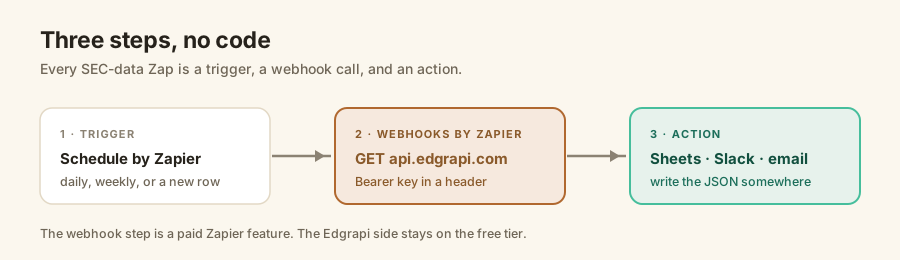
One thing to set expectations on: Webhooks by Zapier is a premium app, so this needs a paid plan. More on the exact cost below.
How do you connect the SEC EDGAR API to Zapier?
Add a Webhooks by Zapier step, choose Custom Request, and fill four fields: the method, the URL, and a header for your key. Set the method to GET, the URL to an Edgrapi endpoint, and add a header with the key Authorization and the value Bearer plus your key. Hit test and Zapier pulls the JSON.
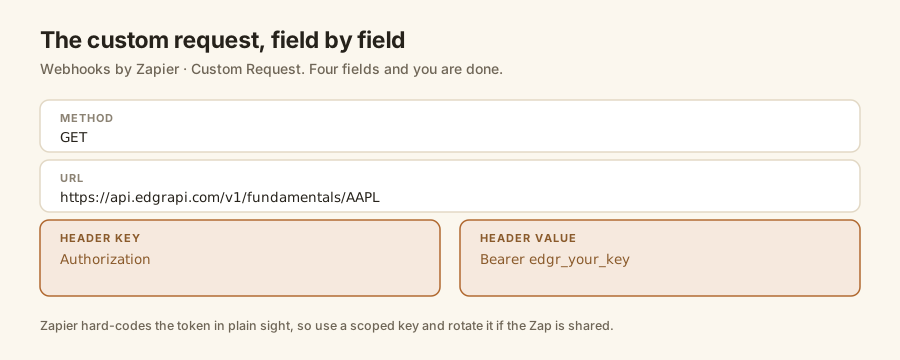
In HTTP terms, the webhook step is sending exactly this:
GET https://api.edgrapi.com/v1/fundamentals/AAPL
Authorization: Bearer edgr_your_key
The five steps look like this:
- Pick a trigger. Schedule by Zapier for a daily or weekly run, or a new row in a sheet.
- Add an action step and choose Webhooks by Zapier, then Custom Request.
- Set the method to GET and paste the Edgrapi endpoint URL.
- In Headers, add key
Authorizationand valueBearer edgr_your_key. - Test the step. Zapier shows the parsed JSON fields, ready to map.
One security note. Zapier hard-codes that token in plain sight, so anyone with access to the Zap can read it. Use a scoped key, and if you share the workflow, rotate it. The SEC EDGAR API key guide covers how the Bearer header works.
What can you automate with SEC financial data?
Anything that starts with a number from a filing. A daily Zap can log revenue and net income to a sheet, post a ratio to Slack, email an alert on a new 10-K, or enrich a CRM record. The webhook call is identical each time, so once you build one Zap you can clone it and swap the last step.
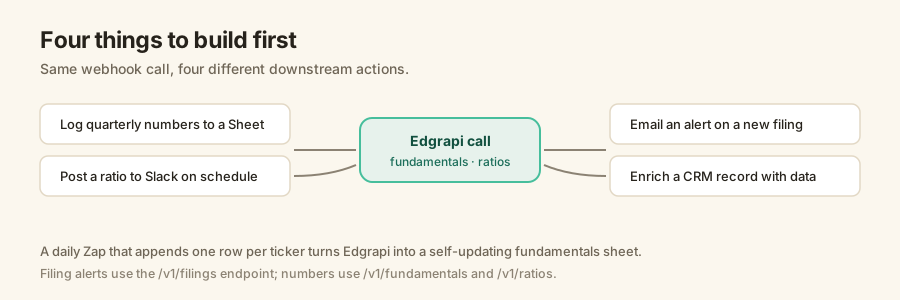
A few that people build first.
A fundamentals tracker: every morning, append one row per ticker with revenue, margins, and growth. Over a quarter you have a self-updating sheet with no maintenance.
A filing watcher: on a schedule, hit the filings endpoint for a ticker and email yourself when a new 10-K or 8-K shows up.
A Slack digest: post a company's latest ratios to a channel every Monday, so the team sees the numbers without opening a terminal.
How do you map the response into a Google Sheet?
Zapier parses the JSON, so you map fields, not text. After the webhook step, add a Create Spreadsheet Row action and drop the ticker, revenue, and net income fields into columns. Each run appends one row, so a scheduled Zap turns Edgrapi into a fundamentals sheet that updates itself.
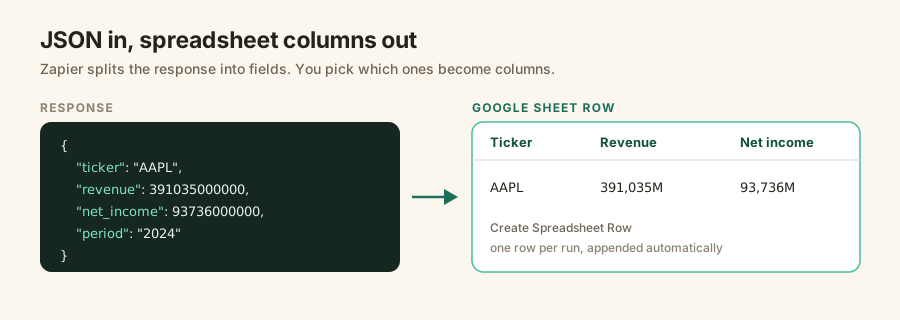
The API returns full dollar figures, so revenue comes back as 391035000000, not 391,035. Format the column in Sheets if you want millions.
The same mapping works for Slack, email, Airtable, or a database row. Whatever the action, you are choosing which parsed fields to send.
What does it cost?
Two bills, and only one starts at zero. Zapier's webhook step needs a paid plan, from about $29.99 a month on Professional for 750 tasks, where each action step counts as one task, per Zapier's pricing. Edgrapi stays free on the starter tier: 100 credits / month, no card, a few credits per call. So the cost here is mostly Zapier, not the data.
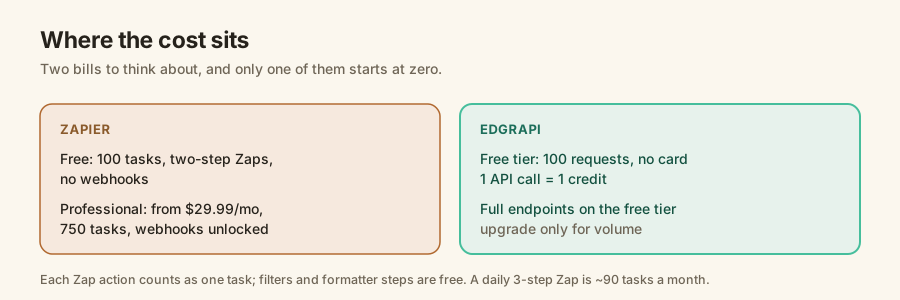
The free Zapier plan will not cut it here.
It gives you 100 tasks and two-step Zaps, but no webhooks, so the Custom Request step is locked until you upgrade. On Professional, the math is gentle: a daily three-step Zap runs about 90 tasks a month, well inside the 750.
Filters, Paths, and Formatter steps do not count as tasks, so you can add logic without burning your budget.
What are the limits and gotchas?
Three things to plan for. Zapier's polling triggers run every 1 to 15 minutes depending on your plan, so this is near-real-time, not instant. The Bearer token sits in plain text in the Zap. And Webhooks does not do OAuth, so header auth is the way in. None of these block the build; they just shape it.
The polling interval is the one people forget, per Zapier's polling docs.
If you need a filing alert within seconds, Zapier is the wrong tool; it checks on a timer. For a morning sheet update or a weekly digest, the timer is exactly what you want.
On rate limits, you will almost never hit Edgrapi's from a Zap, since one run is a handful of calls. The main SEC EDGAR API guide covers the endpoints you can point a webhook at.
Start: build the sheet Zap
Grab a free Edgrapi key, then open Zapier and start a Zap with a Schedule trigger. Add a Webhooks by Zapier custom request to /v1/fundamentals for one ticker, with your Bearer header.
Finish with a Create Spreadsheet Row step and map revenue and net income into columns. Turn it on, and tomorrow morning the row is there, filled in, with nobody touching it. Point the webhook at https://api.edgrapi.com and start with a single company you follow.
Frequently asked questions
Can Zapier call the SEC EDGAR API?
Yes. Zapier's Webhooks by Zapier app can send a custom GET request to any REST endpoint, including the SEC EDGAR API through a wrapper like Edgrapi. You set the method to GET, paste the endpoint URL, and add an Authorization header with your Bearer key. Zapier then passes the JSON response to any downstream app. The webhook step needs a paid Zapier plan.
Do I need code to connect Zapier to an API?
No code, but you do fill in a few fields. In the Webhooks by Zapier custom request step you pick the method, enter the URL, and add a header for your API key. Zapier parses the JSON response for you, so you map fields like revenue and net income into a spreadsheet or Slack message without writing a parser.
Does Zapier support Bearer token authentication?
Yes, by hard-coding it. In the Webhooks by Zapier step you add a header with the key Authorization and the value Bearer plus your token. Zapier's webhook app does not support OAuth 2.0, so bearer and basic auth are the practical options. The token sits in plain text in the Zap, so use a scoped key and rotate it if the workflow is shared.
Is Webhooks by Zapier free?
No. Webhooks by Zapier is a premium app, so it needs a paid Zapier plan. The Professional plan starts around $29.99 a month and unlocks webhooks, multi-step Zaps, and filters. The free plan gives 100 tasks and two-step Zaps but no webhooks. The Edgrapi side stays free: 100 credits with no credit card.
What can I automate with SEC financial data in Zapier?
Plenty, with no code. A daily Zap can append a company's revenue and net income to a Google Sheet, post a ratio to Slack, email an alert when a new 10-K or 8-K is filed, or enrich a CRM record with fundamentals. The pattern is always the same: a trigger, one webhook call to Edgrapi, and an action that writes the result somewhere.
How do I put an Edgrapi API key in a Zapier webhook?
Add it as a header in the Webhooks by Zapier custom request. Set the header key to Authorization and the value to Bearer edgr_your_key, using the key from your Edgrapi dashboard. Get a free key by signing up at edgrapi.com; the free tier is 100 credits with no card, which is plenty to build and test a Zap.