SEC EDGAR Full-Text Search API: Every Filing Since 2001
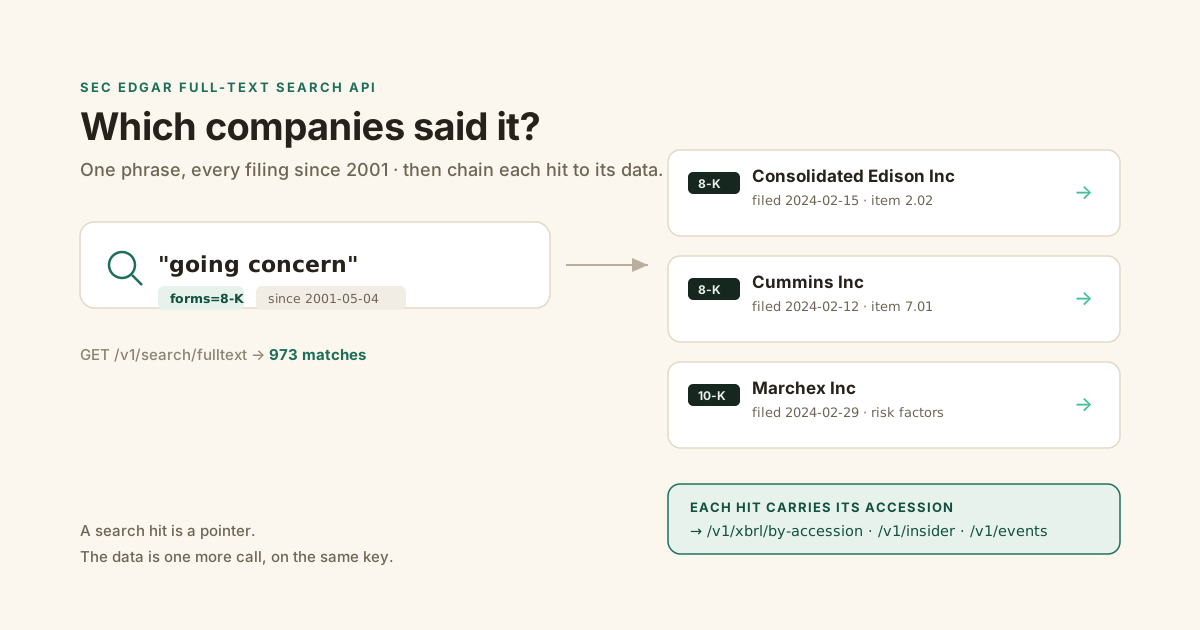
You want to know which companies wrote "going concern" in their last 8-K. Not one company. All of them.
Ticker lookups can't answer that. You need to search the words inside the filings, across everyone, at once.
GET /v1/search/fulltext with a stable schema, and every hit carries the form, 8-K item codes, and a link, so you can chain it straight into parsed data.What is the SEC full-text search API?
The SEC full-text search API is a keyword search engine over the words inside filings, not just the metadata about them. It indexes the full body of every EDGAR filing submitted since 2001, including all attachments and exhibits, and answers one question metadata can't: which companies actually said this? The official endpoint is GET https://efts.sec.gov/LATEST/search-index, it returns JSON, and it needs no key.
Coverage starts on May 4, 2001, per the SEC's full-text search FAQ. Anything filed before that is on EDGAR but is not searchable by text.
This is a different tool from the data APIs. data.sec.gov gives you a company's filings and its XBRL numbers if you already know the CIK. Full-text search runs the other direction: you start with a phrase and get back the companies.
The index is close to live. A new filing shows up in search within about a minute of hitting EDGAR, so "who just disclosed this" is a question you can ask the same day, not next quarter.
It also keeps the dead ones. The index covers filers that have since delisted or gone bankrupt, so a historical search doesn't quietly drop the companies that failed, which is exactly the survivorship gap that ruins a backtest.
The catch is what the endpoint doesn't tell you. It is not officially documented, the SEC can change it without notice, and it hides real limits behind a clean-looking response.
How is full-text search different from the SEC's data APIs?
Full-text search finds companies by what they wrote; the data APIs return numbers for a company you already named. The efts.sec.gov index takes a phrase and hands back the filers that used it. The data endpoints on data.sec.gov take a CIK and hand back that filer's submissions and XBRL figures. You use search to discover the list, then the data APIs to pull the details for each name on it.
Think of it as two halves of one workflow.
Search answers "which companies wrote 'material weakness' this quarter." It can't tell you their revenue, because the numbers live in XBRL tags, not the text index.
The data side answers "what were Apple's last four years of operating cash flow." It can't tell you which companies mentioned a lawsuit, because it's keyed on CIK, not on content.
Neither replaces the other. A real pipeline runs search first to build the universe, then the data endpoints to enrich it. That's the case for having both behind one key instead of stitching two vendors together.
How do you search every filing for a phrase like "going concern"?
You send the phrase in quotes as the q parameter, add a form filter and a date range, and read the matches out of the JSON. A quoted phrase is an exact match; unquoted words are ANDed. With Edgrapi the same query is one authenticated call and every hit comes back with the company, form, filing date, 8-K item codes, and a SEC.gov link already attached.
Here is the whole thing against the live endpoint.
import requests

r = requests.get(
    "https://api.edgrapi.com/v1/search/fulltext",
    params={"q": '"going concern"', "forms": "8-K",
            "startdt": "2024-01-01", "enddt": "2024-03-31"},
    headers={"X-API-Key": "edgr_your_key"},
)
d = r.json()
print(d["total"], "filings matched")
for hit in d["hits"]:
    print(hit["filed"], hit["form"], hit["company"], hit["url"])
The total is the full match count. The hits array is the current page, up to 100.
Each hit carries the fields you need to act on it: the form, the filed date, the company, the filer ciks, the accession number, and a direct url to the document on SEC.gov. For 8-Ks it also carries the items, the codes that say what the filing was about.
That last part matters more than it looks. The accession and the item codes are the hooks that let you turn a search result into structured data, which is the whole point of the section further down.
Quotes matter. Search going concern without them and you get every filing containing both words anywhere; search "going concern" and you get the phrase auditors actually use when a company might not survive the year.
To show the shape is real: a "climate change" phrase search on 8-Ks for the first quarter of 2024 returns 973 matching filings. That is a live number from the endpoint, not a guess.
What can you filter and search on?
You can filter by form type, date range, and filer, and inside the query you get exact phrases, boolean logic, and stem wildcards. What you cannot do is search by meaning. Full-text search is literal: a search for "AI" will not surface a filing that only said "machine learning," because the index matches words, not concepts, per EdgarKit's breakdown of the tool.
The filters that work:
formstakes one form type or a list, like8-Kor10-K,10-Q.startdtandenddtset a date window inYYYY-MM-DD.- A filer filter restricts the search to specific companies by CIK.
Inside the q string, the SEC FAQ documents boolean operators: OR and NOT in capitals, an implied AND between words, and NEAR() for proximity with a default of 10 words. Wildcards work only as a suffix stem, so gas* matches gas and gasoline, but you can't put a wildcard inside a phrase.
So a real analyst query looks less like one word and more like a filter:
q = '"material weakness" NOT remediated'     # flagged, not yet fixed
q = '"going concern" OR "substantial doubt"' # either auditor phrase
That is the difference between a keyword and a screen. You're not looking for a word; you're looking for the companies that used a specific phrase and not another.
Proximity is the other trick worth knowing. NEAR() matches words that sit close together, with a default window of 10 words, so NEAR("cyber", "incident") catches a breach disclosure that never used the exact phrase "cyber incident." It's the middle ground between a loose two-word AND and a rigid exact phrase.
Two limits are worth knowing before you build on it. The 2001 to 2003 filings carry OCR artifacts, so old text is imperfect. And numbers locked inside XBRL tags don't always surface in the text index, so full-text search is the wrong tool for "find companies with revenue over $1B." That's a job for parsed financials.
What can you build on SEC full-text search?
Anything that starts with "which companies said X." Full-text search is the entry point for monitoring and screening workflows that metadata search can't reach, because it finds companies by what they disclosed, not by what sector a database filed them under. The highest-value uses all share that shape.
A few that people actually build:
- Red-flag screening. Sweep 8-Ks for "material weakness," "substantial doubt," or "restatement" to catch trouble the week it's disclosed.
- Contract and deal discovery. Search exhibits for a counterparty name or a clause type to find every filer exposed to it.
- Thematic exposure. Find who mentions "tariff," "GLP-1," or a specific chip so you can map a theme to real filers.
- Competitor and litigation monitoring. Watch for a company or product named in someone else's filing.
- Language drift. Track how a phrase like "climate risk" spreads across 10-Ks year over year.
Every one of these is a phrase, a form filter, and a date window. The search is the cheap part.
How do you monitor new filings for a phrase?
You rerun the same search on a schedule with a tight recent window and keep only the accessions you haven't seen before. Because the index picks up new filings within about a minute, a job that queries the last day or two every few hours catches disclosures the morning they land. If you already know which companies you care about, a filing webhook is the lower-effort path.
The pattern is a saved query plus a seen-set.
Run your phrase with forms=8-K and a startdt of yesterday. Diff the accessions against what you've already stored, alert on the new ones, and repeat on a timer.
The tight window keeps you well under the 10,000 cap and keeps each poll cheap, because you're only ever scanning a day or two of filings.
If you already have a watchlist, don't poll search at all. Point a filing webhook at those tickers and let new filings come to you. Full-text monitoring is for the case where you don't know the companies yet, only the phrase.
How do you get past the 10,000-result limit?
You split one broad query into narrow date windows and stitch the results together. Every full-text search query is capped at 10,000 results, with no scroll cursor. When more match, the total comes back as "10,000 or more" rather than an exact count. The fix is to run the same query one month or one quarter at a time, until each window returns fewer than 10,000 hits.
This is the gotcha that breaks naive scrapers. They ask for page 101 and the endpoint errors, because paging past 10,000 results is not allowed.
import requests

def sweep(q, forms, months):
    out = []
    for start, end in months:            # e.g. [("2024-01-01","2024-01-31"), ...]
        page = 0
        while True:
            r = requests.get(
                "https://api.edgrapi.com/v1/search/fulltext",
                params={"q": q, "forms": forms, "startdt": start,
                        "enddt": end, "limit": 100, "offset": page * 100},
                headers={"X-API-Key": "edgr_your_key"},
            )
            hits = r.json()["hits"]
            out.extend(hits)
            if len(hits) < 100:
                break
            page += 1
    return out
Before you page a window, check its total. If the count still reports "10,000 or more," the window is too wide and you'll miss filings past the cap, so cut it to a shorter span before you start reading pages.
Keep each window under 10,000 total and you can sweep an entire multi-year corpus without ever hitting the ceiling. For a broad phrase across all forms, a monthly window is usually safe; for a common word, drop to weekly.
Free SEC endpoint vs sec-api.io vs a hosted wrapper
The public efts.sec.gov endpoint is free but fragile, sec-api.io is stable but paid, and a hosted wrapper like Edgrapi gives you the stable schema for free. All three read the same SEC index, so the data is identical. What differs is who maintains the plumbing, what it costs, and how much each hit hands back. Here is the honest comparison.
| Raw efts.sec.gov | sec-api.io | Edgrapi | |
|---|---|---|---|
| Cost | Free | From $49/mo | Free tier, 1 credit/call |
| API key | None | Required | Free key, no card |
| Documented, stable schema | No (can change anytime) | Yes | Yes |
| Rate limiting handled for you | No (10 req/s, strict) | Yes | Yes |
| Hits carry 8-K item codes | Raw only | Partial | Yes, labelled |
| Chains to parsed data | No | Separate endpoints | Same key, same platform |
sec-api.io's Personal plan is $49 a month billed annually, with a free tier of 100 calls total, for life, per its pricing page. That's fine for a one-off test and expensive for anything ongoing.
The raw endpoint is genuinely free, and if you only need a handful of searches, use it. The moment you're running it in production, you inherit the 10 requests per second limit, the undocumented schema, and the fact that EFTS throttles harder than the rest of EDGAR. That's the tax on free.
You found the filing. Now what?
A search hit is a pointer, not an answer. Every full-text tool stops at "here are the matching filings," but the value is in the filing's data, not its existence. Because an Edgrapi hit already carries the accession number and, for 8-Ks, the item codes, you can hand that accession straight to the XBRL endpoint or the ticker to the insider endpoint and get the parsed numbers back, on the same key.
This is the step I built the endpoint around, because it's the one every other guide skips.
Say your search for "material weakness" returns an 8-K. You have the accession. One more call turns it into structured data:
# search hit -> parsed XBRL for that exact filing
acc = hit["accession"]                      # e.g. 0000320193-24-000123
x = requests.get(
    f"https://api.edgrapi.com/v1/xbrl/by-accession/{acc}",
    headers={"X-API-Key": "edgr_your_key"},
).json()
print(x["company"], x["count"], "concepts reported")
The company on that hit works the same way. Take its ticker and ask the insider endpoint what its executives were trading, or the events endpoint for the rest of its 8-K history, all on the one key.
Now the pipeline reads end to end: search the words, find the companies, pull the numbers. The 8-K events endpoint and the financial statements endpoint take the same key, so the phrase you searched for becomes the first step of a real workflow instead of a browser tab.
Start: search 8-Ks for a red-flag phrase
Pick a phrase auditors and lawyers use when something is wrong: "material weakness," "substantial doubt," "restatement." Run it against /v1/search/fulltext with forms=8-K and a 90-day window, and read back the companies that filed it this quarter. Then take the first hit and pull its filing data with the same key, so your first search doubles as your first real workflow.
The free tier is 50 credits, no card, and a search is one credit, so you can map an entire quarter of red flags before you spend a dollar. Point it at https://api.edgrapi.com, search your first phrase, then take one hit and pull its filing data with the same key.
Frequently asked questions
Does SEC full-text search cover filings before 2001?
No. EDGAR full-text search indexes filings submitted from May 4, 2001 onward, per the SEC's own FAQ. Filings before that date exist on EDGAR and you can pull them by CIK, but their text is not in the search index, so a keyword query will never return them no matter how wide your date range.
Is the EDGAR full-text search API free?
Yes. The official endpoint at efts.sec.gov needs no key and costs nothing. The trade-off is that it's undocumented, the SEC can change it without notice, and it enforces a strict 10 requests per second limit. Edgrapi wraps the same index with a stable, documented schema on a free tier of 50 credits.
How do I get past the 10,000-result limit?
Split the query into narrow date windows. Every full-text query is capped at 10,000 results with no scroll cursor, and paging past that errors out. Run the same search one month or one quarter at a time, check that each window returns under 10,000 hits, and stitch the windows together to sweep an unlimited span.
Can I search by keyword and ticker at the same time?
Yes. You combine a keyword or quoted phrase with a filer filter, so you can ask "did this specific company ever write this phrase." On Edgrapi you pass the phrase as q and scope by form and date; to pin it to one company, resolve the ticker to a CIK first and filter the results on that CIK.
Is EDGAR full-text search semantic or keyword-based?
Keyword-based. It matches the literal words in a filing, not their meaning, so a search for "AI" will miss a filing that only wrote "machine learning." Use exact phrases and boolean operators to tighten it, and if you need concept-level matching, pull the filing text and run your own embedding search on top.
How fast can I query efts.sec.gov before getting rate-limited?
The SEC asks clients to stay under 10 requests per second across all of EDGAR, and the full-text endpoint throttles harder than the document servers, so treat it as a stricter limit. A hosted wrapper paces and caches requests for you, which is why a burst of searches through Edgrapi doesn't trip the SEC's limit the way a raw loop does.