Best Free Congress Stock Trade Trackers Compared (2026)
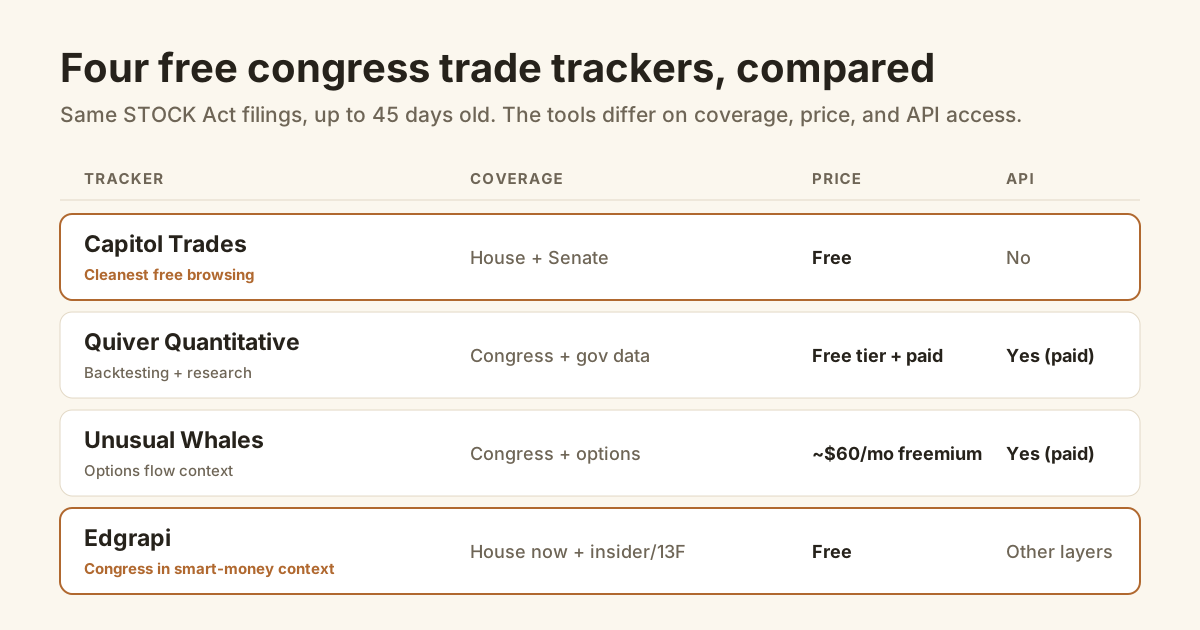
You can watch Congress trade stocks for free. The hard part isn't finding a tracker, it's reading the data right.
The best free congress stock trade tracker for most people is Capitol Trades, a clean tool that scans every STOCK Act disclosure from both chambers at no cost. Paid options like Unusual Whales and Quiver Quantitative add options flow, backtests, and APIs. But every tracker reads the same public filings, so the real skill is knowing the 45-day lag and dollar-range limits before you trade on any of it.
What's the best free congress stock trade tracker?
Capitol Trades is the best free congress stock trade tracker for pure browsing: it's free, covers both the House and Senate, and turns every STOCK Act filing into a searchable feed. If you want backtesting or an API, Quiver Quantitative's paid tier fits; for options flow alongside the trades, Unusual Whales does. For most retail investors who just want to see who bought what, the free tools are more than enough.
Here's the honest shortlist, and what each one is actually for.
| Tracker | Coverage | Price | API / export | Best for |
|---|---|---|---|---|
| Capitol Trades | Congress only, House + Senate | Free | No public API | The cleanest free browsing |
| Quiver Quantitative | Congress + broad government data | Free tier, paid Premium | Yes (paid) | Backtesting and research |
| Unusual Whales | Congress + options flow + institutional | ~$60/month (freemium) | Yes (paid) | Options flow around the trades |
| Edgrapi | Congress (House now) + insider, 13F, activist | Free | Free JSON API, incl. House congress | Congress in smart-money context |
Notice what the table doesn't have: a tool with secret data. They all read the same STOCK Act disclosures. What you're really choosing is price, how much extra sits around the trades, and whether you want to browse or build.
What data does a congress trade tracker actually show?
Every congress trade tracker shows the same core fields pulled from STOCK Act disclosures: the member and their chamber, the ticker, whether it was a buy or a sell, the trade and disclosure dates, and the amount as a range like $15,001 to $50,000. It does not show the exact dollar figure or the execution price, because the law only requires ranges. Everything past that is the tool's own presentation.
The STOCK Act, passed in 2012, is what forces the disclosure. Per Investopedia's summary, members must report each trade within 45 days.
So the raw material is identical across tools. A trade shows up as "Member X bought TICKER, $1,001 to $15,000, filed 30 days after the trade." That's the ceiling of precision the law allows.
One nuance every tracker inherits: the disclosure covers the member's whole household, so trades in a spouse's or dependent child's account file under the member's name. That's why so many "Pelosi trades" are really her husband's. These are periodic transaction reports, separate from the annual financial disclosure that lists overall holdings.
What changes from tracker to tracker is everything around that row: filters, per-member pages, alerts, estimated returns, and whether congress sits next to other data. For the mechanics of pulling it yourself, see our guide to tracking congressional stock trades.
Capitol Trades: the free congress-only pick
Capitol Trades is a free, congress-only tracker built by journalists and data researchers, and it's the cleanest way to browse political trades. It scans every STOCK Act filing from both chambers and presents them in a fast, searchable interface with per-politician and per-company pages. There's no paid tier gating the core data, which is why it's the default free pick. Its limit is scope: it does congress, and only congress.
If your entire question is "what did members of Congress trade," start and probably stop at Capitol Trades.
The interface is genuinely good: sortable by politician, party, chamber, and company, with the disclosure and trade dates side by side so the lag is visible.
What it won't do is connect a member's buy to what company insiders or big funds did in the same stock. That's a different job, and a congress-only tool doesn't try to do it.
Quiver Quantitative: free tier vs paid API
Quiver Quantitative offers a free tier for basic congress-trade search plus a paid Premium plan that unlocks backtesting, alerts, a stock screener, and a politician leaderboard. It also sells an API for programmatic access. Quiver's real edge is breadth: congress trades sit inside a wider alternative-data set covering lobbying, government contracts, and patents, so it suits researchers building strategies more than someone who just wants the feed.
On the free tier you get the recent-trades dashboard and per-politician profiles. The Quiver congress page gates the heavier tools behind Premium.
The paid Congress Backtester is the headline feature, letting you test a "copy this politician" strategy on historical data. Treat any backtest with the usual caution: past disclosed trades are not a live strategy.
If you're a builder who wants congress data as one input among many government datasets, Quiver is the serious-researcher pick.
Is Unusual Whales worth $60 a month for congress trades?
Only if you also want options flow. Unusual Whales is a paid platform, around $60 a month, that bundles congressional trades with options flow, dark-pool prints, and institutional activity. For congress data alone it's overkill, because Capitol Trades gives you that for free. The case for paying is the options and market-structure data around the trades, which is a genuinely different product than a STOCK Act tracker.
Unusual Whales does have a freemium layer, so you can see some congress data without paying.
But nobody should subscribe to Unusual Whales for the congressional feed by itself. You're paying for the options flow, and the congress trades come along for the ride.
If options activity around political trades is your actual thesis, it's a strong tool. If you just want to know who in Congress bought what, you're overpaying.
Edgrapi: congress trades next to insider, 13F, and activist
Edgrapi's free Congress tracker shows House members' trades, member, ticker, buy or sell, and the dollar range, inside a broader SEC-data platform. Its edge isn't congress depth, it's context: the same free tools cover insider Form 4 buys, 13F fund holdings, and 13D/13G activist stakes, so you can check whether a member and insiders bought the same stock. The honest limit: it's House-only for now, Senate still to come.
So this is the pick if you think of congress as one smart-money layer, not the whole picture.
Where Capitol Trades is deeper on congress alone and already covers both chambers, Edgrapi trades that for breadth across filing types, all on the free Congress tracker and its sister tools.
One honest note on access: Edgrapi serves House congressional trades as a JSON API at /v1/congress, next to the web tracker and the insider, 13F, and activist endpoints, all on one free key. It's House-only for now, so if you need Senate coverage or historical backtests as an API, Quiver is the fuller route.
How do you track a specific member, like Nancy Pelosi?
You use the per-politician page every tracker provides. Search the member's name, Nancy Pelosi, Dan Crenshaw, whoever, and you get their disclosed trades: the ticker, buy or sell, the dollar range, and the trade and disclosure dates. The catch is the same 45-day lag, so a member's page shows what they filed weeks ago, not a live portfolio. For the highest-profile names, the data is identical on every tracker.
Pelosi is the name that drives most of this traffic, since her household's trades reliably make headlines. But the mechanism is the same for any member.
On Capitol Trades, searching a member lands you on their page with every disclosure sortable by date and company. Quiver adds an estimated-return column and a portfolio view on its paid tiers.
Two things to check on any member page. First, the lag: the newest filing is still weeks old. Second, whose account it was, because disclosures cover the whole household, so "Pelosi bought" usually means a trade in her spouse's account, not hers.
The pattern beats the single trade. One member buying once tells you little; the same member repeatedly trading a sector they legislate on is the actual story, which is the read our congressional-trades guide leans on.
How current and accurate is congress trading data?
Congress trading data is accurate but late and imprecise, and every tracker inherits the same limits. The STOCK Act gives members up to 45 days to disclose a trade, so the data you see can be weeks old. Amounts come in wide ranges, not exact figures. So a tracker is only as fresh as its filings, which is why you read it for pattern, not to front-run a single trade.
The lag is the thing people miss. A trade you read today may have executed a month and a half ago, at a price you can't see.
The ranges matter too. "$1,001 to $15,000" and "$1,000,001 to $5,000,000" are both single rows, so position size is fuzzy unless the range is huge.
Because the underlying record is public and identical, no tracker is "more accurate" than another. They differ in presentation and freshness of ingestion, not in the truth of the filing. For the bigger debate about the data, see our post on the congressional stock trading ban.
Can you actually make money copying congress trades?
Sometimes, but the edge is thinner than the headlines suggest. The trades are real, and a few members have posted eye-catching returns, but you're acting on data that's up to 45 days old and priced in ranges. Copying a disclosed trade weeks late is not the same as owning the member's timing. Treat congress trades as one signal to research, not a strategy to run blind. None of this is investment advice.
The popular "copy Congress" framing skips the lag. By the time a trade is public, the move that mattered may be over.
The headline cases, a handful of members posting market-beating returns through 2020 and 2021, are what fueled the current push for a congressional trading ban. Even people who copy the trades concede the public data lands too late to capture that timing.
The more useful read is the pattern: a member trading heavily in a sector their committee oversees, or a cluster of members buying the same name, is more telling than any single row.
Pair it with faster signals. A congress buy that lines up with fresh insider buying or a new 13D is a far stronger story than a lone, six-week-old disclosure.
Which congress trade tracker should you pick?
Start with the free one that fits your goal. If you just want to watch political trades, use Capitol Trades and stop there. If you want to backtest or pull data programmatically, Quiver's paid tier earns it. If you want congress trades in the context of insider and fund buying, use Edgrapi's free tools. Don't pay for congress data alone, because the best browser for it costs nothing.
The one move worth making today: pick a member or a company you care about, pull up their disclosures on any free tracker, and note how old the newest filing is. That number, the lag, is the single most important thing to internalize before you act on congressional trading data at all.
Frequently asked questions
What is the best free congress stock trade tracker?
For pure congress-only browsing, Capitol Trades is the best free tracker: it covers both the House and Senate, updates fast, and is clean to search by member or ticker. If you want congress trades sitting next to insider buys, 13F holdings, and activist stakes in one free place, Edgrapi's tracker fits better, though it currently shows House filings only.
Is Capitol Trades really free?
Yes. Capitol Trades is free to use with no account required, and it covers STOCK Act disclosures from both chambers of Congress. It makes money through its parent company's paid data products, not by charging retail users. You can search any member or stock and view individual transaction reports without hitting a paywall, which is rare in this category.
How do I track a specific member of Congress, like Nancy Pelosi?
Every free tracker lets you filter by member name. Search "Pelosi" on Capitol Trades, Quiver, or Edgrapi and you will see the filed trades tied to that household. One catch: disclosures cover the member's spouse and dependent children too, so many "Pelosi trades" are actually her husband's. The reports also arrive up to 45 days after the trade.
How current is congress trading data?
It is delayed by design. The STOCK Act gives members up to 45 days to disclose a trade, so even a live tracker is showing you filings that can be weeks old. No free or paid tool can fix that lag, because the raw data itself is late. Read congress trades as a slow conviction signal, not a same-day trade alert.
Can I get congress trade data through an API?
Some tools offer it, some do not. Quiver Quantitative sells API access to its congressional trading dataset on paid plans. Capitol Trades has no public API. Edgrapi has a free congress API at /v1/congress, serving US House STOCK Act trades as clean JSON (House-only for now, Senate coming), alongside its insider, 13F and activist endpoints on the same key. For Senate coverage or historical backtests, Quiver is the fuller paid option.
Is it legal to track and copy congress trades?
Yes, completely. The STOCK Act of 2012 requires members of Congress to publicly disclose their trades, and that data is public record precisely so anyone can read it. Copying those trades in your own account is legal too. Just remember the disclosures are delayed up to 45 days, so you are never trading on the same information at the same time.