SEC EDGAR API in JavaScript: Pull Company Financials With Node and fetch (2026)
You want a company's revenue in a Node script. You reach for fetch, hit data.sec.gov, and get a 403 before you read a single number.
The data is free and the SEC publishes all of it. But the raw route hands you that 403, a CIK you have to look up, and XBRL tags that rename themselves between companies. Most people quit around the third surprise.
So here is the JavaScript version done two ways: the free SEC route with every trap marked, and the one-call shortcut for when parsing stops being worth your evening.
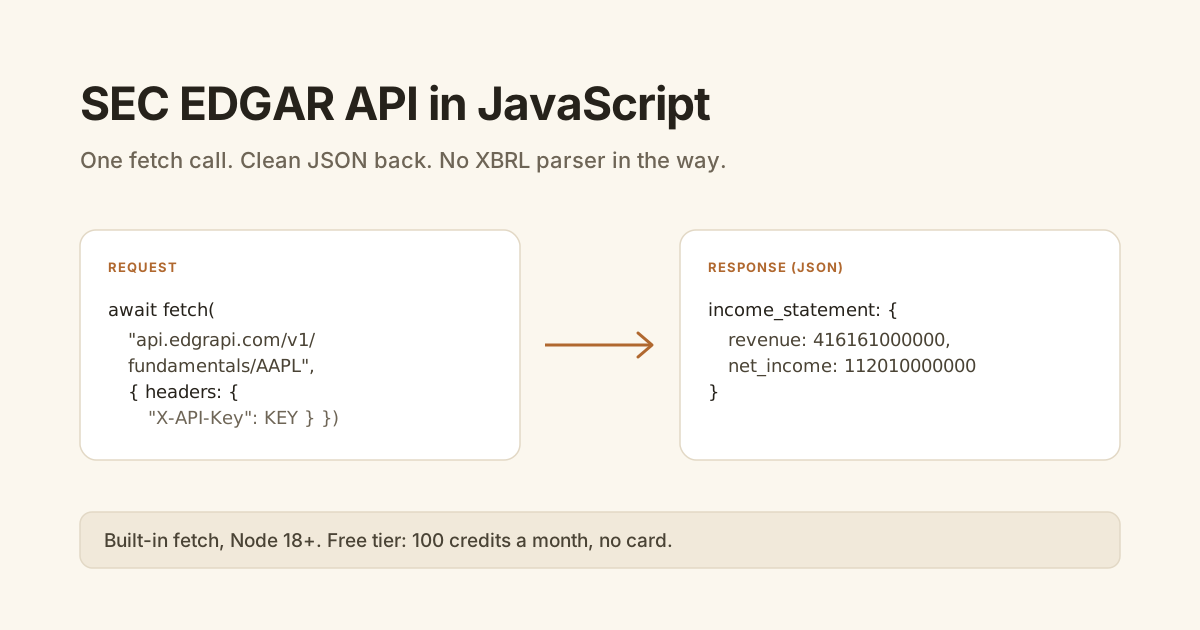
fetch (Node 18 and up, no library). The free SEC route (data.sec.gov) needs a descriptive User-Agent header, a zero-padded CIK, and your own XBRL parsing. For clean statement JSON, one call to api.edgrapi.com/v1/fundamentals/AAPL with an X-API-Key header returns income statement, balance sheet, and cash flow as flat fields. The free tier is 100 credits a month, no card.Can you call the SEC EDGAR API from JavaScript?
Yes, with nothing but fetch. The SEC serves company data as JSON at data.sec.gov, no key required, so a Node script pulls filings and financial facts for free. The catch is that "free" also means you handle the parts the SEC leaves raw: the ticker-to-CIK lookup, the User-Agent rule, and the XBRL structure underneath.
The easy part first. Resolving a ticker to its CIK is one file:
const HEADERS = { "User-Agent": "Your Name you@example.com" };

const tickers = await fetch(
  "https://www.sec.gov/files/company_tickers.json",
  { headers: HEADERS }
).then(r => r.json());

const cik = Object.values(tickers).find(t => t.ticker === "AAPL").cik_str;
console.log(cik); // 320193
That gets you a CIK. Turning it into clean financials is the part that grows.
Why does the raw SEC route get painful in Node?
Because the numbers come back as XBRL, and XBRL does not agree with itself across companies. The same line item is tagged differently by different filers and shifts across years, so revenue is Revenues on one company and RevenueFromContractWithCustomerExcludingAssessedTax on the next. You end up maintaining a map of tag aliases per field, plus dedupe logic for restated periods.
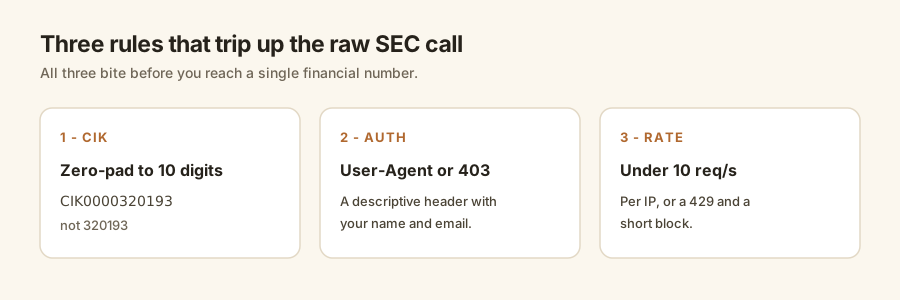
Two of those traps bite before you reach the tags. The CIK has to be zero-padded to 10 digits in the data URLs (CIK0000320193, not 320193). And per the SEC's fair-access rules, a request without a descriptive User-Agent gets a 403 and a short IP block, and going over 10 requests a second per IP gets you a 429.
None of it is hard alone. It is five small chores stacked on what you thought was one HTTP call.
How do you get clean financials in JavaScript in one call?
You point fetch at a hosted endpoint that already did the CIK lookup, the User-Agent handling, and the tag normalization. With Edgrapi that is one GET to /v1/fundamentals/{ticker} with your key in the X-API-Key header, and the statements come back as flat named fields.
const KEY = "edgr_your_key";

const data = await fetch(
  "https://api.edgrapi.com/v1/fundamentals/AAPL?period=annual&limit=1",
  { headers: { "X-API-Key": KEY } }
).then(r => r.json());

console.log(data.income_statement[0].revenue);    // 416161000000
console.log(data.income_statement[0].net_income); // 112010000000
No CIK, no User-Agent dance, no tag map. You send a ticker and read named fields.
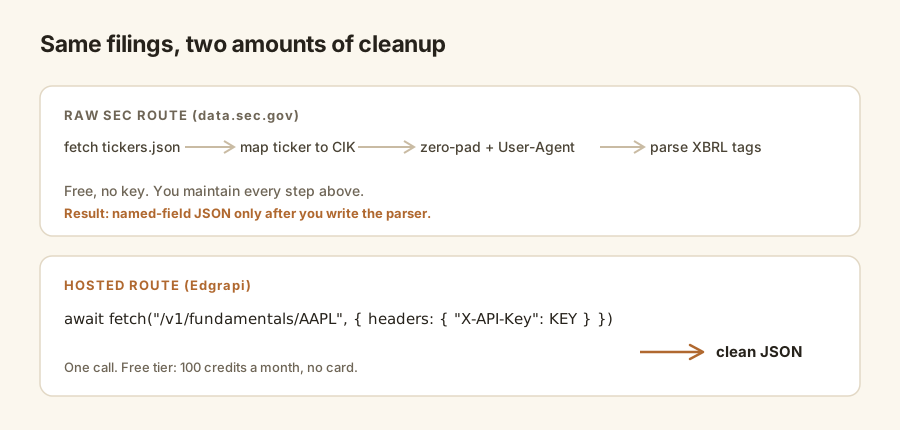
Fair to the free route: for one or two companies in a script you run once, the raw companyfacts JSON is fine, and we walk through it in the why-it's-harder-than-it-looks piece. The hosted call earns its keep once you are doing this across many tickers on a schedule.
| Step | Raw SEC route (data.sec.gov) | Hosted route (Edgrapi) |
|---|---|---|
| Ticker to CIK | You fetch and map company_tickers.json | Pass the ticker directly |
| Auth | Descriptive User-Agent or 403 | X-API-Key header |
| Rate limits | You throttle under 10 req/s per IP | Handled server-side |
| Statements | You parse XBRL tag aliases yourself | Flat named fields |
| Cost | Free, no key | Free tier: 100 credits/month, no card |
Do you need node-fetch or axios, or is built-in fetch enough?
Built-in fetch is enough. Node ships a global fetch powered by undici since v18 in 2022, and it was promoted to stable in Node 21, so it is fully supported in the Node 22 and 24 LTS lines. You do not install node-fetch or axios for a few GET requests. The same code runs unchanged in the browser and in Deno and Bun.
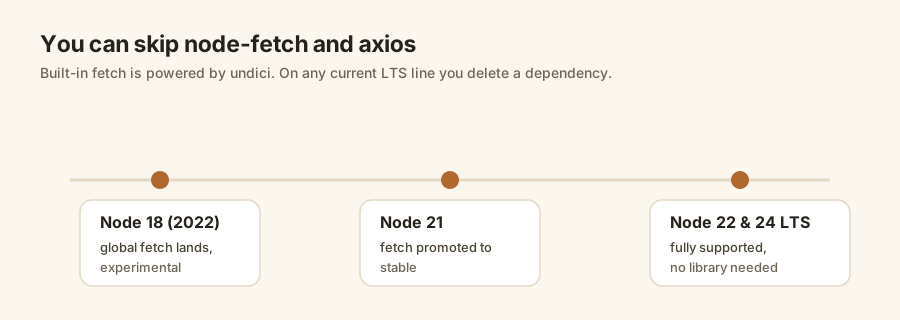
If you are on Node 16 or older, upgrade or add node-fetch. Everyone else can delete a dependency.
The one habit worth keeping is a small wrapper that throws on a bad status, since fetch resolves even on a 404:
async function get(url, key) {
  const r = await fetch(url, { headers: { "X-API-Key": key } });
  if (!r.ok) throw new Error(`${r.status} ${r.statusText}`);
  return r.json();
}
How do you pull ratios, filings, and 10-K text?
Same key, same fetch, a different path. The API has five endpoints and they all follow one pattern, so once you have called fundamentals you have effectively called all of them. Ratios come pre-computed, filings arrive with a link to each document, and sections return 10-K narrative text.
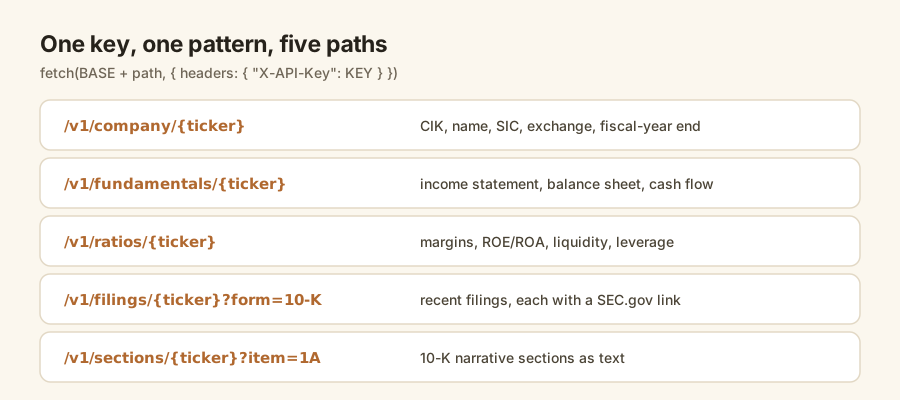
const BASE = "https://api.edgrapi.com/v1";

const ratios  = await get(`${BASE}/ratios/AAPL`, KEY);
const filings = await get(`${BASE}/filings/AAPL?form=10-K`, KEY);
const risk    = await get(`${BASE}/sections/AAPL?form=10-K&item=1A`, KEY);

console.log(ratios.ratios.net_margin, ratios.ratios.return_on_equity);
console.log(filings.filings[0].url);   // link to the latest 10-K
console.log(risk.text.slice(0, 200));  // Risk Factors, as text
Ratios get their own ratios guide, and the 10-K text is in the sections guide. In JavaScript, they are all the same two lines.
How do you use it in the browser or a TypeScript app?
Call it from your server, not the browser. Your API key is a secret, and anything in front-end JavaScript is readable by anyone who opens the network tab. Put the key in a small server route or serverless function, fetch Edgrapi from there, and hand the clean JSON to your front end. In TypeScript, type the response you actually use rather than the whole payload.
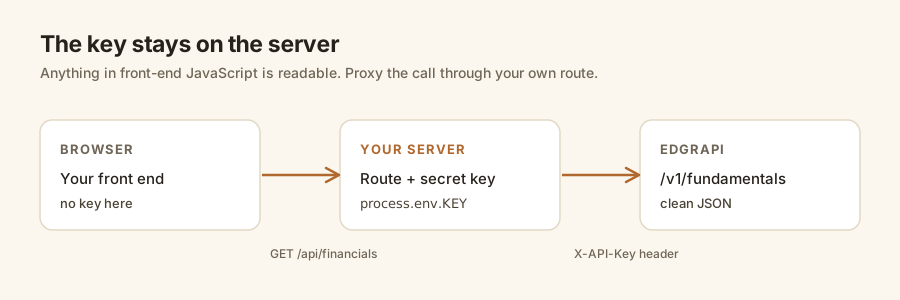
type Fundamentals = {
  income_statement: { revenue: number; net_income: number }[];
};

// server route, e.g. /api/financials?ticker=AAPL
export async function handler(ticker: string): Promise<Fundamentals> {
  const r = await fetch(
    `https://api.edgrapi.com/v1/fundamentals/${ticker}?limit=1`,
    { headers: { "X-API-Key": process.env.EDGRAPI_KEY! } }
  );
  return r.json();
}
That keeps the key server-side and gives your components a typed shape to render.
Start with one ticker in Node
Grab a free key, run the fundamentals call above on a company you follow, and log the revenue. If a number comes back, you are done. That is the whole integration.
The free tier is 100 credits a month, no card, which covers a watchlist's worth of calls. Point fetch at https://api.edgrapi.com and pull your first statement. The endpoints are in the docs, and the complete SEC EDGAR API guide covers the rest of the filing types.
Frequently asked questions
How do I use the SEC EDGAR API in JavaScript?
Call it with the built-in fetch. Node ships a global fetch since v18, so no library is needed. The SEC's data.sec.gov is free but wants a descriptive User-Agent, a zero-padded CIK, and your own XBRL parsing. For clean statement JSON, one fetch to api.edgrapi.com/v1/fundamentals/AAPL with an X-API-Key header returns income statement, balance sheet, and cash flow.
Do I need node-fetch or axios to call an API in Node?
No. Node has had a global fetch, built on undici, since version 18 in 2022, and it became stable in Node 21 and is supported in the 22 and 24 LTS lines. For a few GET requests you can delete node-fetch and axios. On Node 16 or older, upgrade or keep node-fetch as a fallback.
Why do I get a 403 from the SEC EDGAR API in JavaScript?
Because you did not send a descriptive User-Agent header. Since 2021 the SEC's fair-access rules require a User-Agent that names you with a contact email, and reject requests without it with a 403 and a short IP block. Set the header to something like 'Name you@email.com', and keep your calls under 10 requests a second per IP.
How do I get company financials in JavaScript without parsing XBRL?
Use a hosted API that normalizes the XBRL server-side. The raw SEC route returns XBRL where the same line item is tagged differently per filer, so you write per-company tag maps. A single fetch to Edgrapi's fundamentals endpoint returns the statements as flat named fields you read directly, with no tag mapping in your code.
Can I call the SEC EDGAR API from the browser?
You can, but do not put your API key in front-end JavaScript, where anyone can read it in the network tab. Call the API from a small server route or serverless function that holds the key, then hand the clean JSON to your front end. The same fetch code runs on the server unchanged; only the key location changes.
Is there a free SEC EDGAR API for JavaScript?
The SEC's data.sec.gov endpoints are free with no key. Edgrapi's free tier is 100 credits a month, no card, which wraps that data as clean JSON so you skip the CIK lookup, the User-Agent handling, and the XBRL parsing. Use the raw SEC route for one-off scripts and the hosted one when the parsing starts costing you time.