SEC EDGAR Search Tools Compared: What Each One Finds (2026)
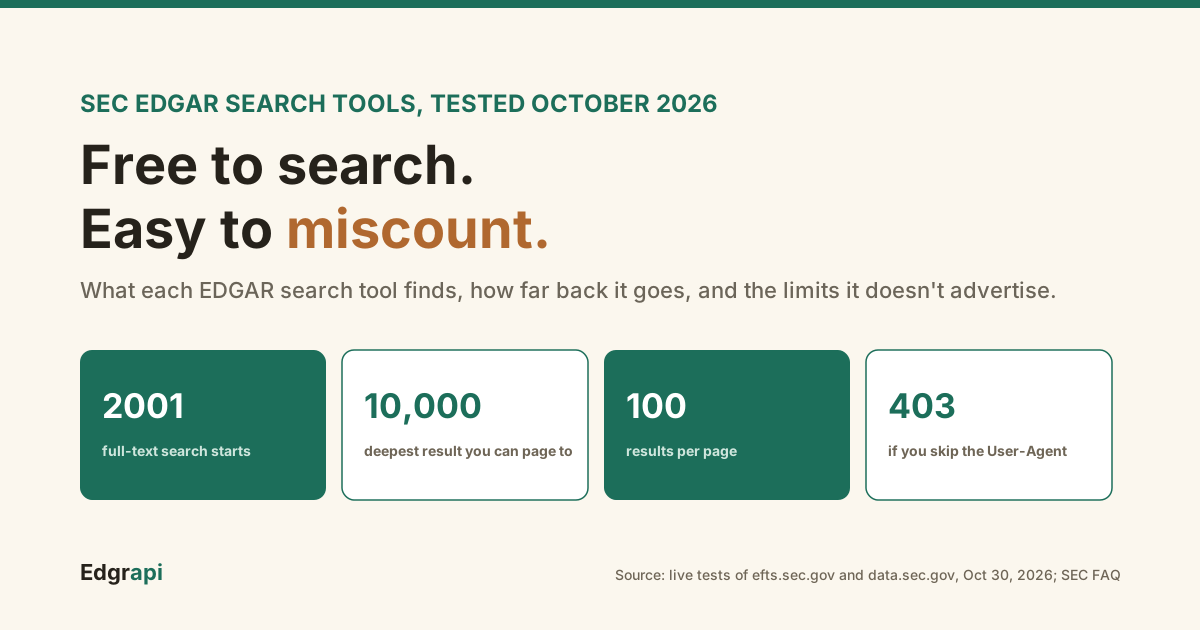
I asked Perplexity how far back EDGAR full-text search goes. It said the last four years.
That's wrong, and the mistake comes from an old SEC page. I tested it: full-text search reaches back to January 2001.
SEC EDGAR search tools come in three kinds: the SEC's own free search pages, its free data APIs, and paid tools built on top of both. Each one finds something different, and each has a limit it doesn't advertise. I tested all of them on October 30, 2026. Here's what each one finds and where it stops.
What are the SEC EDGAR search tools?
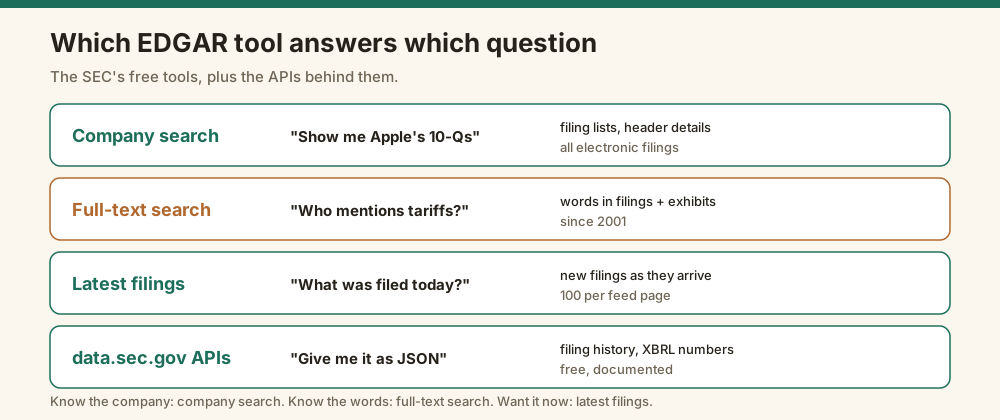
The SEC runs five free search tools on EDGAR: company search, full-text search, latest filings, mutual fund search and insurance product search. It also offers free data APIs and RSS feeds. Company search finds a filer and lists its filings. Full-text search reads inside the documents. Latest filings shows new filings as they arrive. Paid tools sit on top and add convenience.
I lined up the main options side by side:
| Tool | What it searches | How far back | Cost | API |
|---|---|---|---|---|
| EDGAR company search | One filer's filing list | All electronic filings | Free | Yes, via data.sec.gov |
| EDGAR full-text search | Words inside filings and exhibits | 2001 | Free | Undocumented JSON |
| EDGAR latest filings | New filings as they arrive | Today | Free | Atom feed |
| data.sec.gov APIs | Filing history and XBRL numbers | Varies by filer | Free | Yes |
| sec-api.io | Filings, full text and more | 1993, per its site | $199/mo for full text | Yes |
| Edgrapi | Full text plus filings and data | 2001 for full text | 1 credit a search | Yes, plus MCP |
The free tools cover most needs. The real choice is how much plumbing you want to write yourself.
How far back does EDGAR full-text search go?
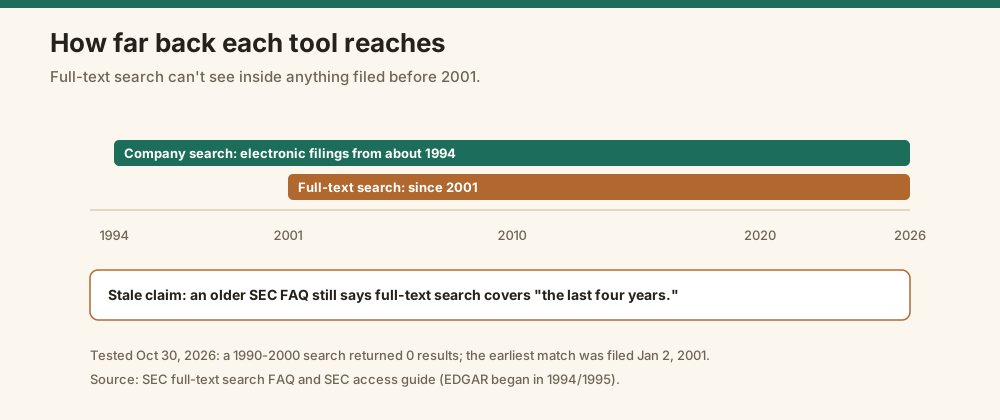
EDGAR full-text search goes back to 2001. The SEC's current FAQ says it covers "all EDGAR filings submitted electronically since 2001." I checked: a search limited to 1990 through 2000 returned zero results, and the earliest match I found was filed January 2, 2001. Filings from 1994 to 2000 are on EDGAR, but full-text search can't see inside them.
So why did Perplexity say four years? An older SEC FAQ page is still online.
It describes the original tool, which covered filings "in the last four years." It still turns up in search results, and AI answers repeat it.
That gap bites if you research anything older. EDGAR's electronic filings start around 1994, according to the SEC's own access guide.
For anything filed before 2001, use company search instead. Find the filer, then open its filings one by one.
What can EDGAR full-text search actually do?
EDGAR full-text search finds exact words and phrases inside filings and their exhibits. It treats every term as required, uses quotes for phrases, and supports OR, exclusion with a minus sign, and a trailing asterisk wildcard. You can filter by form type, date range and company. It can't understand plain-English questions, which the SEC FAQ says plainly is "not currently supported."
The syntax is short enough to memorize:
"going concern"matches the exact phrasetariff "supply chain"needs both terms, since AND is implied. In 2025 10-K filings it matched 1,387 documentssoftware -hardwareexcludes a wordgas*matches gas, gasoline and gases, but only at the end of a word
The FAQ also lists a NEAR operator for words close together. Through the JSON endpoint behind the search page, my NEAR test returned zero results, so don't count on it in code.
Exhibits are the hidden strength. A merger agreement or an executive contract is often filed as an exhibit, not in the main document, and full-text search reads those too.
The results aren't sorted by date. Set a date range if you want recent filings first.
Why do EDGAR search counts mislead?
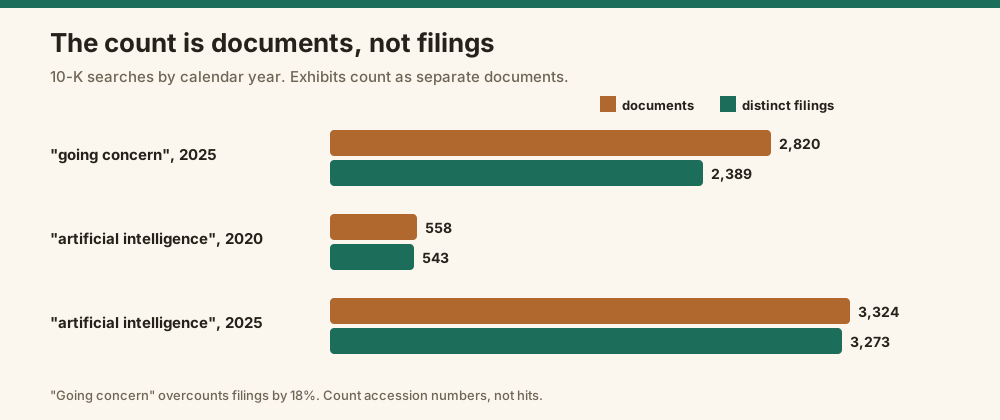
EDGAR full-text search counts matching documents, not filings, and it stops counting at 10,000. A 10-K and its exhibits are separate documents, so one filing can match several times. In 2025, "going concern" matched 2,820 documents in 10-K filings but only 2,389 distinct filings. Broad searches just say "10,000 or more," with no exact number.
I counted both ways for a few searches:
| Search in 10-K filings | Matching documents | Distinct filings |
|---|---|---|
| "going concern," 2025 | 2,820 | 2,389 |
| "artificial intelligence," 2020 | 558 | 543 |
| "artificial intelligence," 2025 | 3,324 | 3,273 |
That "going concern" gap is 431 extra documents, about 18% more than the real filing count. Quote the document number and your trend is wrong.
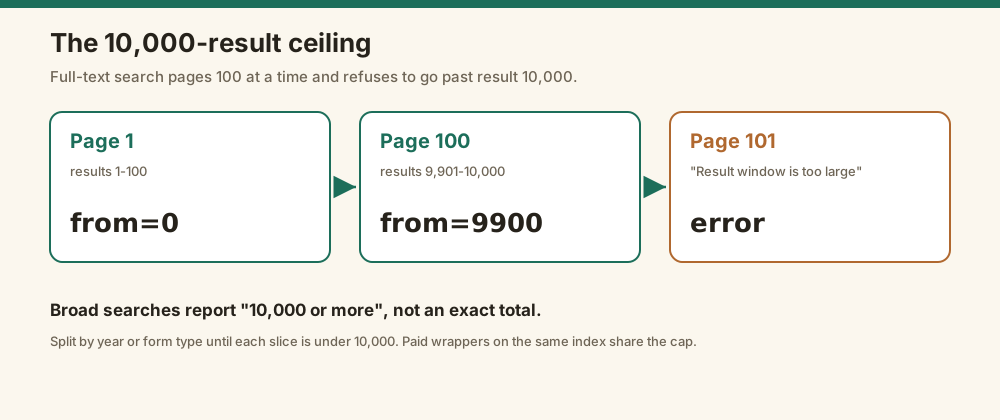
The second trap is the ceiling. Results come 100 at a time, and the SEC's server refuses to page past result 10,000. Ask for more and it returns an error: "Result window is too large."
So for a broad term, you can't see every match. Split the search by year or form type until each slice is under 10,000.
The trends themselves are real once you count filings. 10-K filings mentioning "artificial intelligence" went from 543 in 2020 to 3,273 in 2025, about six times as many.
When should you use company search or latest filings instead?
Use EDGAR company search when you know the company and want its filing list, and use latest filings when you want what was filed today. Company search looks up a filer by name, ticker or CIK and lists every filing, including ones from before 2001. Latest filings shows new submissions as they arrive, which makes it the fastest way to catch an 8-K or Form 4 the day it posts.
Company search doesn't read document text. It searches header details like the company name, form type and date.
That makes it the right tool for "show me Apple's 10-Q filings" and the wrong one for "which companies mention tariffs."
Search by CIK when you can. Tickers change when companies rename or merge, but the SEC's CIK number never does, so a CIK search still works years later.
Latest filings has its own quirks. Its Atom feed returns at most 100 entries per page, even when you ask for 200, and its form filter matches by prefix.
I covered those in detail in my guide to the SEC EDGAR RSS feed, including how to avoid missing filings on a busy day.
The rule I use:
- Know the company: company search
- Know the words: full-text search
- Want it as soon as it's filed: latest filings
Is there an API for EDGAR full-text search?
The SEC doesn't publish a documented API for full-text search. Its search page runs on a JSON endpoint at efts.sec.gov that you can call directly, but it isn't listed among the SEC's official APIs. The documented ones at data.sec.gov cover filing history and XBRL financial data, not document text. Both are free, and both return a 403 error if you don't send a User-Agent header.
I tested the User-Agent rule on both. No header, no data. Every time.
The SEC's access guide asks you to declare one, like "Sample Company Name AdminContact@sample.com," and to stay under 10 requests per second.
This Python script searches the full-text endpoint directly. It pages through results and counts distinct filings, so you avoid the document-count trap:
import requests

URL = "https://efts.sec.gov/LATEST/search-index"
HEADERS = {"User-Agent": "Your Name your.email@example.com"}   # SEC returns 403 without one

def count_filings(query, form, start, end):
    """Page through EDGAR full-text search; return (documents, distinct filings)."""
    docs, filings, offset = 0, set(), 0
    while offset < 10_000:                      # SEC refuses to page past result 10,000
        params = {"q": query, "forms": form, "dateRange": "custom",
                  "startdt": start, "enddt": end, "from": offset}
        hits = requests.get(URL, params=params, headers=HEADERS, timeout=60).json()["hits"]["hits"]
        if not hits:
            break
        docs += len(hits)
        filings.update(h["_source"]["adsh"] for h in hits)   # accession number = one filing
        offset += 100                                         # 100 results per page
    return docs, len(filings)

print(count_filings('"artificial intelligence"', "10-K", "2025-01-01", "2025-12-31"))
It printed (3324, 3273) when I ran it.
Because the endpoint is undocumented, it can change without notice. That's the main reason people pay for a wrapper. I went deeper on the request format, filters and paging in the EDGAR full-text search API guide.
The data.sec.gov APIs are steadier. The submissions API returns a company's 1,000 most recent filings, with older ones split into extra files. The XBRL frames API returned 2,509 companies' revenue for 2024 in one call.
Which paid SEC search tools are worth it?
Paid SEC search tools are worth it when you'd otherwise build the same thing yourself. Reading tools like BamSEC and AlphaSense add filing comparisons, alerts and research features for analysts. Developer APIs like sec-api.io and Edgrapi wrap the same SEC data in documented endpoints. For occasional searches, the free SEC tools are enough.
Check what each plan includes. On sec-api.io's pricing page, the $49-a-month Personal plan lists full-text search as "Not included." It starts on the $199-a-month Business plan.
Its page also says its search APIs return a maximum of 10,000 records per query, the same ceiling the SEC's own search has.
Edgrapi's /v1/search/fulltext searches the same index for 1 credit a call:
import requests

r = requests.get("https://api.edgrapi.com/v1/search/fulltext",
                 headers={"X-API-Key": "YOUR_KEY"},
                 params={"q": '"artificial intelligence"', "forms": "10-K",
                         "startdt": "2025-01-01", "enddt": "2025-12-31", "limit": 3}, timeout=60)
data = r.json()
print(data["total"], "matching documents")
for hit in data["hits"]:
    print(hit["filed"], hit["company"], hit["url"])
It returned 3,324 matching documents, the same count the SEC gave. Each hit comes with a direct link to the document.
One of the three hits was an exhibit, a list of subsidiaries, not the 10-K itself. Same trap as before.
It has the same 10,000-result ceiling, since it reads the same index. What it adds is a documented, stable endpoint and the rest of the filing data on one key. An AI agent can also call it as a tool through the Edgrapi MCP server.
For a wider look at the paid APIs, see my comparison of sec-api.io alternatives.
How do you pick an EDGAR search tool?
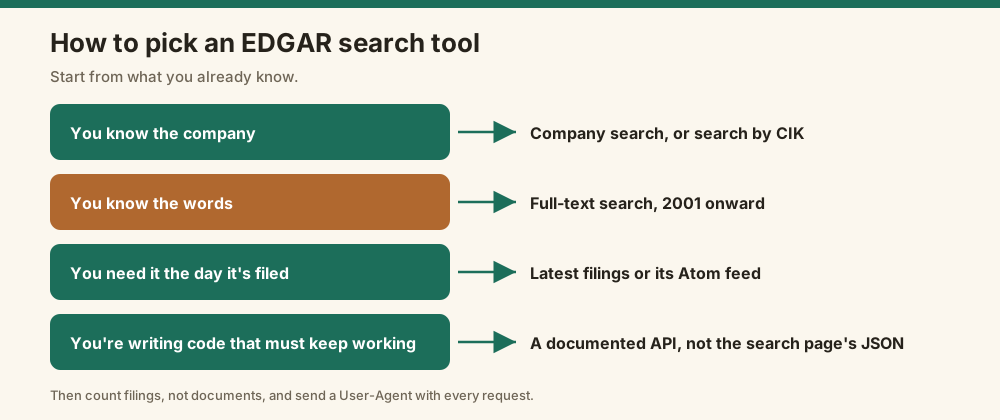
Pick an EDGAR search tool by what you already know. If you know the company, use company search. If you know the words, use full-text search for anything since 2001. If you need new filings fast, use latest filings or a feed. If you're writing code that has to keep working, use a documented API instead of the search page's JSON.
A few habits make any of them more accurate:
- Count filings, not documents, before you quote a number
- Set a date range, because results aren't sorted by date
- Split broad searches by year to stay under the 10,000 cap
- Send a User-Agent with every request, or the SEC blocks you
- Use company search for anything filed before 2001
Most bad EDGAR numbers I've seen came from skipping one of those. Rarely from the tool.
Search the text, then count the filings
Start with the free SEC full-text search for words and company search for filing lists. When you put a number in a report, count distinct filings and say what date range you searched. If you need the same search inside your own code or an AI agent, get a free Edgrapi key and call /v1/search/fulltext.
Frequently asked questions
What's the best way to search SEC EDGAR filings?
Use EDGAR full-text search to find words and phrases inside filings since 2001, and EDGAR company search to list one company's filings. Both are free on sec.gov. For new filings, use the latest filings page or its feed. For code, use the data.sec.gov APIs or a documented wrapper, since the full-text endpoint isn't an official API.
How far back does EDGAR full-text search go?
EDGAR full-text search covers filings submitted electronically since 2001, according to the SEC's current FAQ. In my tests, nothing filed before January 2, 2001 came back. An older SEC page still says "the last four years," which is out of date. For filings from the 1990s, use company search and open each filing.
Is there an API for EDGAR full-text search?
Not an official one. The SEC's search page uses a JSON endpoint at efts.sec.gov that returns 100 results per page and stops at 10,000, but the SEC doesn't document it as an API. Its documented data.sec.gov APIs cover filing history and XBRL data. Paid APIs such as sec-api.io and Edgrapi wrap full-text search in documented endpoints.
Is EDGAR full-text search free?
Yes. EDGAR full-text search is free on sec.gov, with no account or key. The SEC asks automated users to send a User-Agent header and stay under 10 requests per second, and requests without a User-Agent get a 403 error. Paid tools charge for convenience, alerts or a stable API, not for the filings themselves.
Why doesn't EDGAR full-text search find older filings?
EDGAR full-text search only indexes filings from 2001 onward, so earlier filings never appear, whatever date range you set. EDGAR itself holds electronic filings back to the mid-1990s. To find those, search the company in EDGAR company search and open its filing list. Paper filings from before EDGAR may need a FOIA request, the SEC says.
What's the difference between EDGAR company search and full-text search?
EDGAR company search finds a filer by name, ticker or CIK and lists its filings by form and date. It searches header details only. Full-text search reads the words inside filings and exhibits across every company since 2001. Use company search when you know the company and full-text search when you know the words.