SEC EDGAR 403 Forbidden? Fix 'Undeclared Automated Tool' (2026)
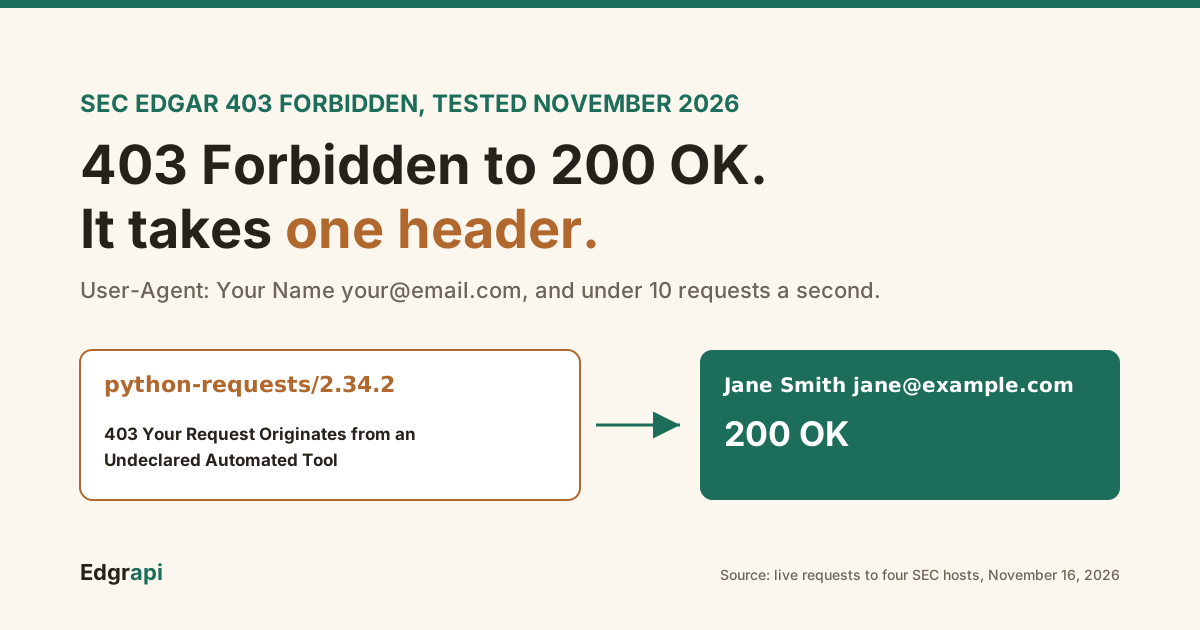
Your script worked in the browser. Then Python got a 403 and a page titled "Your Request Originates from an Undeclared Automated Tool."
The fix is one header. SEC EDGAR returns 403 Forbidden when a request has no User-Agent, or a default one from a library like requests, curl or urllib. Add a User-Agent with your name or company and a contact email, such as "Jane Smith jane@example.com", and stay under 10 requests a second. In my tests on November 16, 2026, that header turned every 403 into a 200.
What does "Your Request Originates from an Undeclared Automated Tool" mean?
It means the SEC's firewall decided your request came from a script that didn't identify itself, and blocked it with HTTP 403. The SEC lets anyone download EDGAR data for free, but it asks every automated tool to declare who runs it in the User-Agent header. Requests that send no User-Agent, or a library default, get this page instead of the data.
The page itself says the SEC reserves the right to limit requests from undeclared automated tools. It also says your traffic "will be managed until action is taken to declare your traffic."
That last part is the useful bit. The block isn't a ban on you. It's a block on how your requests look, and it lifts once they look right.
Nothing is wrong with your URL, your IP or the data you asked for. Change the header and the same request goes through.
What User-Agent does the SEC accept?
The SEC accepts a User-Agent that names you or your company and includes a contact email. Its own example is "Sample Company Name AdminContact@<sample company domain>.com". In my tests, a name with an email passed on all four SEC hosts I tried, while a name alone, a browser string or a library default got 403 on www.sec.gov. The email is what made the difference.
The SEC publishes that format on its Accessing EDGAR Data page, next to the rate limit.
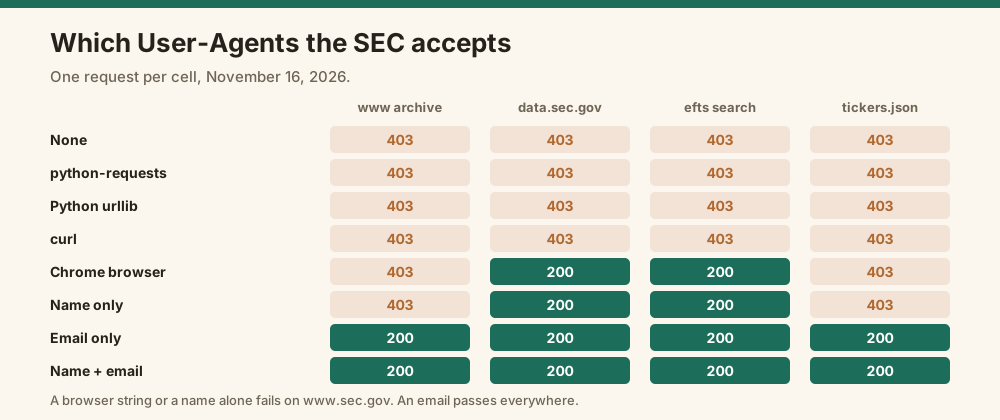
I wanted to know exactly what passes, so I sent one request per User-Agent to four SEC endpoints on November 16, 2026, pausing between each. Here's what came back:
| User-Agent sent | www.sec.gov archive | data.sec.gov API | efts.sec.gov search | company_tickers.json |
|---|---|---|---|---|
| None | 403 | 403 | 403 | 403 |
| python-requests default | 403 | 403 | 403 | 403 |
| Python urllib default | 403 | 403 | 403 | 403 |
| curl default | 403 | 403 | 403 | 403 |
| Chrome browser string | 403 | 200 | 200 | 403 |
| Name only | 403 | 200 | 200 | 403 |
| Email only | 200 | 200 | 200 | 200 |
| Name + email | 200 | 200 | 200 | 200 |
Two things jumped out. First, faking a browser doesn't work. A Chrome User-Agent passed on data.sec.gov but still got 403 on the filing archive.
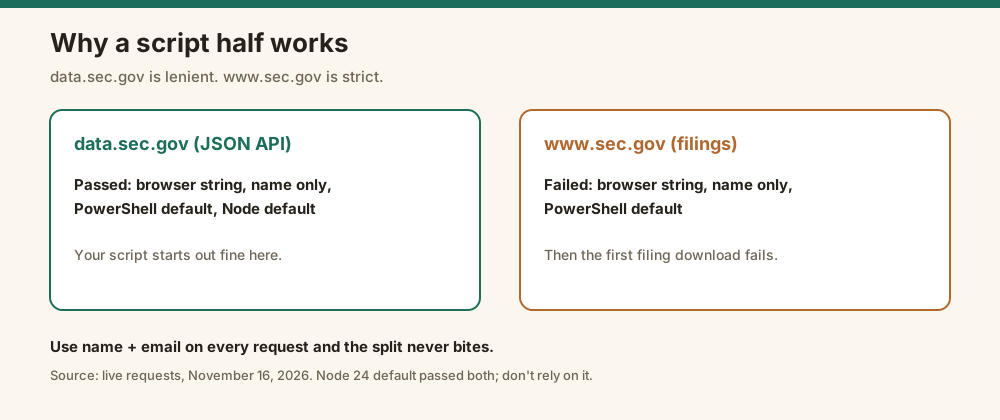
Second, data.sec.gov is more forgiving than www.sec.gov. A script can work against the JSON API and then fail the moment it downloads an actual filing. Use the full name-plus-email format everywhere and you never hit that split.
I retested the name-only and browser cases a few minutes later, on their own. They failed the same way.
How do you fix the 403 in Python?
In Python, pass a headers dictionary with your User-Agent on every request, or set it once on a requests Session. The requests library's default User-Agent, "python-requests/<version>", was blocked on every SEC host in my test. With "Your Name your@email.com" added, the same call to the submissions API returned 200 and Apple's filing history.
Here's the minimal fix with requests:
import requests

HEADERS = {"User-Agent": "Jane Smith jane@example.com"}

r = requests.get("https://data.sec.gov/submissions/CIK0000320193.json", headers=HEADERS)
print(r.status_code)          # 200
print(r.json()["name"])       # Apple Inc.
If you make many calls, set the header once on a Session so you can't forget it:
session = requests.Session()
session.headers.update({"User-Agent": "Jane Smith jane@example.com"})

tickers = session.get("https://www.sec.gov/files/company_tickers.json").json()
print(len(tickers))           # 10404 on Nov 16, 2026
With urllib, put the header on the Request object. A bare urlopen(url) sends "Python-urllib/3.x" and gets blocked:
import urllib.request

req = urllib.request.Request(url, headers={"User-Agent": "Jane Smith jane@example.com"})
data = urllib.request.urlopen(req).read()
The popular EDGAR libraries ask for your identity up front, for exactly this reason:
- sec-edgar-downloader:
Downloader("MyCompanyName", "my.email@domain.com"), per its PyPI page - edgartools:
set_identity("your.name@example.com"), or theEDGAR_IDENTITYenvironment variable, per its GitHub README
If either library gives you a 403, check that you actually set the identity. A placeholder email from a tutorial is a common culprit.
It also pays to fail loudly. A script that retries a 403 in a loop just digs the hole deeper, so check for the SEC's block page and stop:
r = session.get(url)
if r.status_code == 403 and "Undeclared Automated Tool" in r.text:
    raise RuntimeError("SEC blocked this request: set a User-Agent with your name and email")
if r.status_code == 403 and "Request Rate Threshold Exceeded" in r.text:
    raise RuntimeError("SEC 403: check your User-Agent, then slow below 10 requests/second")
r.raise_for_status()
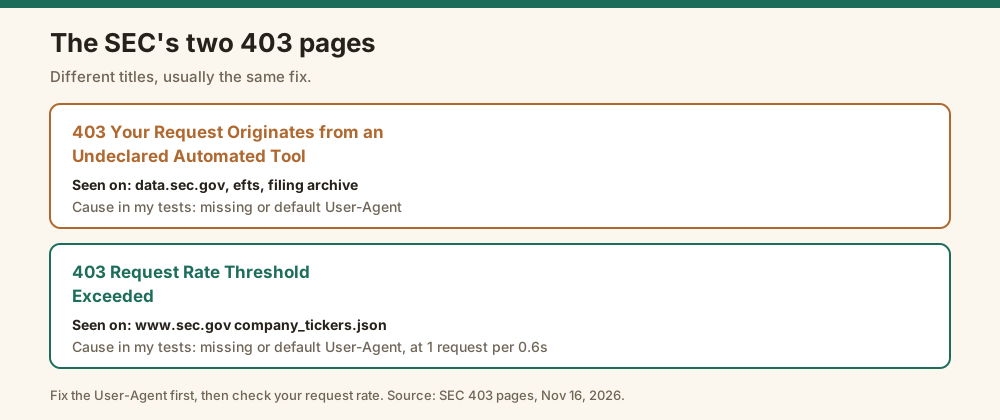
Both strings are the titles of the SEC's two 403 pages as they appeared in my tests, so the check tells you which problem you hit instead of a bare "403 Forbidden."
My SEC EDGAR API Python guide walks through a full script with the header in place.
How do you fix it in curl and Node?
In curl, add -A "Your Name your@email.com" or -H "User-Agent: Your Name your@email.com" to the command. curl's default User-Agent, "curl/<version>", got 403 on every SEC host in my test. In Node, pass the header in the fetch options. Every language works the same way: set a User-Agent with a name and email before the request goes out.
The curl fix:
curl -A "Jane Smith jane@example.com" \
  "https://data.sec.gov/submissions/CIK0000320193.json"
And in Node:
const r = await fetch("https://data.sec.gov/submissions/CIK0000320193.json", {
  headers: { "User-Agent": "Jane Smith jane@example.com" },
});
console.log(r.status, (await r.json()).name);   // 200 Apple Inc.
One oddity from my tests: Node 24's built-in fetch passed even with its default User-Agent. I wouldn't rely on that. It's not what the SEC's policy asks for, and the next filter change could block it.
The same applies to Go, Java, Ruby and anything else. Every HTTP client sends some default, and none of those defaults name you.
How do you set the User-Agent in PowerShell?
In PowerShell, pass -UserAgent "Your Name your@email.com" to Invoke-RestMethod or Invoke-WebRequest. In my test on Windows PowerShell 5.1, the default User-Agent passed on data.sec.gov but got 403 on www.sec.gov, the same split as a browser string. With the -UserAgent parameter set, the submissions call returned Apple's filing history.
The working call:
$r = Invoke-RestMethod -Uri "https://data.sec.gov/submissions/CIK0000320193.json" `
  -UserAgent "Jane Smith jane@example.com"
$r.name    # Apple Inc.
That split is why PowerShell scripts often look fine at first. The JSON API answers, and then the first filing download from www.sec.gov fails.
Set the parameter on every call, including the downloads.
How do you check which headers your script really sends?
Send the same request to an echo service like httpbin.org/headers, which returns the headers it received. If the User-Agent it shows is a library default, your header never made it onto the request. In my test, a bare requests call showed "python-requests/2.34.2", and the same call through a configured Session showed the name and email.
Here's the check in Python:
r = session.get("https://httpbin.org/headers")
print(r.json()["headers"]["User-Agent"])
You can also inspect the request object after any call. In requests, r.request.headers shows exactly what went out.
The usual bugs show up fast this way. A header dictionary built but never passed. A Session configured in one function and a plain requests.get used in another. A wrapper library that overwrites your headers.
Header-name case isn't one of them. In requests, "User-agent" and "User-Agent" both worked against data.sec.gov in my test.
curl -H "X-API-Key: edgr_your_key" "https://api.edgrapi.com/v1/filings/AAPL"What does "Request Rate Threshold Exceeded" mean?
"Request Rate Threshold Exceeded" is the SEC's other 403 page, and despite the name it doesn't always mean you went too fast. In my tests, www.sec.gov's company_tickers.json returned it to requests with no User-Agent or a library default, even at one request every 0.6 seconds. If you see it, fix your User-Agent first, then check your request rate.
That surprised me, so I checked it twice. Same result, with the same well-paced requests.
The page text is short. It says automated access must comply with the SEC's privacy and security policy, points you to sec.gov/developer, and gives a reference ID.
So treat the two error pages as one problem with two labels. Both mean the SEC doesn't like how your traffic looks. A missing User-Agent is the most common cause, and too many requests per second is the second.
What is the SEC EDGAR rate limit?
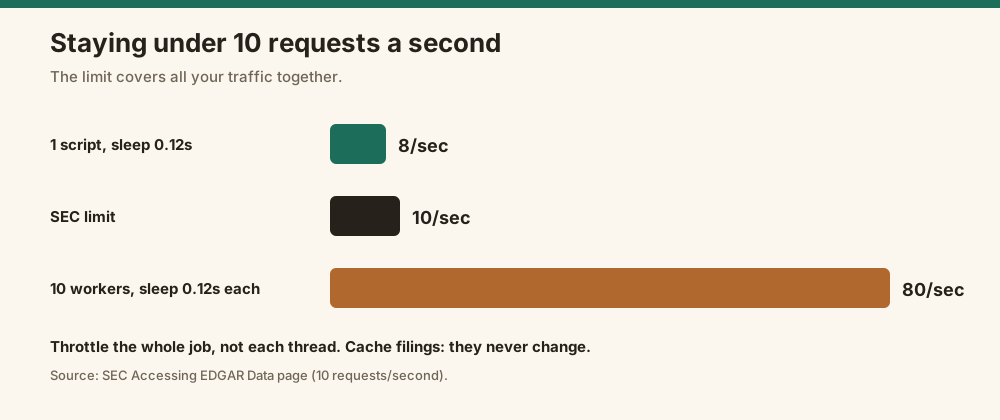
The SEC EDGAR rate limit is 10 requests per second, per the SEC's fair access guidance. That limit covers all your traffic together, so ten scripts on one network share it. The SEC also says it reserves the right to limit request rates for fair access, and asks you to download only what you need. There's no API key and no published daily cap.
The simplest way to stay under it is a short pause between requests:
import time

for url in urls:
    r = session.get(url)
    # ... handle r ...
    time.sleep(0.12)   # about 8 requests per second, with headroom
Ten parallel workers each sleeping 0.12 seconds is about 80 requests a second, which is way over. Throttle across the whole job, not per thread.
Caching helps more than throttling. Filings never change after they're accepted, so save each document once and read it from disk after that.
For bulk work, skip per-filing requests entirely. EDGAR publishes quarterly index files and nightly ZIP archives. My guide to downloading SEC filings in bulk covers both, with tested file sizes.
What should you do if you're already blocked?
If you're already getting 403s, stop sending requests, fix your User-Agent, and slow down before you retry. The SEC's 403 page says undeclared traffic is managed until you declare it, so retrying with the same headers won't help. The SEC doesn't publish how long a rate-limit block lasts. sec-api.io's pricing page says 10 minutes, but that's their claim, not the SEC's.
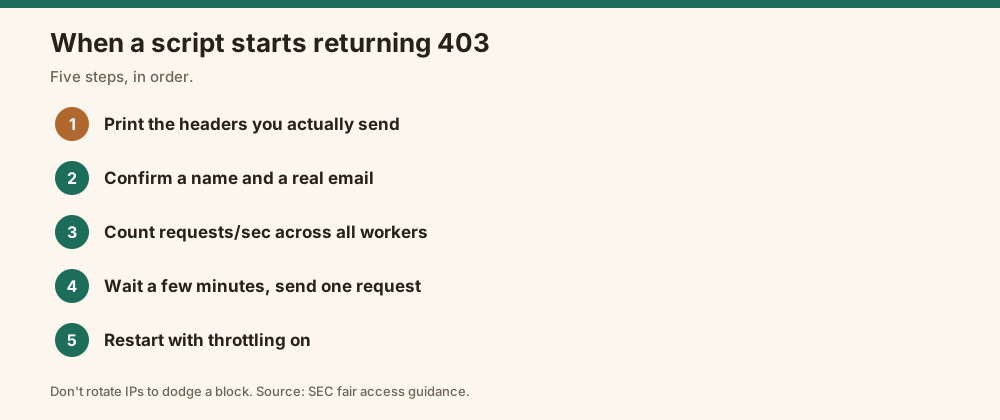
My checklist when a script starts returning 403:
- Print the exact headers your code sends. Many "I set it" bugs are a typo in the header name.
- Confirm the User-Agent has a name and a real email.
- Count your requests per second across every worker, not just one.
- Wait a few minutes, then send one request by hand.
- If that single request passes, restart the job with throttling on.
Don't rotate IPs or proxies to get around a block. The SEC's guidance says it doesn't allow botnets or automated tools outside its policy, and spreading undeclared traffic across addresses is exactly what that describes.
Why does EDGAR work in your browser but not in your script?
EDGAR works in your browser because the browser sends a full set of headers, and the SEC's filter judges more than one header. Your script sends a bare library default instead. Copying the browser's User-Agent into a script doesn't fix it: in my test, a Chrome User-Agent still got 403 on the www.sec.gov filing archive. Declaring a name and email did.
It's a common trap. Someone copies their browser's User-Agent, it works on data.sec.gov, and then the filing downloads fail.
The SEC isn't trying to stop scripts. Its policy asks to know who runs them, which is why the email matters.
Should you call EDGAR directly or use an API?
Call EDGAR directly if you're comfortable managing the User-Agent, the 10-per-second limit and your own caching. It's free and official. Use an API if you'd rather not run that plumbing. Edgrapi, which I run, calls EDGAR with a declared User-Agent and paces requests for you, so your code sends an API key instead.
With Edgrapi, the Apple filing history from the examples above is one call:
curl -H "X-API-Key: edgr_your_key" "https://api.edgrapi.com/v1/filings/AAPL"You never see a 403 from the SEC, because Edgrapi's servers make the SEC requests. The free tier gives you 50 credits, and a filings call costs 1.
To be fair about the tradeoff: the SEC's own data is free and complete. Edgrapi saves you code and returns cleaned JSON, but it's a paid product past the free credits.
Set the header once and move on
Put your User-Agent in one place, a Session or a config constant, use "Your Name your@email.com", and throttle the whole job to under 10 requests a second. Then rerun the request that failed. If it still returns 403, print the headers you're actually sending, because the fix almost always turns out to be there.
Frequently asked questions
Why am I getting 403 Forbidden from SEC EDGAR?
You're most likely sending no User-Agent or a library default like "python-requests" or "curl". The SEC blocks those with 403 and a page titled "Your Request Originates from an Undeclared Automated Tool." Add a User-Agent with your name and contact email, such as "Jane Smith jane@example.com." In my November 2026 tests, that fixed every 403 across four SEC hosts.
What User-Agent should I use for SEC EDGAR?
Use your name or company name plus a contact email, in the format the SEC publishes: "Sample Company Name AdminContact@sample.com." In my tests, any User-Agent containing an email passed on www.sec.gov, data.sec.gov and efts.sec.gov. A name alone or a copied browser string passed on data.sec.gov but got 403 on the www.sec.gov filing archive.
What is the SEC EDGAR rate limit?
The SEC allows up to 10 requests per second for automated access, across all of your traffic combined. There's no API key and no published daily cap, but the SEC reserves the right to limit request rates to keep access fair. A pause of about 0.12 seconds between requests keeps a single script safely under the limit.
How long does an SEC EDGAR block last?
The SEC doesn't publish a duration. Its 403 page says undeclared traffic is managed until you declare it, so fixing your User-Agent is the first step. sec-api.io, a commercial provider, says rate-limit blocks last 10 minutes. Stop sending requests, fix your headers, wait a few minutes, then test with a single request.
Can I use a browser User-Agent for SEC EDGAR?
It's not a reliable fix. In my November 2026 tests, a Chrome User-Agent passed on data.sec.gov and efts.sec.gov but got 403 on the www.sec.gov filing archive and company_tickers.json. The SEC asks automated tools to declare who runs them, so use your name and email instead of pretending to be a browser.
What does "Request Rate Threshold Exceeded" mean on SEC.gov?
It's an SEC 403 page that usually means your traffic broke its fair access rules. Despite the name, it isn't always about speed. In my tests, company_tickers.json returned it to requests with a missing or default User-Agent, even when they were spaced well apart. Fix your User-Agent first, then make sure you stay under 10 requests a second.