How to Download SEC Filings: One at a Time or in Bulk (2026)
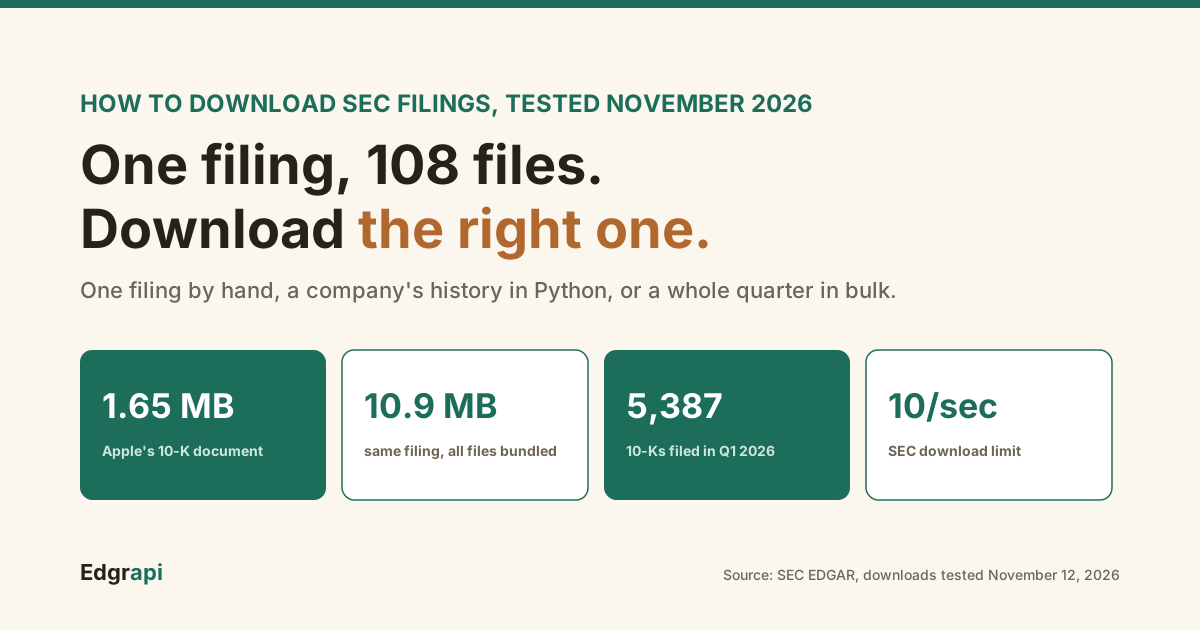
Apple's newest 10-K is a 1.65 MB web page. The same filing, downloaded as one complete file, is 10.9 MB.
Which one you want decides how you should download SEC filings. You can download any SEC filing free from EDGAR: open the filing's index page and save the document, or script it with the SEC's free submissions API and a User-Agent header. For bulk, EDGAR publishes quarterly index files and nightly ZIP archives. No account or API key is needed. Here's every route, tested in November 2026.
How do you download a single SEC filing?
To download a single SEC filing, search the company on EDGAR, open the filing you want, and click the document on its filing index page. The main document is usually an HTML file, and exhibits are listed beside it. It's free with no account. Apple's 10-K filed November 3, 2026, for example, has 108 files in its folder, from the main report to exhibits and XBRL data.
The steps:
- Open EDGAR company search on sec.gov and type a ticker or name
- Filter the filing type, such as 10-K
- Click the filing to open its index page
- Click the main document, then save it from your browser
The index page is the part people skip. It lists every document in the filing, including exhibits you can miss if you only open the main report.
Every filing has a permanent address built from the company's CIK and the accession number. Apple's latest 10-K lives at /Archives/edgar/data/320193/000032019326000026/.
Learn that pattern once and you can build any filing's URL in code. My EDGAR explainer breaks down how accession numbers work.
What files are in an SEC filing?
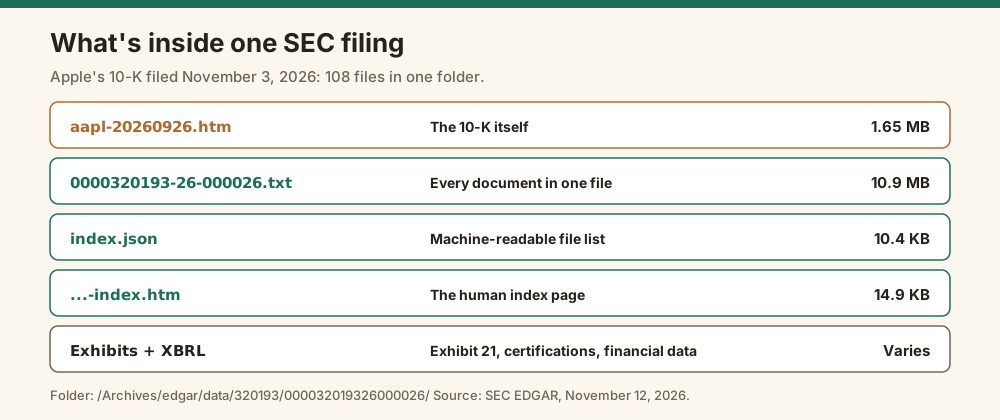
An SEC filing is a folder of files, not one document. It holds the main document, usually HTML, plus exhibits, XBRL financial data, an index page and one complete submission text file that bundles everything. Apple's November 2026 10-K folder held 108 files. Its main document was 1.65 MB, while the complete submission file was 10.9 MB because it packs every exhibit inside.
Here's what I downloaded from that one filing on November 12, 2026:
| File | What it is | Size |
|---|---|---|
aapl-20260926.htm | The 10-K itself | 1.65 MB |
0000320193-26-000026.txt | Complete submission, every document in one file | 10.9 MB |
0000320193-26-000026-index.htm | The human index page | 14.9 KB |
index.json | Machine-readable list of the folder's files | 10.4 KB |
-xbrl.zip and exhibit files | Financial data and exhibits like Exhibit 21 | Varies |
That index.json file is the most useful one for scripts. Add /index.json to any filing folder URL and you get the full file list as JSON.
The complete submission file is the trap. It's what EDGAR's index files point to, and it can be huge. One 10-K I pulled from the third quarter of 2026 came to 41.3 MB as a single file.
So if you only want the report itself, download the main document, not the complete submission.
How do you download SEC filings with Python?
To download SEC filings with Python, call the SEC's free submissions API for the company's filing list, build the document URL from the accession number and primary document name, and save the response. Send a User-Agent header with your name and email, or the SEC returns HTTP 403. No API key is needed. The script below saved Apple's latest 10-K, 1,650,120 bytes, when I ran it on November 12, 2026.
import requests

HEADERS = {"User-Agent": "Acme Research admin@acme-research.com"}   # SEC requires a name and email

cik = "0000320193"                                                 # Apple
sub = requests.get(f"https://data.sec.gov/submissions/CIK{cik}.json", headers=HEADERS, timeout=30).json()
recent = sub["filings"]["recent"]
i = recent["form"].index("10-K")                                   # newest 10-K
acc = recent["accessionNumber"][i]
url = f"https://www.sec.gov/Archives/edgar/data/{int(cik)}/{acc.replace('-', '')}/{recent['primaryDocument'][i]}"

doc = requests.get(url, headers=HEADERS, timeout=60)
open("apple-10k.htm", "wb").write(doc.content)
print(recent["filingDate"][i], url, len(doc.content), "bytes")
It printed the filing date, 2026-11-03, the document URL and the byte count.
One limit to know: the submissions API's "recent" list holds about 1,000 filings. Apple's had 1,001, and the older 1,278 filings, back to 1994, sit in a second file listed under filings.files.
The User-Agent rule trips up most first scripts. I tested five different headers against four SEC hosts in the SEC API key guide, and only a declared name and email worked everywhere.
How do you bulk download SEC filings?
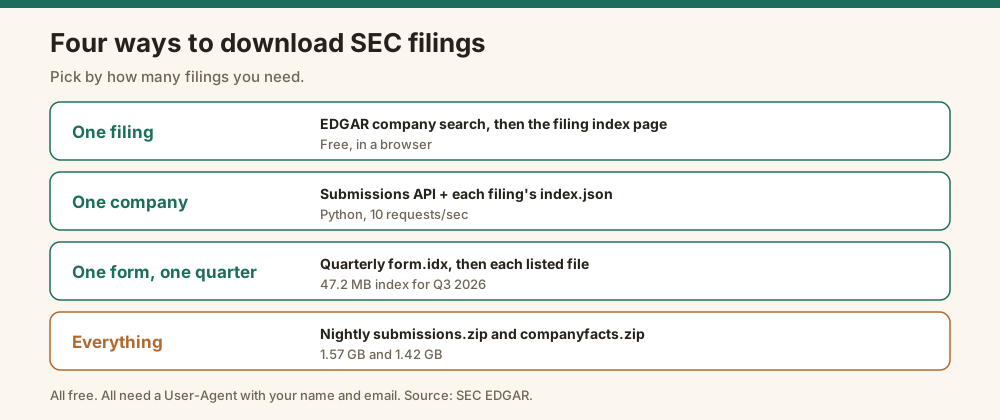
To bulk download SEC filings, use EDGAR's quarterly index files to list every filing of a form type, then download each one with a short pause between requests. The quarterly form index for Q3 2026 was 47.2 MB and listed 352 10-K filings. For data rather than documents, the SEC also publishes nightly ZIP files of every company's filing history and XBRL financials, each over 1.4 GB.
Here are the bulk routes, all free:
| Route | What you get | Size I measured |
|---|---|---|
Quarterly form.idx | Every filing in a quarter, sorted by form | 47.2 MB for Q3 2026 |
Daily form.YYYYMMDD.idx | Every filing from one day | 1.06 MB for November 10, 2026 |
submissions.zip | Every company's filing history as JSON | 1.57 GB |
companyfacts.zip | Every company's XBRL financial data as JSON | 1.42 GB |
| Full-text search | Filings matching words, since 2001 | Per query |
The quarterly index is the workhorse. Each line has the form type, company name, CIK, date and a file path.
This script lists every 10-K from Q3 2026 and downloads the first three:
import time, requests

HEADERS = {"User-Agent": "Acme Research admin@acme-research.com"}

idx = requests.get("https://www.sec.gov/Archives/edgar/full-index/2026/QTR3/form.idx", headers=HEADERS, timeout=120).text
rows = [line for line in idx.splitlines() if line.startswith("10-K ")]          # exact form, no 10-K/A
paths = [line.split()[-1] for line in rows]                                     # edgar/data/.../accession.txt
print(len(rows), "10-K filings in Q3 2026")

for p in paths[:3]:                                                             # download a few, politely
    r = requests.get("https://www.sec.gov/Archives/" + p, headers=HEADERS, timeout=120)
    open(p.split("/")[-1], "wb").write(r.content)
    print(p, len(r.content), "bytes")
    time.sleep(0.2)                                                             # well under 10 requests/second
It found 352 10-Ks and saved three complete submission files of 11.0 MB, 3.4 MB and 41.3 MB.
Those sizes are why bulk downloads need a plan. The index points at complete submission files, so a full quarter of 10-Ks can run into many gigabytes.
How do you download every filing for one company?
To download every filing for one company, read its full filing list from the SEC's submissions API, including the extra files listed under filings.files, then fetch each filing folder's index.json and download the documents you need. Apple's list held 1,001 recent filings plus 1,278 older ones going back to January 1994. At 10 requests a second, that's a few minutes of requests for the main documents alone.
The extra files catch people. The "recent" list stops around 1,000 filings, so a script that reads only that list quietly misses everything older.
The full loop looks like this:
- Fetch
data.sec.gov/submissions/CIK##########.json - Fetch each file named in
filings.filesfor the older history - For each accession, build the folder URL and read
index.json - Download the main document or the exhibits you want, pausing between requests
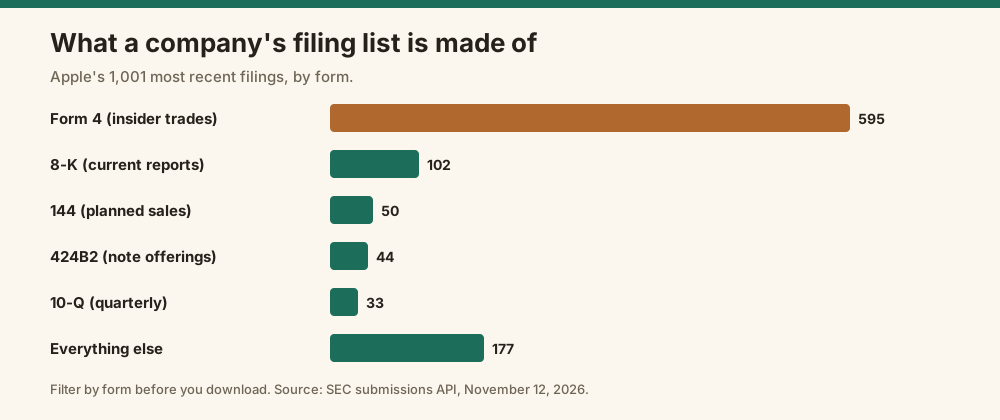
Filter by form before you download. Of Apple's 1,001 recent filings, 595 were insider Form 4s and 102 were 8-Ks. Only a handful were annual reports.
curl -H "X-API-Key: edgr_your_key" "https://api.edgrapi.com/v1/filings/AAPL"Which file format should you download?
Download the HTML main document if you want to read or parse the report's text, the XBRL files if you want the financial numbers, and the complete submission text file only if you need every exhibit in one piece. Modern filings are mostly HTML, with PDFs only as optional copies or exhibits, and the SEC's XBRL data is easier to get through its free JSON APIs than by parsing the files yourself.
A quick guide:
| You want | Download |
|---|---|
| The report's text | The main .htm document |
| Financial numbers | XBRL, or the SEC's companyfacts JSON API |
| One exhibit | That exhibit's file from index.json |
| Everything at once | The complete submission .txt |
The financial numbers are the case where downloading documents is the wrong move. The SEC's EDGAR APIs already return them as JSON, and my XBRL to JSON guide covers the gaps.
When do most 10-K filings come out?
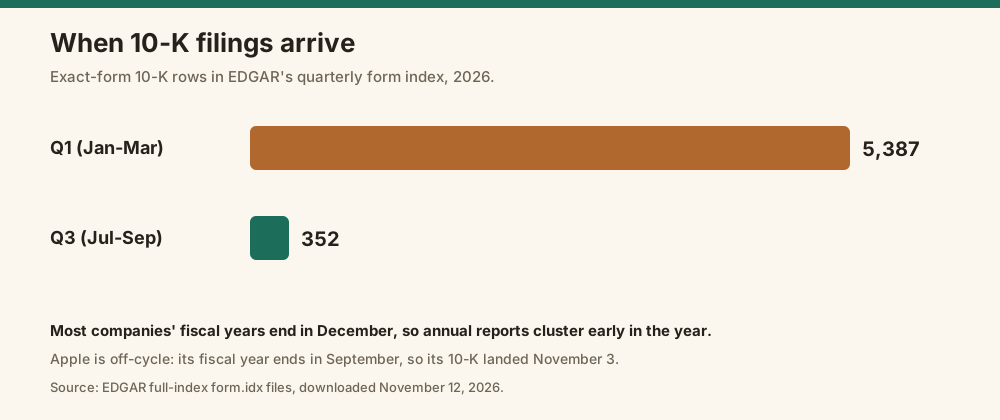
Most 10-K filings come out in the first quarter of the year, because most companies' fiscal years end in December and annual reports are due within 60 to 90 days. EDGAR's first-quarter 2026 index listed 5,387 10-K filings, compared with 352 in the third quarter. If you're bulk downloading annual reports, the January-to-March index is where almost all of them are.
The gap is stark:
| Quarter | 10-K filings in EDGAR's form index |
|---|---|
| Q1 2026 (January to March) | 5,387 |
| Q3 2026 (July to September) | 352 |
These counts are index rows for the exact form "10-K," without amendments.
Apple is the off-cycle exception. Its fiscal year ends in late September, so its 10-K landed on November 3, 2026.
For deadlines by company size, see SEC filing deadlines.
What are the SEC's download limits?
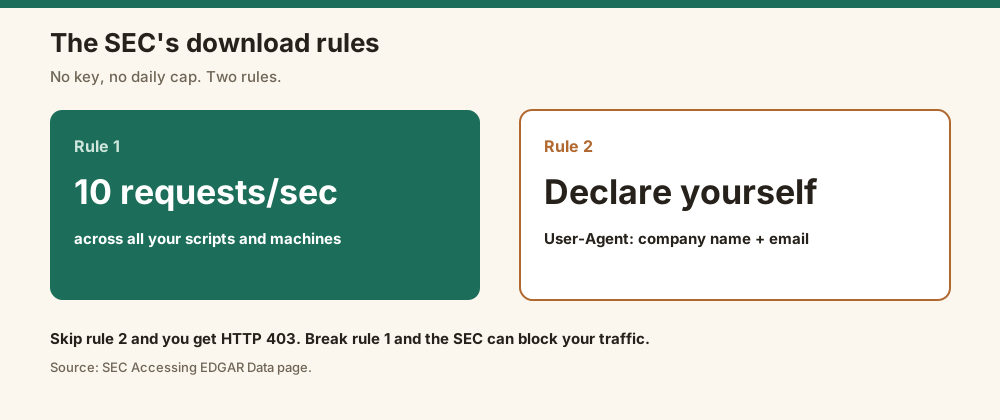
The SEC limits automated downloads to 10 requests per second, per its Accessing EDGAR Data page, and every request must carry a User-Agent header with your name and email. There's no daily cap and no key. Go faster and the SEC can block your traffic, and a missing User-Agent gets HTTP 403 straight away. For full downloads, the SEC points to its bulk ZIP files instead of millions of requests.
The SEC's Accessing EDGAR Data page states it directly: "Current max request rate: 10 requests/second."
Ten a second sounds like plenty. But at that rate, 5,387 complete 10-K files take about nine minutes of requests, plus however long the downloads themselves take.
The bulk ZIPs are the better route for data. The SEC's API page says the ZIP files are "republished nightly at approximately 3:00 a.m. ET."
Indexes have their own timing too.
The SEC says some filings that start after 5:30 p.m. Eastern, or 10 p.m. for insider Forms 3, 4 and 5, are disseminated the next business day.
Should you use a library or an API to download filings?
Use a free library like sec-edgar-downloader or edgartools if you're downloading filings to your own disk and can handle the SEC's rules yourself. Use an API when you want filings inside an application without managing User-Agents, rate limits and caching. Both pull the same public EDGAR documents. The difference is who handles the plumbing, and whether you pay per call.
I compared the libraries in two posts: sec-edgar-downloader alternatives and Edgrapi vs edgartools.
Edgrapi's /v1/download returns a filing's primary document by accession number, 1 credit a call:
import requests

r = requests.get("https://api.edgrapi.com/v1/download", headers={"X-API-Key": "YOUR_KEY"},
                 params={"accession": "0000320193-26-000026"}, timeout=60)
open("apple-10k.htm", "wb").write(r.content)
print(r.status_code, r.headers["X-SEC-Source"], len(r.content), "bytes")
When I ran the same request through Edgrapi's code on November 12, 2026, it returned Apple's 10-K, 1,650,120 bytes, the same file as the direct download. Add file= with an exhibit name to get that instead.
It has limits. It serves text documents only (HTML, XML and plain text), so PDFs and images come back with their SEC URL instead, and it isn't a bulk exporter.
Start with one filing, then script the pattern
Download one filing by hand first and open its index.json to see every file inside. Then script the same URL pattern with the submissions API and a User-Agent, stay under 10 requests a second, and switch to the quarterly indexes or nightly ZIPs for bulk. If you'd rather not run that plumbing, get a free Edgrapi key and pull documents by accession number.
Frequently asked questions
How do I download SEC filings?
Search the company on EDGAR at sec.gov, open the filing you want, and click the document on its filing index page to save it. It's free and needs no account. To download in code, use the SEC's free submissions API to find the document URL, and send a User-Agent header with your name and email.
Can I download SEC filings in bulk?
Yes. EDGAR publishes quarterly and daily index files that list every filing, which you can loop through to download documents at up to 10 requests per second. For data rather than documents, the SEC also publishes nightly ZIP files of every company's filing history and XBRL financials, each over 1.4 GB in November 2026.
How do I download all 10-K filings?
Download EDGAR's quarterly form index for each quarter you need, keep the rows that start with "10-K," and fetch each listed file with a short pause between requests. Most 10-Ks come out in the first quarter: the Q1 2026 index listed 5,387, compared with 352 in Q3 2026. The listed files are complete submissions, which can exceed 40 MB each.
Is there a limit on downloading from EDGAR?
Yes. The SEC allows automated access of up to 10 requests per second and asks every script to send a User-Agent header with a company name and contact email. Requests without one get HTTP 403. There's no daily cap or API key, but the SEC reserves the right to limit request rates for heavy users.
What is the complete submission text file?
The complete submission text file is one .txt file that bundles every document in an SEC filing, including the main report and all exhibits. It's what EDGAR's index files point to. It can be much larger than the report itself: Apple's November 2026 10-K was 1.65 MB, while its complete submission file was 10.9 MB.
How do I download SEC filings with Python?
Use the requests library to fetch the company's filing list from data.sec.gov/submissions, find the filing, and build the document URL from the CIK, accession number and primary document name. Send a User-Agent header with your name and email on every request. Libraries like sec-edgar-downloader and edgartools wrap the same steps.