sec-edgar-downloader Alternative: Clean JSON Migration Guide
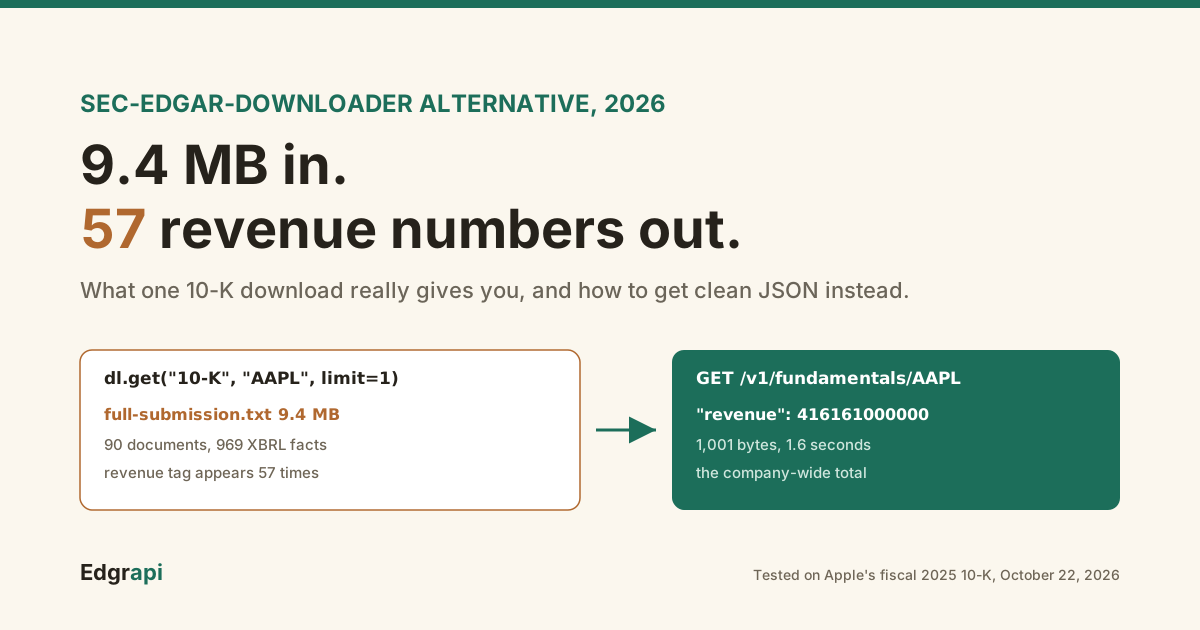
I downloaded Apple's latest 10-K with sec-edgar-downloader. It took 2.1 seconds and gave me a 9.4 MB text file with 57 different revenue numbers in it.
That's the gap a sec-edgar-downloader alternative fills. The library is great at fetching raw filings, but it stops there, and the parsing is on you. If you want financial numbers, filing lists, or 10-K sections as JSON, swap the download-and-parse step for an API call that returns structured data, and keep the library only for bulk archiving.
What does sec-edgar-downloader actually give you?
sec-edgar-downloader gives you the raw filing, saved to disk. In version 5.1.0, released February 2, 2026, a call like dl.get("10-K", "AAPL", limit=1) writes a single full-submission.txt file. For Apple's fiscal 2025 10-K, that file was 9.4 MB and held 90 embedded documents, including 74 XML files and 969 inline XBRL numbers.
This is the exact test I ran on October 22, 2026:
from sec_edgar_downloader import Downloader

dl = Downloader("Your Company", "you@example.com", "out")
dl.get("10-K", "AAPL", limit=1)
# out/sec-edgar-filings/AAPL/10-K/0000320193-25-000079/full-submission.txt
One thing surprised me. In 5.1.0 the download_details option defaults to False, so you don't get a separate primary HTML document unless you ask for it.
What you get is everything the company submitted, stitched together: the 10-K itself, every exhibit, the XBRL schema files, and the images.
That's perfect if you need the full record. It's a lot if you just wanted revenue.
The folder layout is worth knowing before you migrate. Files land in sec-edgar-filings/<ticker>/<form>/<accession>/, and that folder name is the filing's accession number, here 0000320193-25-000079.
That accession number is the key to everything else. Any filing you've already archived can be looked up, re-downloaded, or matched to parsed data by it, so your existing archive keeps working after you switch.
It's popular for good reason: 232,448 PyPI downloads in the month to October 22, 2026, according to pypistats.
Why is parsing a sec-edgar-downloader filing so hard?
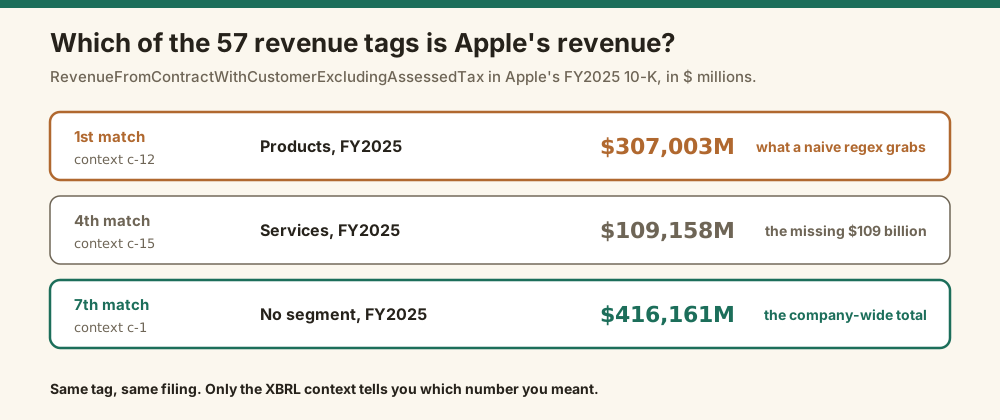
Parsing is hard because one number shows up many times with different meanings. In Apple's 10-K, the revenue tag RevenueFromContractWithCustomerExcludingAssessedTax appears 57 times. The first match is $307,003 million, which is product revenue only. The total, $416,161 million, is the seventh match, and the only way to tell them apart is the XBRL context attached to each one.
The first match, inside the file:
<ix:nonFraction contextRef="c-12" name="us-gaap:RevenueFromContractWithCustomerExcludingAssessedTax"
  scale="6" decimals="-6">307,003</ix:nonFraction>
That c-12 context points to a segment called ProductMember. Context c-1, with no segment at all, is the company-wide total.
So a regex that grabs the first revenue tag gets Apple's revenue wrong by $109 billion.
That gap isn't random, either. It's exactly Apple's services revenue, $109,158 million, which sits under its own context a few matches further down.
The file has all the right numbers. It just doesn't tell you which one you meant.
That's one company. Across filers, revenue hides under different concepts and scales, and prior years get restated in later filings.
Downloading takes two seconds. Getting the right number out takes a parser that understands contexts, units, periods, and amendments, and that's the part people underestimate.
What are the best sec-edgar-downloader alternatives?
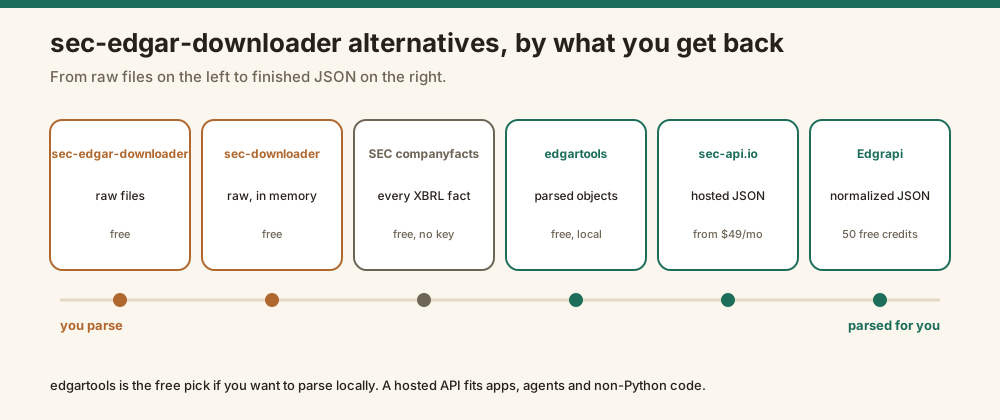
The best sec-edgar-downloader alternative depends on what you want back. If you still want raw files with more control, use sec-downloader. If you want parsed objects in Python for free, use edgartools. If you want JSON from SEC itself, use the companyfacts API. If you want normalized statements, sections, and other data behind one key, use a hosted API like sec-api.io or Edgrapi.
How they compare:
| Option | What you get back | Cost | Best for |
|---|---|---|---|
| sec-edgar-downloader | Raw full-submission files on disk | Free, open source | Bulk archives, NLP on full text |
| sec-downloader | Raw files, metadata first, in memory | Free, open source | More control over which files to fetch |
| edgartools | Parsed Python objects, XBRL statements | Free, open source | Python users who want to parse locally |
| SEC companyfacts API | Every XBRL fact for a company, as JSON | Free, no key | Raw facts straight from the source |
| sec-api.io | Hosted JSON for filings and extracts | 100 free calls, then from $49 a month billed yearly | Teams with a budget and many endpoints |
| Edgrapi | Normalized statements, sections, filings as JSON | Free 50 credits, then from $10 a month | One key for SEC plus government data |
sec-downloader describes itself on GitHub as a wrapper around sec-edgar-downloader. It adds metadata-first downloads and in-memory storage.
edgartools is the most popular of the group. It had 842,132 PyPI downloads in the same month, per pypistats.
I'd pick edgartools if you want to stay fully local and free. It's a good library, and it does real XBRL parsing, so it solves the problem this article is about.
I'd pick a hosted API if you're calling from an app, an agent, or a language other than Python, or if you'd rather not run the parser yourself.
SEC's own companyfacts API deserves a mention too. It's free, needs no key, and returns every XBRL fact a company has reported as JSON, documented on SEC's EDGAR API page. The catch is the same one from above: you still pick the right tag and context yourself.
How do you migrate from sec-edgar-downloader to clean JSON?
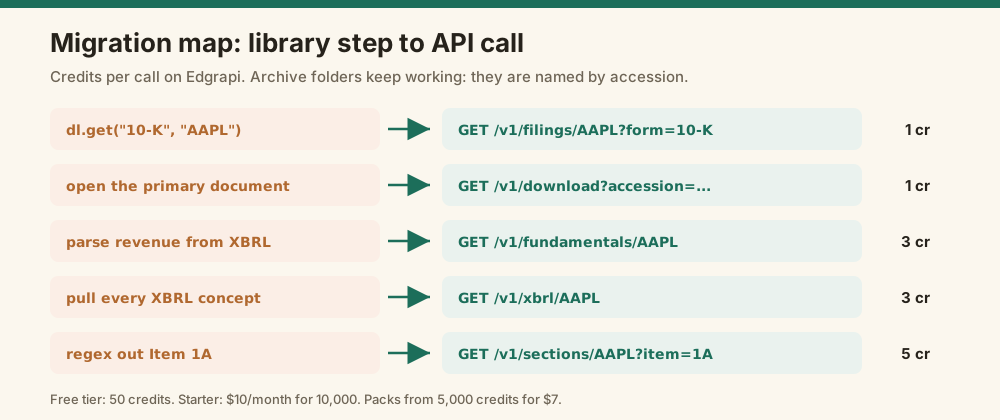
Migrate by replacing each download-and-parse step with the API call that returns the finished result. A dl.get for a filing list becomes a filings call. Reading the primary document becomes a download call. Parsing numbers out of XBRL becomes a fundamentals or XBRL call. Pulling Item 1A text becomes a sections call. Most scripts shrink from a few hundred lines to a few.
The mapping I'd use:
| You did this with sec-edgar-downloader | Do this instead | Credits |
|---|---|---|
dl.get("10-K", "AAPL") to list filings | GET /v1/filings/AAPL?form=10-K | 1 |
| Open the primary 10-K document | GET /v1/download?accession=... | 1 |
| Parse revenue and net income from XBRL | GET /v1/fundamentals/AAPL | 3 |
| Pull every XBRL concept | GET /v1/xbrl/AAPL | 3 |
| Extract Item 1A Risk Factors | GET /v1/sections/AAPL?item=1A | 5 |
The before and after for the revenue example looks like this.
Before, you download 9.4 MB and write a context-aware parser. After, it's one call:
import requests

r = requests.get("https://api.edgrapi.com/v1/fundamentals/AAPL",
                 headers={"X-API-Key": "edgr_your_key"},
                 params={"period": "annual", "limit": 1})
year = r.json()["income_statement"][0]
print(year["period"], year["revenue"], year["net_income"])
# 2025 416161000000 112010000000
That response was 1,001 bytes and came back in 1.6 seconds when I tested it on October 22, 2026. The revenue matches the company-wide total, not the product line.
For the documents themselves, reuse the accession folder names you already have. Pass one to the download endpoint and you get just the primary 10-K document, 1.5 MB for Apple, instead of the whole 9.4 MB submission.
The financial statements guide covers the other fields, and the Python guide shows the rest of the endpoints.
How do you get 10-K text sections without parsing HTML?
Call a sections endpoint instead of slicing the HTML yourself. For Apple's fiscal 2025 10-K, Edgrapi's sections call listed the items with their lengths: Risk Factors at 68,059 characters, MD&A at 18,053, and Business at 16,064. You then ask for one item by number and get plain text back, with no HTML tags or page headers to strip.
This is the job that breaks most homegrown parsers.
No two companies format a 10-K the same way. Headings move, tables split across pages, and some filers wrap Item 1A in different markup entirely.
So if your pipeline ends in a fragile regex like Item 1A(.*?)Item 1B, this is the step worth replacing first.
r = requests.get("https://api.edgrapi.com/v1/sections/AAPL",
                 headers={"X-API-Key": "edgr_your_key"},
                 params={"item": "1A"})
The 10-K sections guide walks through the full list of items.
How do you get Form 4, 13F, and 8-K data without parsing?
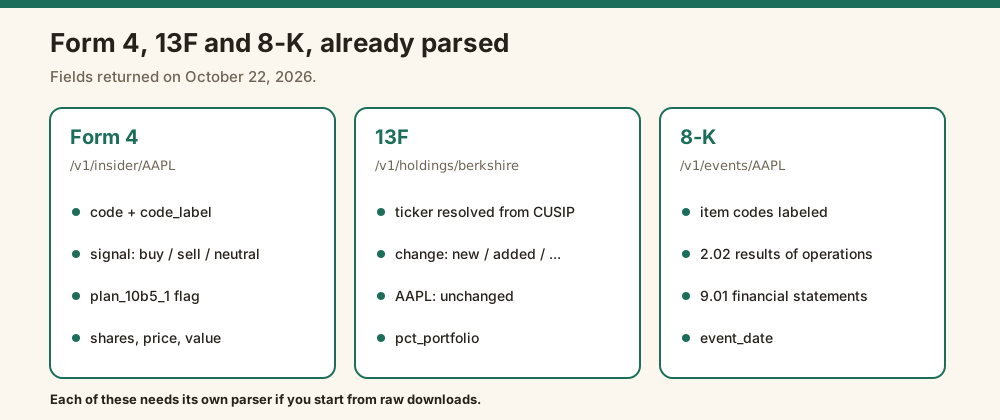
Most scripts built on the library don't stop at 10-Ks. They also pull Form 4 insider trades, 13F fund holdings, and 8-K current reports, and each one needs its own parser. A parsed API returns each as JSON: insider trades with a buy or sell signal, 13F positions with tickers and quarter-over-quarter changes, and 8-Ks with their item codes already labeled.
I called each of these on October 22, 2026.
Form 4 is the worst to parse by hand. The trade sits in an XML file, coded with letters like P, S, A, and M. A parsed response gives each transaction a code_label, a signal of buy, sell, or neutral, and a plan_10b5_1 flag for pre-scheduled sales.
r = requests.get("https://api.edgrapi.com/v1/insider/AAPL",
                 headers={"X-API-Key": "edgr_your_key"}, params={"limit": 5})
for f in r.json()["filings"]:
    for t in f["transactions"]:
        print(f["owner"], t["code"], t["signal"], t["shares"], t["plan_10b5_1"])
13F filings list holdings by CUSIP, not ticker, and big funds file under several sub-managers. The holdings endpoint resolves tickers and labels each position's change. Berkshire's Apple stake came back with ticker AAPL and a change status of "unchanged."
8-Ks are about the item codes. Apple's latest one came back tagged 2.02 (results of operations) and 9.01 (financial statements and exhibits), so you can filter for the events you care about without opening the document.
The Form 4 guide, 13F guide, and 8-K guide go deeper on each.
What does it cost to switch from sec-edgar-downloader?
Switching costs depend on volume, since the library itself is free. On Edgrapi, a filing list or document download costs 1 credit, statements cost 3, and 10-K sections cost 5. The free tier is 50 credits with no card. Starter is $10 a month for 10,000 credits, and one-time packs start at 5,000 credits for $7. sec-api.io starts at $49 a month billed yearly.
Price out a realistic job and it gets concrete.
Say you track 500 companies and refresh their annual statements once a month. That's 500 calls at 3 credits, or 1,500 credits, which fits inside Starter with room to spare.
Add a monthly check of each company's filing list at 1 credit each, and you're at 2,000 credits. Still inside Starter.
The math changes if you pull full 10-K text for hundreds of companies every day. At that volume, a local pipeline with edgartools or sec-edgar-downloader plus your own parser is cheaper, and I'd tell you to build it.
Then there's time. A parser you never write is one you never have to fix when a filer changes its layout.
When should you keep using sec-edgar-downloader?
Keep sec-edgar-downloader when you need the complete raw record and plan to process it yourself. It's the right tool for building a local archive of every filing a company made, for full-text NLP across exhibits, or for research that has to cite the exact submitted document. It's free, it's maintained, and it already respects SEC's rate limit.
Credit where it's due. The library throttles itself to SEC's 10 requests per second using a rate limiter, which you can see in its source.
It also sets a proper User-Agent from the company name and email you pass in, which version 5 made mandatory. And it accepts either a ticker or a CIK, so you rarely need a separate lookup step.
Both matter, because SEC's Accessing EDGAR Data page sets the 10-requests-per-second cap and asks every automated client to declare who it is.
So I wouldn't rip the library out of a pipeline that's working. I'd replace only the steps where you parse.
A hybrid setup looks like this. The library keeps archiving raw filings, and the API answers the questions:
from sec_edgar_downloader import Downloader
import requests

Downloader("Your Company", "you@example.com", "archive").get("10-K", "AAPL", limit=1)   # raw record

year = requests.get("https://api.edgrapi.com/v1/fundamentals/AAPL",
                    headers={"X-API-Key": "edgr_your_key"},
                    params={"limit": 1}).json()["income_statement"][0]               # the numbers
You keep the source of truth on disk, and you stop maintaining a parser.
Why do sec-edgar-downloader requests return 403 errors?
A 403 from SEC almost always means a missing or vague User-Agent, or too many requests per second. SEC asks automated clients to identify themselves with a name and contact email, and it caps traffic at 10 requests per second per user. sec-edgar-downloader version 5 requires both a company name and an email for exactly this reason.
If you're on an old version, upgrade first. The 4.x line used a different User-Agent setup, and version 5.0.0 rewrote the package around SEC's official API.
Then check the identity string. "MyCompanyName" and "my.email@domain.com" from the README examples will get you nowhere useful. Use your real name and a real inbox.
Still blocked? Slow down. Several scripts running in parallel from one IP add up fast, and SEC can block an IP that goes over.
A hosted API takes this off your plate, since it calls SEC on your behalf from servers that already follow the rules.
How do the speed and size compare?
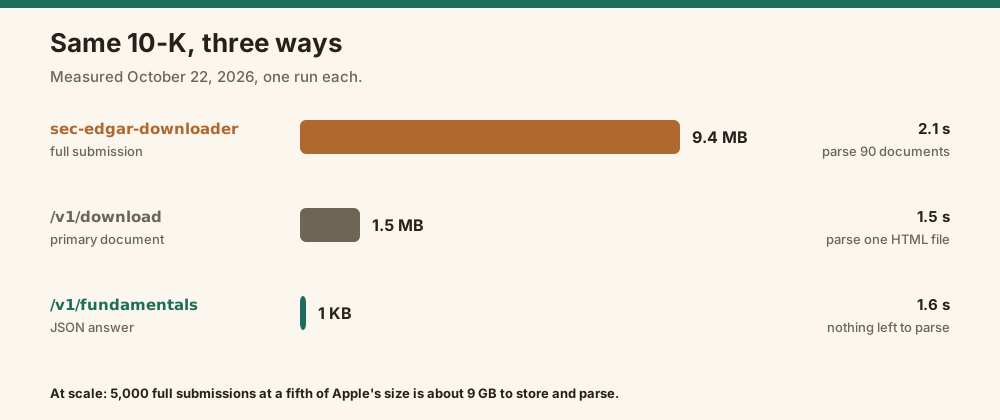
On the same Apple 10-K, the two routes differ more in what you get than in speed. sec-edgar-downloader returned a 9.4 MB raw file in 2.1 seconds. Edgrapi's fundamentals call returned a 1,001-byte JSON answer in 1.6 seconds, and its download call returned just the 1.5 MB primary document in 1.5 seconds. The real cost of the raw route is the parsing you do afterward.
My measurements from October 22, 2026:
| Route | Time | Size | What you still have to do |
|---|---|---|---|
| sec-edgar-downloader, 10-K | 2.1 s | 9.4 MB | Parse 90 documents and 969 XBRL facts |
| Edgrapi /v1/download, primary doc | 1.5 s | 1.5 MB | Parse one HTML document |
| Edgrapi /v1/fundamentals | 1.6 s | 1 KB | Nothing |
One run each, so treat the times as rough. Network and caching move them around.
The size gap matters more at scale. Ten years of 10-Ks for 500 companies is 5,000 full submissions. Even at a fifth of Apple's size, that's around 9 GB of text to store and parse.
Replace the parsing step, not the whole pipeline
A sec-edgar-downloader alternative is worth it for the parsing, not the downloading. Keep the library if you archive raw filings. Swap in edgartools if you want to parse locally for free, or an API if you want finished JSON in any language. Start by replacing your revenue or Item 1A parser with one API call, and compare the numbers against what your parser returns today.
Frequently asked questions
What is the best alternative to sec-edgar-downloader?
It depends on what you need back. For raw files with more control, sec-downloader wraps the same library. For free local parsing in Python, edgartools turns filings into objects and XBRL statements. For JSON from the source, SEC's companyfacts API is free. For normalized statements and 10-K sections in any language, use a hosted API like Edgrapi or sec-api.io.
Does sec-edgar-downloader parse financial statements?
No. sec-edgar-downloader only downloads filings to disk. For a 10-K, version 5.1.0 saves a full-submission.txt file containing every document and XBRL fact the company filed. You have to parse the numbers yourself, and that's tricky: Apple's fiscal 2025 10-K contains the revenue tag 57 times, for different segments and years.
How do I get the full-submission.txt file contents as JSON?
There's no direct conversion, because the file is a bundle of HTML, XML, and XBRL documents. For numbers, use SEC's companyfacts API or a parsed API that returns statements as JSON. For text, use a sections endpoint that extracts items like Risk Factors. For the original document, fetch the primary filing by accession number instead of the whole submission.
Is sec-edgar-downloader still maintained?
Yes. Version 5.1.0 was released on February 2, 2026, and requires Python 3.10 or newer. Version 5.0.0, from September 2023, rewrote it around SEC's official API, added built-in rate limiting at 10 requests per second, and made the company name and email for the User-Agent mandatory. It had 232,448 PyPI downloads in the month to October 22, 2026.
Why am I getting a 403 Forbidden error from SEC EDGAR?
Usually because your User-Agent is missing or generic, or you're sending more than 10 requests per second. SEC asks automated clients to declare a name and contact email. Upgrade sec-edgar-downloader to version 5, pass your real company name and email, and avoid running many scripts in parallel from one IP address.
Can I use sec-edgar-downloader and an API together?
Yes, and it's often the best setup. Use sec-edgar-downloader to archive raw filings you might need later, and use an API for the numbers and text you actually work with every day. That way you keep the complete record without writing and maintaining a parser for every filing format.