SEC API Key: Do You Need One to Use EDGAR's API?
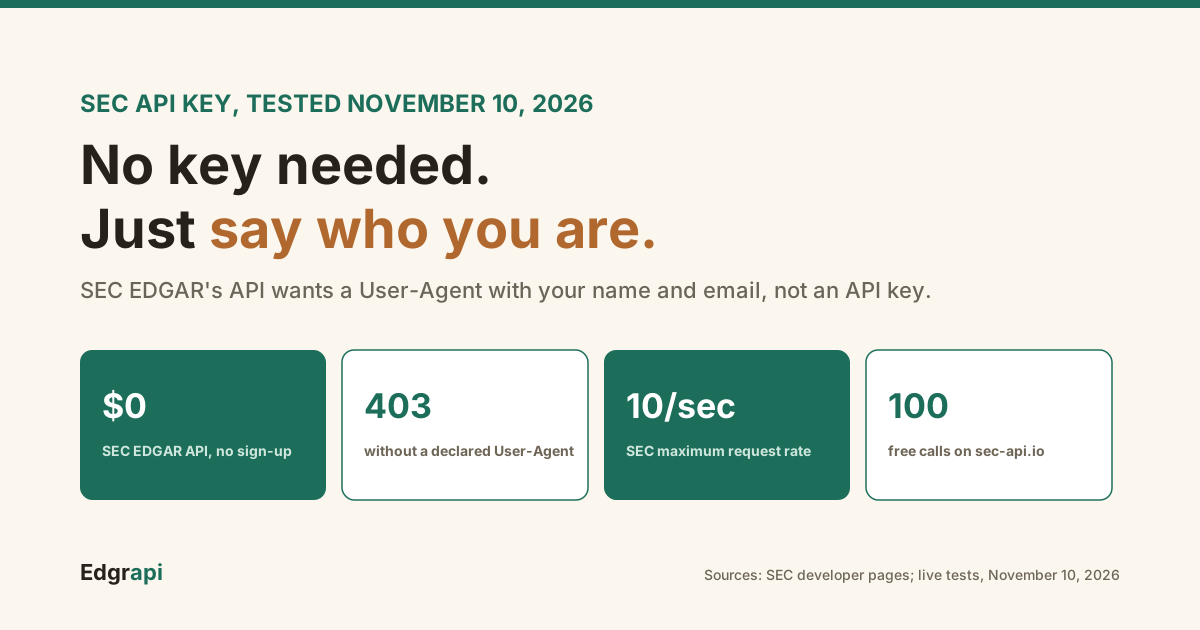
I sent the same request to the SEC five ways. Only one worked everywhere, and none of them used an API key.
You don't need an API key for the SEC EDGAR API. The SEC says its data.sec.gov APIs "do not require any authentication or API keys to access." What it does require is a User-Agent header naming you, like "Acme Research admin@acme-research.com." In my November 10, 2026 tests, requests without one got HTTP 403 on every SEC host I tried. The "SEC API key" most people search for belongs to sec-api.io, a paid service.
Do you need an API key for the SEC EDGAR API?
No. The SEC's official EDGAR APIs at data.sec.gov are free and need no API key, account or sign-up. The SEC's developer page says the APIs "do not require any authentication or API keys to access." Instead, every request must carry a User-Agent header that names your company and a contact email. Skip it and the SEC answers with HTTP 403 Forbidden, which looks a lot like a missing-key error.
That's where the confusion starts.
A 403 reads like "you're not authorized," so developers go looking for a key. There isn't one to find.
The free APIs cover two things, according to the SEC's EDGAR API page: each company's filing history (the submissions API) and the XBRL financial data from 10-Qs, 10-Ks and other reports. The SEC says the submissions API updates with "a typical processing delay of less than a second."
Everything else on sec.gov, like filing documents and full-text search, works the same way. No key, just a User-Agent.
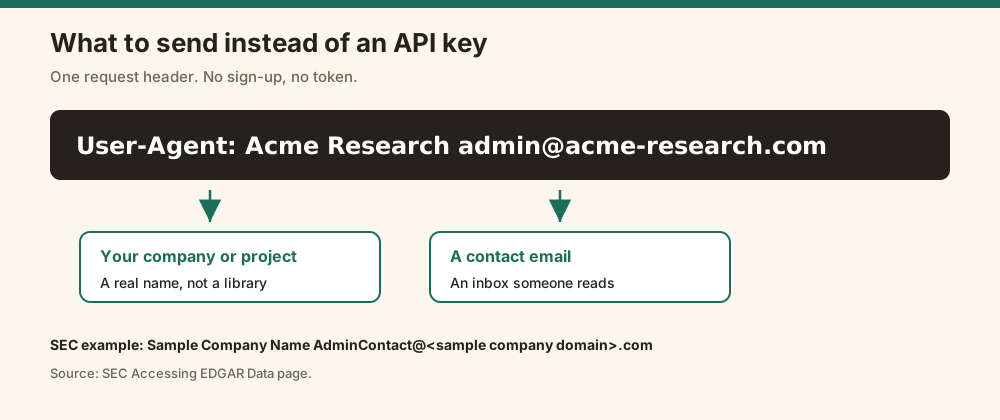
What do you send instead of an API key?
Instead of an API key, you send a User-Agent header with your company name and a contact email. The SEC's own example is "Sample Company Name AdminContact@<sample company domain>.com." It goes in the request headers, not the URL, and the SEC uses it to tell declared automated traffic from anonymous bots. There's nothing to register: you just declare who you are.
The rule comes from the SEC's Accessing EDGAR Data page, which says "Please declare your user agent in request headers."
A good User-Agent looks like this:
User-Agent: Acme Research admin@acme-research.comUse a real company or project name and an inbox someone reads. The SEC's example puts the email in the same string as the name, with a space between them.
The SEC adds one more line worth knowing: "We do not offer technical support for developing or debugging scripted processes." If your script breaks, you're on your own.
What happens if you skip the User-Agent?
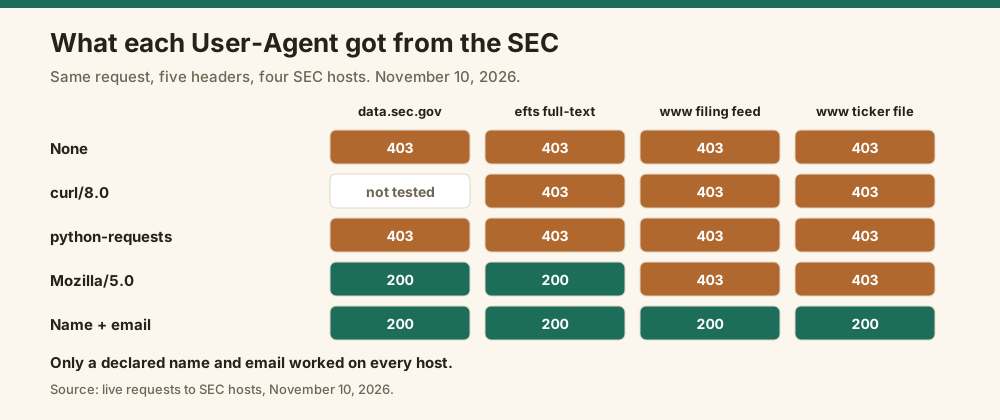
If you skip the User-Agent, the SEC returns HTTP 403 Forbidden. I tested it on November 10, 2026 against four SEC hosts. With no User-Agent, with a curl-style "curl/8.0," and with Python's default "python-requests/2.32.3," every host returned 403. With a declared name and email, every host returned 200. That one header is the whole difference between blocked and working.
Here's what I got:
| User-Agent sent | data.sec.gov submissions | efts.sec.gov full-text search | www.sec.gov filing feed | www.sec.gov ticker file |
|---|---|---|---|---|
| None | 403 | 403 | 403 | 403 |
| curl/8.0 | Not tested | 403 | 403 | 403 |
| python-requests/2.32.3 | 403 | 403 | 403 | 403 |
| Mozilla/5.0 | 200 | 200 | 403 | 403 |
| Name and email | 200 | 200 | 200 | 200 |
The python-requests row is the one that catches people. You didn't set a User-Agent, so the library sent its own, and the SEC blocked it.
So if your script works in a browser but fails in code, this is almost always why.
Should you fake a browser User-Agent?
No. Pretending to be a browser is unreliable and against the SEC's request to declare yourself. In my tests, "Mozilla/5.0" worked on data.sec.gov and full-text search but got 403 on www.sec.gov's filing feed and ticker file. A declared name and email worked on all four. Some tutorials, like this one on Finxter, still suggest a browser-style header, and that inconsistency is why scripts built on it break.
The failure is confusing because it's partial. Your code fetches company data fine, then dies when it tries to download the filing itself from www.sec.gov.
You end up debugging the wrong thing.
Declaring yourself also protects you. If your traffic causes a problem, the SEC knows who to contact instead of just blocking your IP.
What are the SEC EDGAR API rate limits?
The SEC EDGAR API allows a maximum of 10 requests per second. The SEC's Accessing EDGAR Data page lists "Current max request rate: 10 requests/second" and says the SEC "reserves the right to limit request rates." There's no per-key quota because there's no key. The limit applies to your traffic as a whole, so splitting work across threads doesn't buy you more speed.
I hit this myself. On November 10, 2026, a link checker of mine sent a burst of parallel requests to sec.gov, and the SEC started answering with HTTP 429 Too Many Requests for every page.
The fix is boring and works:
- Send requests one at a time, or a few at a time
- Sleep at least 0.1 seconds between requests
- Back off for several minutes after a 429 or 403
- Use the SEC's nightly bulk ZIP files for full downloads
The bulk files are the underrated part. The SEC republishes ZIPs of all submissions and XBRL data "nightly at approximately 3:00 a.m. ET," so one download replaces thousands of calls.
curl -H "X-API-Key: edgr_your_key" "https://api.edgrapi.com/v1/fundamentals/AAPL?limit=20"What SEC data can you get without a key?
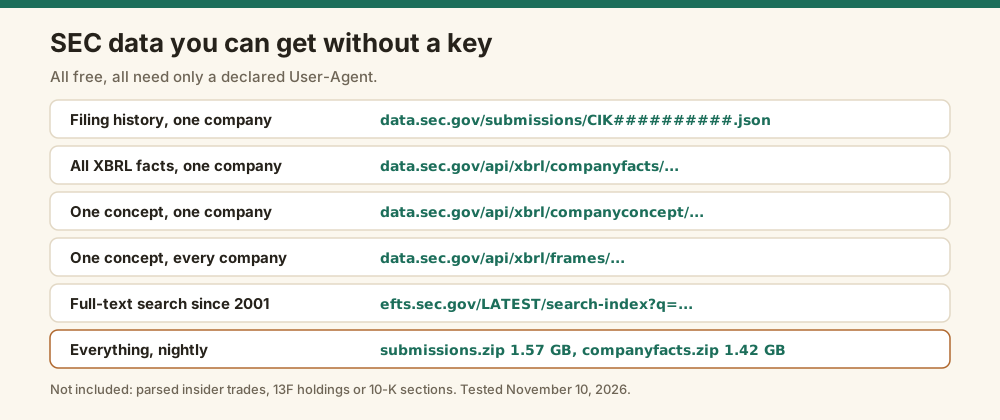
Without any key, you can get every company's filing history, all of its XBRL financial facts, one financial line across every company, and full-text search of filings since 2001. The SEC also publishes the whole thing as bulk ZIP files. On November 10, 2026, the submissions ZIP was 1.57 GB and the company facts ZIP was 1.42 GB. All of it needs only a declared User-Agent.
The free endpoints, each tested with a User-Agent on November 10, 2026:
| What you get | Endpoint |
|---|---|
| One company's filing history | data.sec.gov/submissions/CIK##########.json |
| All XBRL facts for one company | data.sec.gov/api/xbrl/companyfacts/CIK##########.json |
| One XBRL concept for one company | data.sec.gov/api/xbrl/companyconcept/CIK##########/us-gaap/{concept}.json |
| One concept across all companies | data.sec.gov/api/xbrl/frames/us-gaap/{concept}/USD/{period}.json |
| Full-text search of filings | efts.sec.gov/LATEST/search-index?q=... |
The frames endpoint is the hidden gem. One call for current accounts payable at the end of 2025 returned values for 3,618 companies.
What you don't get is parsing. Insider trades, 13F holdings and 10-K sections all sit in the filing documents, and turning them into rows is your job.
Where does the "SEC API key" come from?
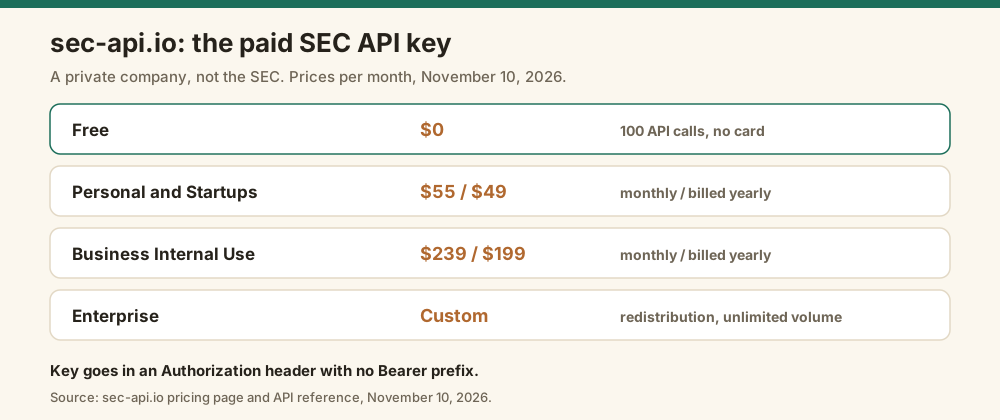
When people search for an SEC API key, they usually mean sec-api.io, a paid commercial API that isn't run by the SEC. It issues an API key when you create an account, with 100 free API calls and no credit card required. Its Personal and Startups plan costs $55 a month, or $49 a month billed yearly, according to its pricing page on November 10, 2026.
It's a private company. Its footer says sec-api.io is "independent of, and not affiliated with" the SEC.
You send its key in an Authorization header with no "Bearer" prefix, or as a token query parameter, per its API reference. When I called it on November 10, 2026 with no key, it returned HTTP 403 and "API token invalid."
Its plans, from its pricing page:
| Plan | Billed monthly | Billed yearly | Query API rate limit |
|---|---|---|---|
| Free | $0 for 100 API calls | Not applicable | Not listed |
| Personal and Startups | $55/mo | $49/mo ($588/yr) | 20 per second per key |
| Business Internal Use | $239/mo | $199/mo ($2,388/yr) | 40 per second per key |
| Enterprise | Custom | Custom | Custom |
Full-text search isn't in the Personal plan. It starts at Business Internal Use.
Its FAQ also explains a common key error: once your free credits run out, the API returns HTTP 429 with a message that the trial limit was exceeded.
I compared it in more depth in sec-api.io alternatives.
How do you call the SEC EDGAR API without a key in Python?
To call the SEC EDGAR API without a key in Python, set a User-Agent header with your name and email, then request the JSON endpoint directly. No sign-up or token is involved. The script below fetched Apple's filing history in one request when I ran it on November 10, 2026. Without the header, the same request returned 403.
import requests

HEADERS = {"User-Agent": "Acme Research admin@acme-research.com"}   # your company name and a real contact email

r = requests.get("https://data.sec.gov/submissions/CIK0000320193.json", headers=HEADERS, timeout=30)
print(r.status_code, r.json()["name"], r.json()["filings"]["recent"]["form"][:5])

r = requests.get("https://data.sec.gov/submissions/CIK0000320193.json", timeout=30)   # no User-Agent of your own
print(r.status_code)
It printed 200 Apple Inc. with Apple's five most recent form types, then 403 for the request without a header.
The number in the URL is Apple's CIK, padded to 10 digits. My CIK lookup guide shows how to find any company's.
For everything else the free API offers, see the SEC EDGAR API guide.
When is a paid SEC API key worth it?
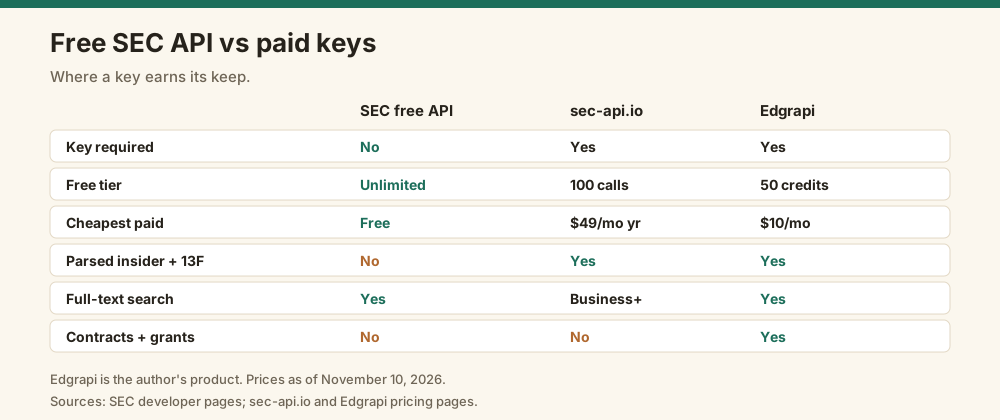
A paid SEC API key is worth it when the free API makes you build too much yourself. The SEC gives you filing lists and XBRL facts, but not parsed insider trades, 13F holdings, 10-K sections or clean financial statements. Paid APIs sell those, along with higher rate limits per key. If you only need filing histories or raw XBRL, the free API with a User-Agent is enough.
I run Edgrapi, a paid API in this space, so weigh this with that in mind:
| Need | SEC's free API | sec-api.io | Edgrapi |
|---|---|---|---|
| Key required | No, User-Agent only | Yes | Yes |
| Free tier | Unlimited, 10 requests/sec | 100 API calls | 50 credits, one-time |
| Cheapest paid plan | Free | $49/mo billed yearly | $10/mo, or $7 one-time packs |
| Filing history and XBRL facts | Yes | Yes | Yes |
| Parsed insider trades and 13F | No | Yes | Yes |
| Full-text search | Yes | Business plan and up | Yes |
| Federal contracts and grants | No | No | Yes |
Edgrapi takes its key in an X-API-Key header or as Authorization: Bearer. It refuses keys in the URL on purpose: when I put one in a query string, it returned 401 with "keys in URLs leak into logs, history, and Referer headers."
That's good advice for any key, including sec-api.io's. Prefer the header.
Declare yourself, then decide if you need a key
Add a User-Agent with your company and email to every SEC request, stay under 10 requests a second, and use the nightly bulk files for big pulls. That covers most projects for free. If you need parsed insider trades, 13F holdings or financial statements without writing the parsers, get a free Edgrapi key and compare it with sec-api.io's 100 free calls.
Frequently asked questions
Does the SEC EDGAR API require an API key?
No. The SEC's EDGAR APIs at data.sec.gov require no API key, account or authentication. The SEC's developer page says they "do not require any authentication or API keys to access." You do need to send a User-Agent header with your company name and a contact email, or the SEC returns HTTP 403 Forbidden.
Is the SEC EDGAR API free?
Yes. The SEC EDGAR API is free to use, with no sign-up, key or paid tier. It covers company filing histories and XBRL financial data, and the SEC publishes nightly bulk ZIP files of the same data. The only limits are a declared User-Agent on every request and a maximum of 10 requests per second.
What User-Agent does the SEC require?
The SEC asks for a User-Agent that names your company and gives a contact email, such as "Acme Research admin@acme-research.com." Its own example is "Sample Company Name AdminContact@<sample company domain>.com." Library defaults like "python-requests" get blocked, and fake browser strings work on some SEC hosts but not others.
Why does SEC EDGAR return 403 Forbidden?
SEC EDGAR returns 403 Forbidden when a request has no declared User-Agent, or uses a library default like "python-requests." In my November 2026 tests, those got 403 on all four SEC hosts I checked, while a name-and-email User-Agent got 200 on all four. A 403 after many fast requests can also mean you exceeded the rate limit.
How do I get a sec-api.io API key?
You get a sec-api.io API key by creating an account on sec-api.io, which includes 100 free API calls with no credit card. sec-api.io is a private company, not the SEC. Paid plans start at $55 a month, or $49 a month billed yearly. You send the key in an Authorization header with no Bearer prefix.
What is the SEC EDGAR rate limit?
The SEC EDGAR rate limit is 10 requests per second, according to the SEC's Accessing EDGAR Data page, and the SEC "reserves the right to limit request rates." There's no per-key quota, since there's no key. Exceeding the limit can bring HTTP 429 or 403 responses, so slow down and back off for a few minutes.
Related guides: Financial data APIs compared
- Yahoo Finance MCP Server: Setup, Limits and Alternatives (2026)
- Best Financial Data APIs for Fundamentals, Tested (2026)
- Quiver Quantitative API: Pricing, Limits and Alternatives (2026)
- Financial Modeling Prep API Pricing (2026): Every Plan and Limit
- sec-edgar-downloader Alternative: Clean JSON Migration Guide